Maintenance
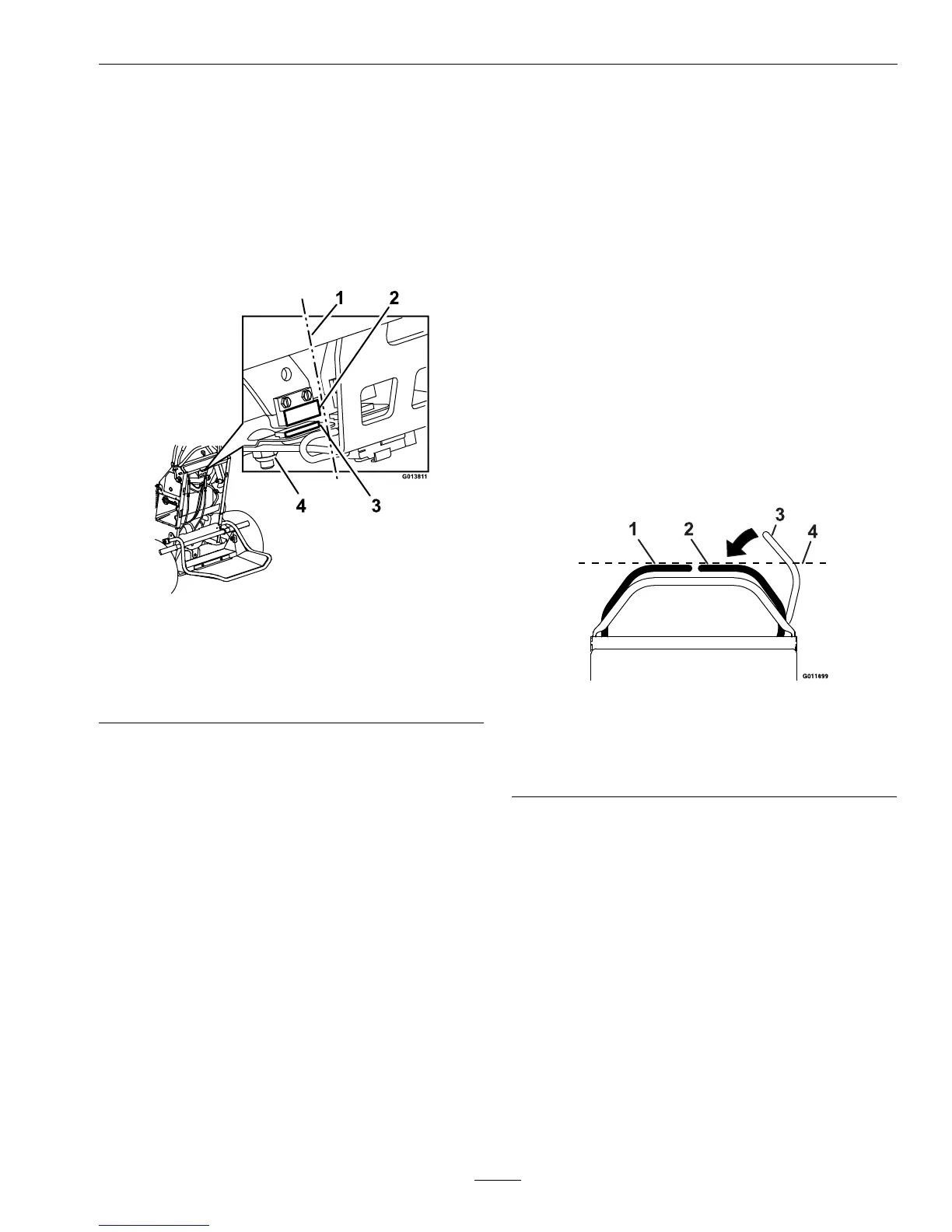
6.CheckthealignmentontheLHandRHneutral
switchesupperandlowersurfaces(reference
Figure39).Iftheyarenotinalignment,loosenthe
hardwareonthelowerneutralswitchandadjustit
forwardorrearwardasnecessary.Oncealigned,
tightenthehardware.Checktheneutralswitch
alignmentagainasthedeckismovedthroughthe
highestandlowestcutheightsetting;adjustthe
lowerneutralswitchsurfaceifnecessary.
Figure39
1.Alignmentreference
4.Lowerneutralswitch
surface
2.Upperneutralswitch
surface
5.Hardware
3.Switchmountingplate
7.Adjusttheupperneutralswitchsurfaceleft
orrightifside-to-sidealignmentisneeded.
Theupperandlowerswitchesshouldbeas
closetogetheraspossiblewithouttouching
(approximately.06inch(1.5mm)gapisdesirable).
Theswitchmountingplatecanbemovedupor
downtoadjustthepositionofthelowerneutral
switch.
8.Checkthefunctionoftheneutralswitchesby
temporarilyreplacingthekey.Withtheengine
off,turntheignitionswitchtothe“ON”position.
LocatetheLCDindicatorinthemessagedisplay.
Raiseandlowerthedeck.
A.Iftheindicatordisplayswhilemovingthedeck
upanddown,theneutralswitcheshavebeen
adjustedproperlyandnofurtheradjustment
isnecessary.
B.Iftheindicatordoesnotstaylitwhilemoving
thedeckupanddown,contactanAuthorized
ServiceDealer.Removethekey.
AdjustRHMotionControl
HandlePosition
Ifthemotioncontrolleversdonotalignhorizontally,
adjusttherightsidemotioncontrollever.
Note:Adjustthehorizontalalignmentbeforethe
fronttobackalignment.
1.Stopengine,waitforallmovingpartstostop,and
removekey.Engageparkingbrake.
2.Pushtherightmotioncontrolleverdownoutof
lockedneutralposition.
3.Checkifitalignshorizontallywiththeleftmotion
controllever.
Figure40
1.LHMotioncontrollever
2.RHMotioncontrollever
3.RHMotioncontrolleverinPTOdisengagedposition
4.Checkthehorizontalalignmenthere
4.Toadjusttherightmotioncontrollever
horizontally,thecamneedstobeadjusted.
5.Releasethecushionfromtherearofthemachine.
6.Loosenthenutandboltholdingthecam.
7.Adjustthecamuntilitalignswiththeleftmotion
controlleverandtightenthenutandboltforthe
cam.
43






 To Next Page