2. KEY
1
2
9
3
8
7
6
4
6
5
3
2
1
10
11
4
5
5
2
1
3
4
21GB
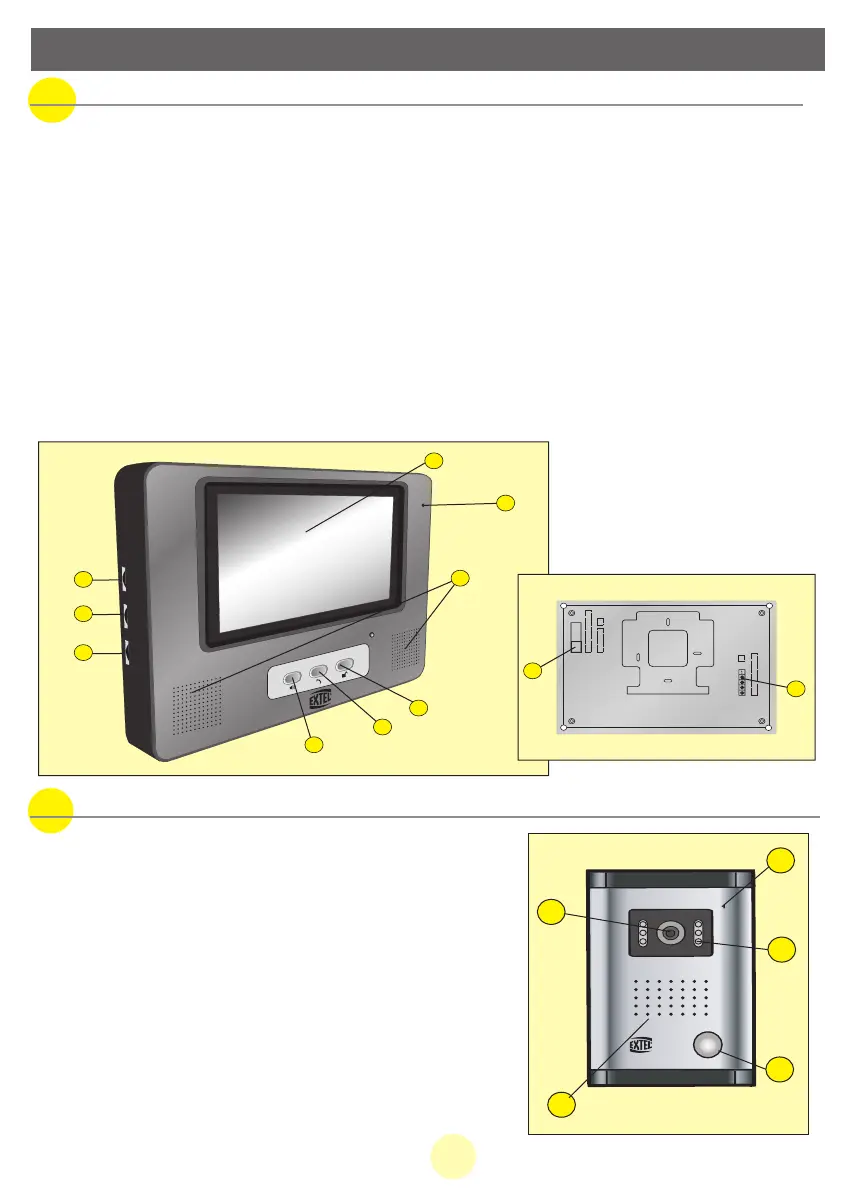
a. Monitor
1.
14,5 cm colour screen
2. Alarm button.
3. “On/Off” button for the video and communication.
4. Door-open command (currentless contact on monitor terminals 5 and 6).
5. Speaker for ring tone and conversation.
6. Brightness adjustment on the screen.
7. Colour adjustment on the screen.
8. Volume adjustment and ringer cut-off.
9. Microphone to communicate with the roadside panel
10. At the rear of the monitor, outlet for the 15 VDC plug of the adapter
(adapter to
be connected to an installation compliant with NFC 15-100 standards in force in France).
11. At the rear of the monitor, terminal blocks for connecting wires.
b. Roadside panel, external camera
1. Microphone: enables visitor to communicate with
internal unit.
2. Colour lens of the camera, C-MOS with automatic
iris lens.
3. Infrared LEDS for low-light vision. For night vision,
plan to install additional lighting system.
4. Call button, when pressing this button, the
internal unit rings, the camera and the
monitor start working.
5. Speaker: enables to be heard outside.
MANUAL WEVP 626 E BIS LANGU.qxd 28/09/07 16:01 Page 24



 To Next Page