22GB
6
4
3. INSTALLATION
Important: if you try the system before installing it, make sure the street unit and the monitor are not in the
same room, otherwise the videophone will emit piercing feedback noise.
1
2
2
3
4
3
6
5
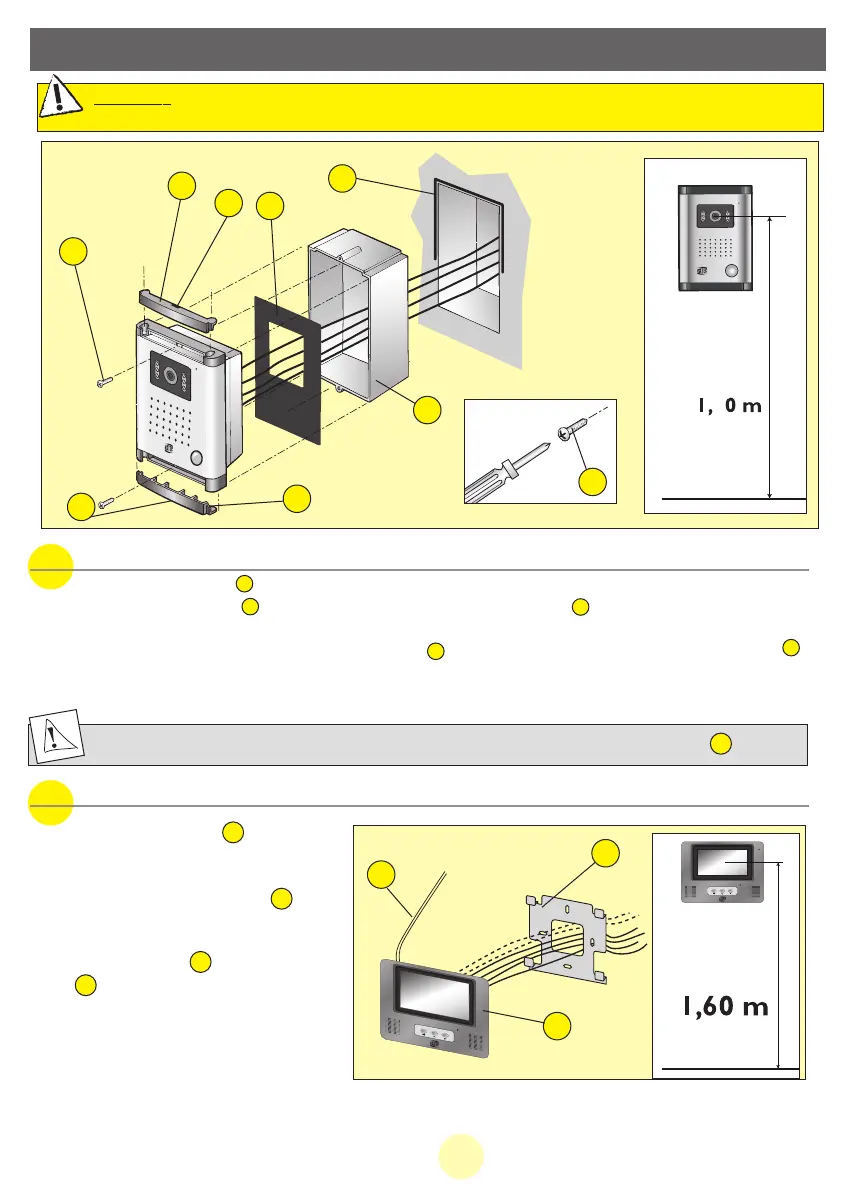
b. Installing the monitor
1. Fix the wall support (2).
2. Connect the wires from the roadside
panel and from the lighting system.
3. Connect the adapter plug (3) to the
monitor (without connecting it to mains
outlet)
4. Fix the monitor (1) on the wall sup-
port (2) .
5. After being sure the installation is
completed, connect the adapter power
supply plug to mains outlet.
3
1
2
2
3
1
2
Note: if the power supply cord is cut, respect polarity
Put a silicon gasket on the upper half between the external panel and the wall .
3
4
5
a. Installing the roadside panel (camera)
1. Fit the plastic box taking care not to block the attachment nuts of the panel.
2. Remove the 2 screw caps with a small screwdriver to put in the slot (5).
3.
Connect the link wire according to the wiring diagram.
4. Fix the board on the built-in box sing the two screw supplied ; do not forget the waterproof gasket .
5. Replace the 2 screw caps.
Do not expose the camera to direct sun light or to reflective surface.
1
2
6
MANUAL WEVP 626 E BIS LANGU.qxd 28/09/07 16:01 Page 25



 To Next Page