28
PRODUCT FUNCTIONALITY
Chapter 5
If points 1 and 2 have been performed correctly, when the ame is developed the stove will pass to start 3.
mode ( “AU 07”).
On termination of the start phase the stove will pass to normal functioning: display D1 will show the 4.
room temperature while display D2 will show the work power.
ATTENTION!!!
DO NOT USE ANY INFLAMMABLE LIQUIDS FOR IGNITION1.
DO NOT ALLOW THE BAG OF PELLETS TO COME INTO CONTACT WITH THE BOILING HOT 2.
STOVE DURING THE FILLING PHASE
IN THE CASE OF CONTINUOUS NO IGNITION, CONTACT AN AUTHORISED TECHNICIAN3.
NORMAL FUNCTIONING
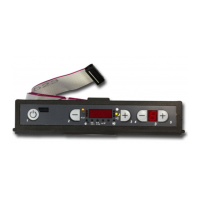
When ignition has taken place, the user can adjust the heating power using buttons 4 and 5. By pressing
button 4 the heat power is decreased and therefore also the consumption of pellets per hour, vice versa by
pressing 5 the heating power is increased and as a consequence also pellet consumption.
As well as the adjustment of ow rate it is also possible to adjust the room temperature directly from the
control board.
Regarding the ventilation of hot air, both for the front part and for ducting, the insert is adjusted
automatically.
Check the content of the feed-box in order to prevent the re going out due to the lack of fuel.
ATTENTION!!!
The bags of pellets must be kept at least 1.5 metres from the stove.1.
It is recommended that the feed-box is always half full.2.
Make sure the appliance is o before lling the pellet feed-box.3.
SWITCHOFF
Press button 1 for 3 seconds:
When the operation has been performed, the appliance automatically enters the switch- o phase, blocking
the supply of pellets; display D1 will alternatively show “OFF”, current time and room temperature.
The ue exhaust motor will remain on until the stove temperature has fallen su ciently.



 To Next Page