36
USER PARAMETERS
Chapter 7
If the problem occurs after only a few months working, check that routine cleaning stated
in the stove booklet, has been carried out correctly.
The regulation to be performed is a percentage. Therefore a modi cation of this parameter will lead to a
proportional variation of all stove feeding speeds.
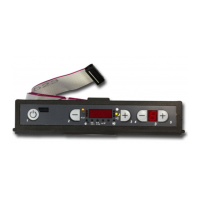
To access the percentage adjustment of pellet feeding, enter the user programming by pressing key 3 and,
holding this down, press key 5.
At this point use key 5 to move within the menu until a ashing “F” appears on display D2. If, inadvertently,
progress is made beyond this parameter, exit using key 1 and repeat the operation. The value “00”will
appear on display D1: keys 2 and 3 can be used to adjust the percentage increase/decrease desired by 5
points per time (the parameter can be varied with a maximum travel from –50 to +50).
Adjustment table
LACK OF
FUEL
Increase the percentage value by 5 points and try the stove with the new
calibration for at least half an hour. If the problem is attenuated, but not solved,
increase by another 5 points. Repeat the operation until the problem is solved.
If the problem cannot be resolved, contact the after-sales service.
EXCESS
FUEL
Decrease the percentage value by 5 points and try the stove with the new
calibration for at least half an hour. If the problem is attenuated, but not solved,
decrease by another 5 points. Repeat the operation until the problem is solved.
If the problem cannot be resolved, contact the after-sales service.
When the adjustment has been made, press button 1 to conform and escape.
DUCTING MOTOR % ADJSUTMENT
Parameter “H” allows to make a percentage modi cation, therefore proportional on all powers, ducting
motor speed. For access, enter the user programming by pressing keys 3. Hold it down and press 5; then
move within the menu using button 5 until the ashing letter “H” appears on display D2.
The value “00” will appear on display D1: keys 2 and 3 can be used to adjust the percentage increase/
decrease desired by 5 points per time (the parameter can be varied with a maximum travel from –20 to
+30). When the adjustment has been made, press button 1 or 5 to conform and escape.



 To Next Page