34
USER PARAMETERS
Chapter 7
Parameter A (D2=A ( ashing); D1=E.g. “OFF1”)
At this point the values introduced in this parameter have no value as the ignition and switch-o of the 3rd
time period have been disabled.
To con rm and continue programming, press button 5.
Press button 4 to go back to the previous parameter.
Press button 1 to escape.
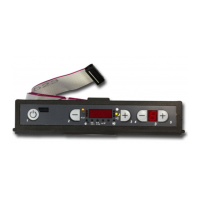
Nota bene: The relative indicator light on the control board will switch on when the weekly
programmer is active (see display table description).
TO DEACTIVATE THE WEEKLY PROGRAMMER enter user programming by pressing key 3 and holding,
press key 5, a ashing “0” will appear on display D2. Set “o ” in the display D1 using keys 2 and 3. Then press
key 1 to con rm and escape.
The manual controls, from the display or remote control, always remain priority with respect to
programming.
DAYNIGHT TEMPERATURE FUNCTION
The day-night temperature function allows to switch the appliance on/o automatically on the basis of
two pre-selected temperatures.
This is very useful when the stove exceeds the room thermostat setting (e.g. due to between-season
conditions or over-sized stove with respect to the room).
The system allows to set one temperature during the day and another one during the night.
First of all the current day and time must be set using the current day and time adjustment sequence to
give a reference to the function itself.
To access the day-night temperature function parameters, press 3, hold it down and press 5 and then
release both keys together: once entered, press button 5 and move to parameter b (D2=ut B).
Parameter b (D2=B; D1=E.g. “06:00”)
Using buttons 2 and 3 it allows to adjust the day time start/night time end.
To con rm and continue programming, press button 5.
Parameter c (D2=C; D1=E.g. “22:00”)
Using buttons 2 and 3 it allows to adjust the day time end/night time start.
To con rm and continue programming, press button 5.
Parameter d (D2=D; D1=E.g. “25°C”)
Using buttons 2 and 3 it allows to adjust the day time maximum temperature.
To con rm and continue programming, press button 5.
Parameter E (D2=E; D1=E.g. “20°C”)
Using buttons 2 and 3 it allows to adjust the night time maximum temperature.
To con rm and continue programming, press button 1.
Once exiting the programming, to activate/deactivate the function press 4, hold it down and press 5 and
then release both keys together.
The relative luminous indicator will appear/disappear on the control board (see display table
description).



 To Next Page