33
USER PARAMETERS
Chapter 7
To con rm and continue programming, press button 5.
Press button 4 to go back to the previous parameter.
Parameter 4 (D2=4 ( ashing); D1=00)
N.B. This parameter is reserved for the after-sales service and must not be modi ed.
Parameter 5 (D2=5 ( ashing); D1=E.g. “15:00”)
Use buttons 2 or 3 to set “15:00”, which corresponds to the switch-on time of the 2nd time span. To con rm
and continue programming, press button 5.
Press button 4 to go back to the previous parameter.
Parameter 6 (D2=6 ( ashing); D1=E.g. “22:00”)
Use buttons 2 or 3 to set “22:00”, which corresponds to the switch-o time of the 2nd time span. To con rm
and continue programming, press button 5.
Press button 4 to go back to the previous parameter.
Parameter 7 (D2=7 ( ashing); D1=E.g. “OFF1”)
Activate the second time span only Saturday and Sunday. To do this use keys 2 and 3 in the following
way:
a. key 3 - scroll the various days
b. key 2 - enable/disable (ON/OFF) the 1st time span for that day
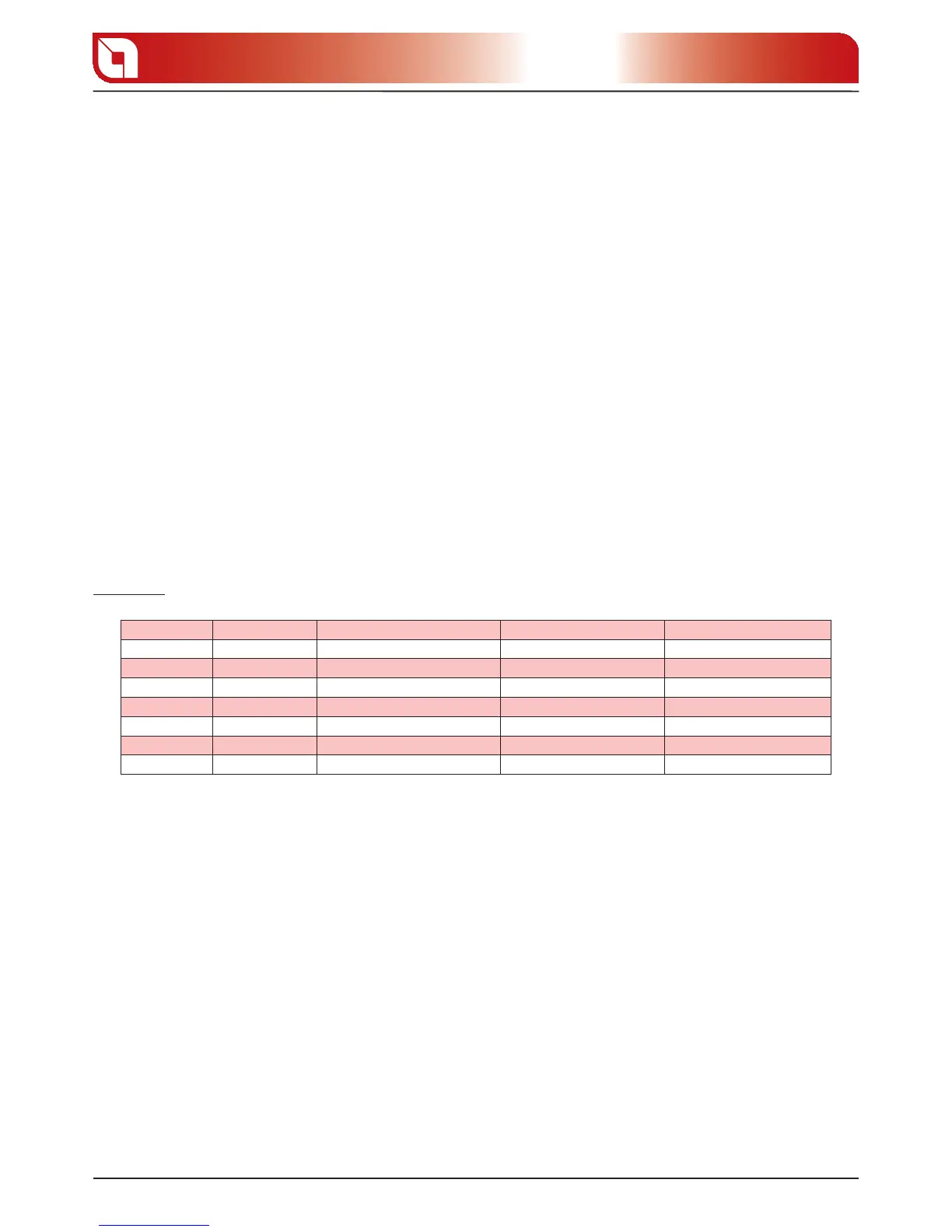
Example:
Day Initial value Function key 2 Final value Function key 3
MONDAY OFF1 OFF1 to ON1 and vice versa OFF1 (time deactivated) Go to next day
TUESDAY OFF2 OFF2 to ON2 and vice versa OFF2 (time deactivated) Go to next day
WEDNESDAY OFF3 OFF3 to ON3 and vice versa OFF3 (time deactivated) Go to next day
THURSDAY OFF4 OFF4 to ON4 and vice versa OFF4 (time deactivated) Go to next day
FRIDAY OFF5 OFF5 to ON5 and vice versa OFF5 (time deactivated) Go to next day
SATURDAY OFF6 OFF6 to ON6 and vice versa ON6 (time active) Go to next day
SUNDAY OFF7 OFF7 to ON7 and vice versa ON7 (time active) Go to next day
To con rm and continue programming, press button 5.
Press button 4 to go back to the previous parameter.
Parameter 8 (D2=8 ( ashing); D1=E.g. “OFF”)
Set at “OFF” using buttons 2 or 3, which is found before the time “00:00”, in a way to disable the switch-on
of the 3rd time period.
To con rm and continue programming, press button 5.
Press button 4 to go back to the previous parameter.
Parameter 9 (D2=9 ( ashing); D1=E.g. “OFF”)
Set at “OFF” using buttons 2 or 3, which is found before the time “00:00”, in a way to disable the switch-o
of the 3rd time period.
To con rm and continue programming, press button 5.
Press button 4 to go back to the previous parameter.



 To Next Page