20 Summit24e3 Switch Installation and User Guide
Summit24e3 Switch Overview
• RADIUS client and per-command authentication support
• TACACS+ support
• Network Login
• Console command-line interface (CLI) connection
• Telnet CLI connection
• SSH2 connection
• Simple Network Management Protocol (SNMP) support
• Remote Monitoring (RMON)
• Traffic mirroring for ports
Summit24e3 Switch Front View
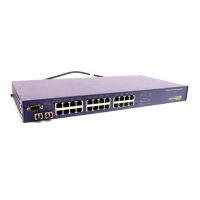
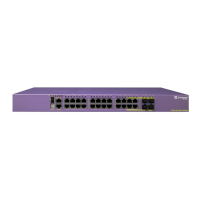
Figure 1 shows the Summit24e3 switch front view.
Figure 1: Summit24e3 switch front view
The Summit24e3 switch has 24 autosensing 10BASE-T/100BASE-TX ports using RJ-45 connectors and
provides two unpopulated Extreme mini-GBIC ports using LC connectors. You can use the
1000BASE-SX mini-GBIC in the Summit24e3 switch.
Console Port
Use the console port (9-pin, “D” type connector) for connecting a terminal and carrying out local
management.
Reset Button
The reset button is used to hard reset the switch. Use a non-conductive tool to push the reset button.
NOTE
See Table 4 for information about supported mini-GBIC types and distances.
Mini-GBIC ports
Mini-GBIC
port status LEDs
Reset
SH_24e3
10/100 Mbps ports
Console
port





 To Next Page
