5. Pair the transmitter with the receiver (see Pairing and
Unpairing the Transmitter and Receiver
[Point-to-Point Only]). When the pairing process is
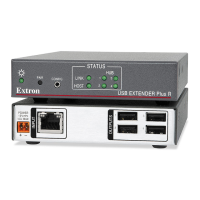
complete, the Link LEDs on the front panels of the
transmitter and receiver light (shown at right).
6. If appropriate, choose a location and mount the transmitter
and receiver (see Mounting the USB Extender Plus Series on page 38).
• For rack mounting, fasten the enclosure to the rack or rack shelf.
• For furniture mounting, attach units to the mounting brackets (not included), then
fasten the brackets to the furniture.
• For table mounting, attached the provided four rubber feet to the bottom of the
unit and place it where desired.
• For wall mounting (AAP and Decorator-Style models only), install the junction
boxes, mud rings, mounting frames, or AAP frames, following the instructions
provided by the manufacturer. Attach the units to the frames.
7. Power on the host computer. On the transmitter, the Host LED on the front panel and
the green Activity LED on the rear panel RJ-45 LAN connector light when the computer
recognizes the transmitter. When the transmitter and receiver are paired with each other,
the front panel Link LEDs light on both the transmitter and receiver.
8. Connect up to four USB cables from peripheral devices (such as a keyboard, mouse,
scanner, or printer) to the receiver Hub ports (see figure 8,
5
, on page 10). When the
first device is connected, the Host LED stops blinking and remains lit steadily.
As each peripheral device is connected, the LED for its hub port lights when the host
PC detects the device.
9. If desired, connect a 9-pin D-to-2.5 mm TRS cable between a computer and the front
panel Config port on the transmitter, receiver, or both to configure the units via SIS
commands (see Connecting for Serial Communication on page 13).
The system is now ready to operate.
Pairing and Unpairing the Transmitter and Receiver (Point-to-Point Only)
In order to function together, the transmitter and receiver must be paired the first time they
are used together. Both units must be connected together through their RJ-45 connectors
(the transmitter Output connector and the receiver Input connector) and powered on.
NOTES:
• Pairing and unpairing via the pair button is required only for point-to-point
non-network applications.
• Before pairing a transmitter to a receiver, Extron recommends that you unpair and
cycle power to each unit in order to clear any previous pairing or to resolve any
pairing issues that might occur (see “Unpairing the transmitter and receiver”).
Unpairing the transmitter and receiver
To unpair a transmitter and receiver that have been paired together:
1. Press and hold the Pair button on either the transmitter or receiver until the transmitter
or receiver Link LED turns off (approximately 10 seconds) and the Link LED on the
receiver begins to blink.
2. Release the Pair button.
3. Repeat steps 1 and 2 for each transmitter and receiver.
4. Proceed with the pairing (see Pairing the transmitter and receiver on the next page).
LINK
Rack-mountable
Models
LINK
AAP and
Decorator-Style
Models
USB Extender Plus Series • Installation and Operation 12


 To Next Page