Setting Up Network Operation
To set up the USB Extender Plus for use on the network, do the following:
1. Connect the transmitter, receivers, and computer to a gigabit network switch (see
figure 12 on page 15 for an example).
NOTE: The transmitter, receivers, and the PC running the PCS software must all be
on the same subnet and network.
2. By default, over-the-network pairing should be enabled. If it is not, enter the following
SIS command to enable it:
E
N 1 USBC
}
(See SIS Commands on page 22 for information on entering these commands.)
3. Obtain the subnet mask and gateway IP address of your computer network. Either
obtain this information from your system administrator, or via a Windows Command
window as follows:
a. Open a Command window on your computer.
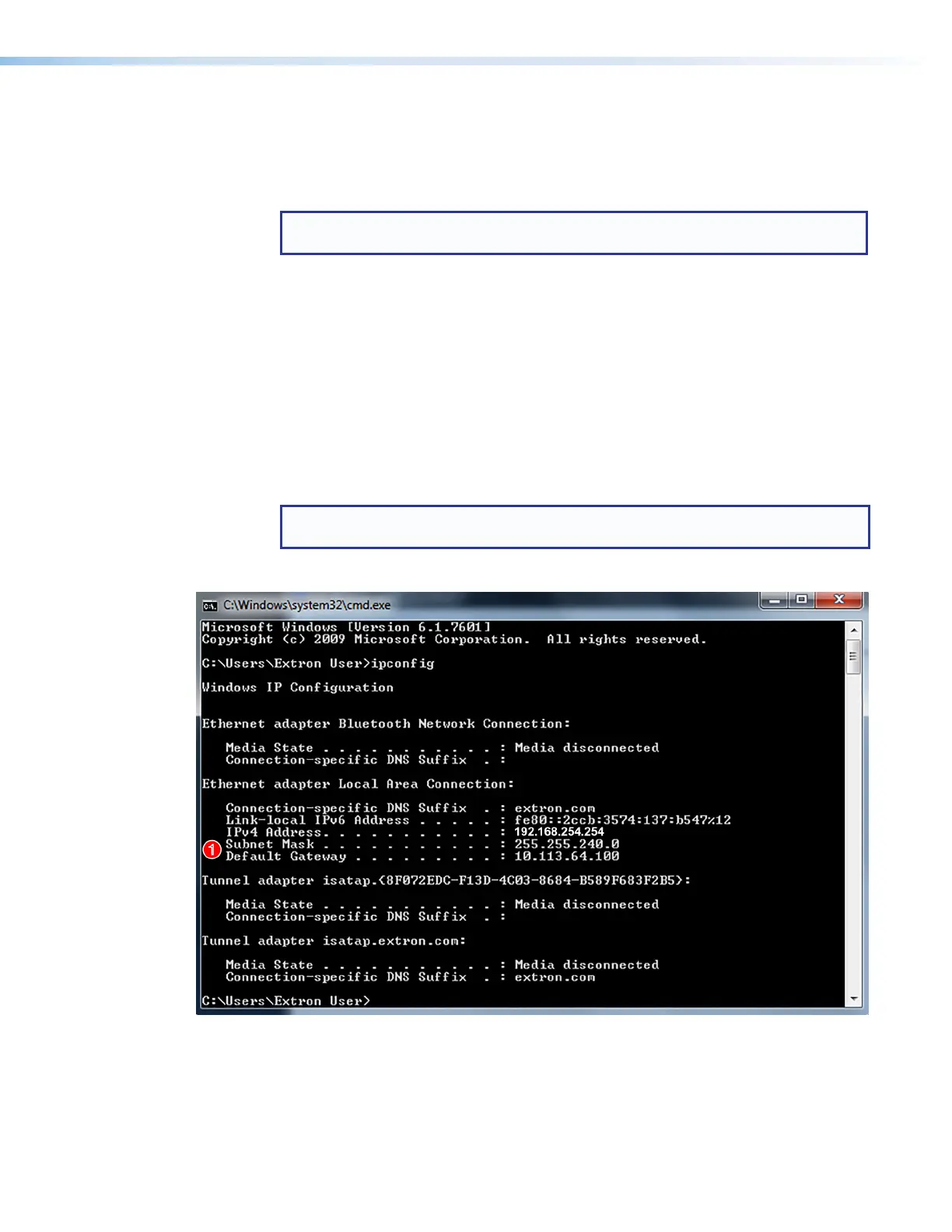
b. At the command prompt enter ipconfig. A screen similar to the example in
figure 23 appears, displaying connection information for the computer.
NOTE: Before assigning network addresses, check with your system administrator
to find out what IP addresses are available or appropriate for you to use.
4. Record the Subnet Mask and Default Gateway addresses (see figure 23,
1
).
Figure 23. Command Prompt Window with IP Information
5. Use the PCS configuration software or SIS commands to set the IP address, gateway
address, and subnet mask as needed (see figure 27 on page 32).
USB Extender Plus Series • Remote Configuration and Control 29


 To Next Page