Final installation
To complete the installation:
1. Test the USB Extenders Plus for proper operation.
2. At the power outlet (not the extender), unplug the power supply.
3. Mount the transmitter or receiver into the wall box.
4. At the power outlet, reconnect the power supply.
AAP mounting
The USB Extender Plus AAP transmitter and receiver can also be mounted to a two-space
AAP frame, available at www.extron.com. Follow the instructions provided with the frame
to attach the extenders to it.
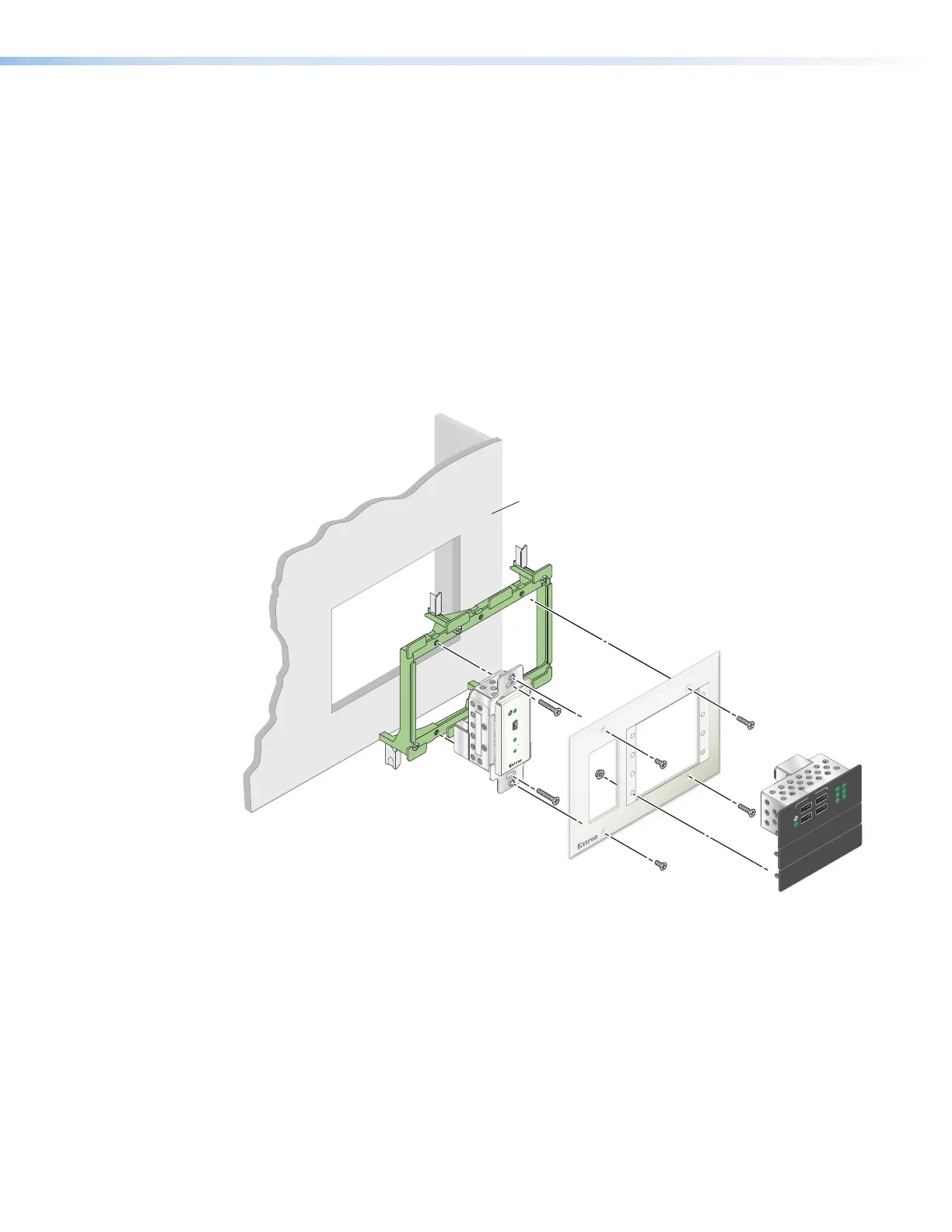
Figure 36 shows an example of mounting both an AAP extender and a decorator-style
extender to an AAP frame.
Wall
Mud Ring
AAP 314
HOST
LINK
HOST
USB EXTENDER Plus AAP R
HUB
STATUS
LINK
1
2
1
HOST
2
3
4
3
4
AAP 314
USB Extender Plus AAP
USB Extender
Plus Decorator-Style
Figure 36. Mounting a USB Extender Plus AAP and Decorator-Style to an AAP
Frame and a Mud Ring
USB Extender Plus Series • Reference Information 40


 To Next Page