Mt740/745, 741/746/En/Rev. 002/12/97 * 901.742 002
BEISSBARTH MT 740/ 745, 741/ 746
3-1
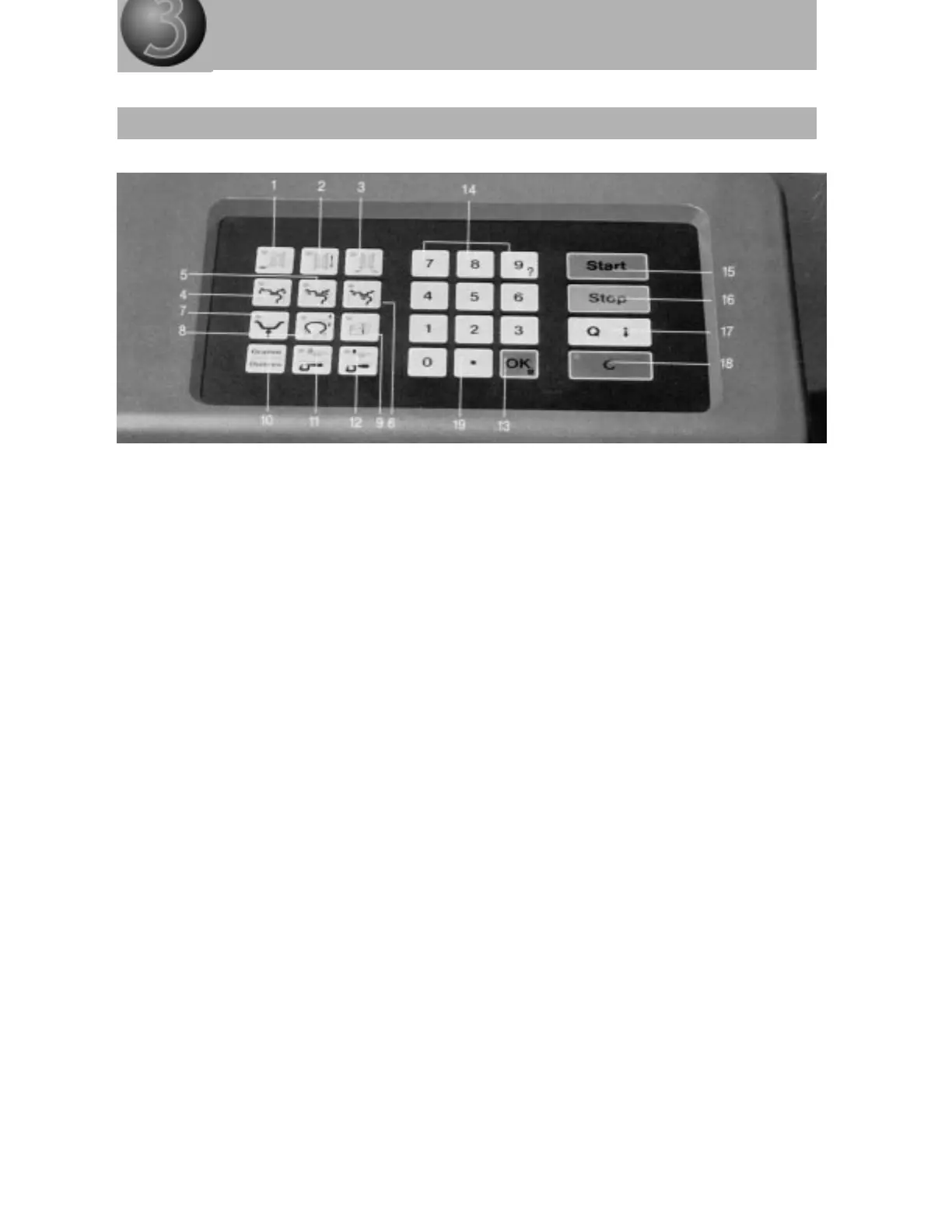
Keyboard layout
SHORT DESCRIPTION
1 = Rim distance key
2 = Rim diameter key
3 = Rim width key
4 = Drive-on weight key
5 = Adhesive weight key (for both sides of rim flange)
6 = Adhesive weight key (for one side)
7 = Multifunction key
8 = Matching key
9 = Printer key*
10 = Selector key (grams/ounces)
11 = Calibrating key (flange calibration, zeroing)
12 = Calibrating key (with 60-gram adjustment weight)
13 = OK key (dual-function key: M for menu call-up)
14 = Numerical keys (key 9 with dual function: also for call-up of operator guidance)
15 = Start key
16 = Stop key
17 = Suppress key
18 = Erase key
19 = Decimal point and save key
* = Accessory



 To Next Page