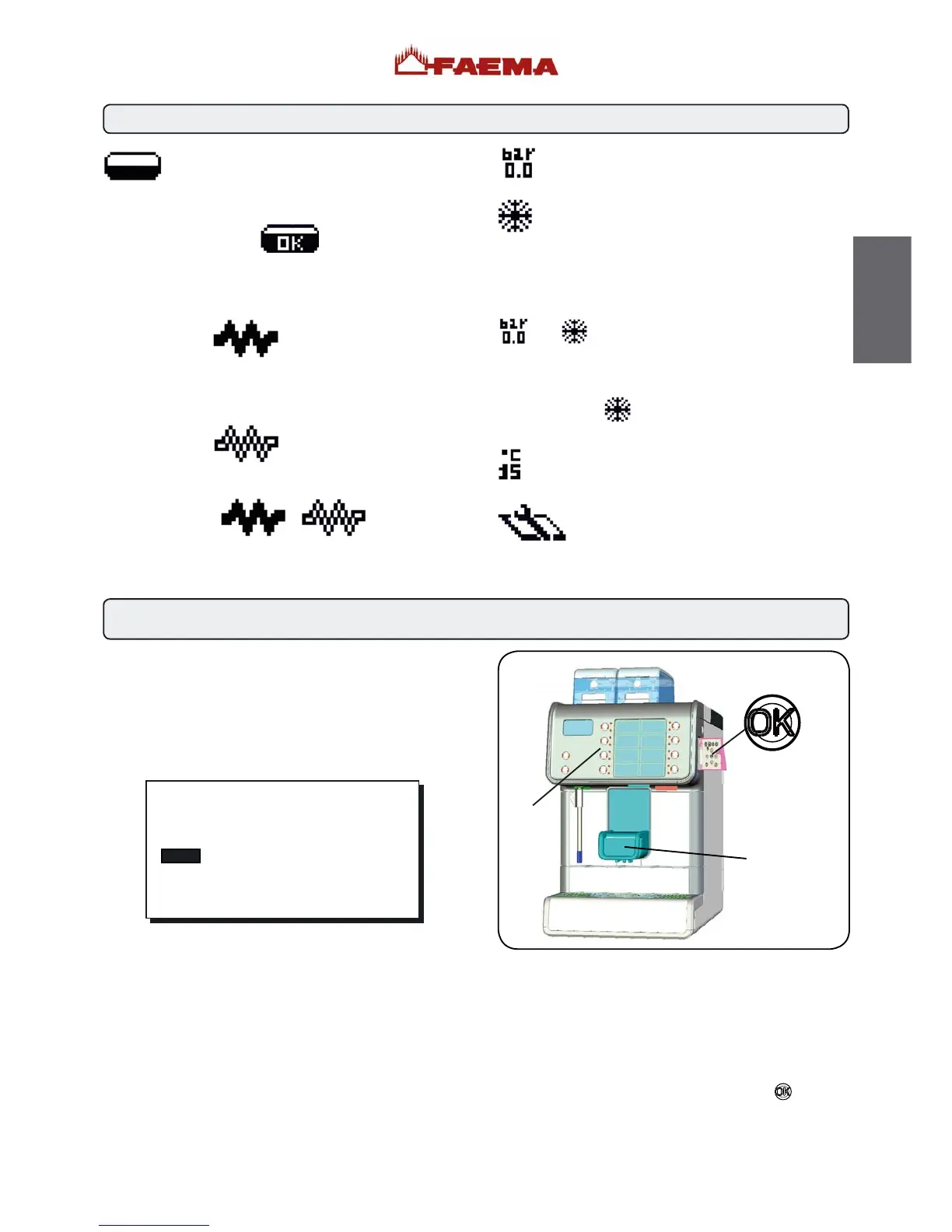
Description display symbols
8. Dispensing of beverages - coffee
This symbol indicates the boiler water level.
During the loading phase, the dark bottom part of
the icon blinks.
When the optimum level is reached, the symbol looks like
this:
When the resistance (services boiler and coffee boiler) is
activated and functioning, the icon looks like this
(dark inside).
When the services boiler pressure and the temperature of
the coffee boiler reach the set values, the icon appears as
shown below
(light inside).
While the machine is working, the two icons
will alternate on the display, indicating activation of electrical
heating.
This symbol indicates the boiler pressure value.
This symbol indicates that:
- the machine is in the first heating phase;
- the boiler pressure has dropped below 0.5 bar;
- the boiler temperature is less than 60°C.
Note: when the services boiler and boiler have still not reached
operating parameters and dispensing keys are pressed, the
message “MACHINE COLD - WAIT” appears and the symbols
and alternate on the display screen.
The machine has reached the set work pressure and
temperature when the icon
disappears from the display.
This symbol indicates the coffee boiler temperature.
This symbol indicates that a services card has
been inserted in the slot (39) and, therefore, the
technical programming menu can be accessed.
GENERAL INFORMATION
Place the cup (or cups) under dispenser (1) of the required
group.
Adjust the height of the dispenser (1) if necessary.
On the selection keypad (3), press the coffee dispensing key
corresponding to the chosen dose: only the LED of the selected
key remains lit and the dispensing process begins.
The following message will appear on the display:
Dispensing stops automatically.
Note: Coffee cannot be dispensed while hot water is
dispensed.
10 March 2010
wednesday 15:15:04
DISPENS. IN PROGRESS
1
3
Dispensing STOP function
Pressing the selection key again stops beverage dispensing
before it reaches the programmed dose.
Note: Pressing the key does not change program settings.
Otherwise, if the “Technical Programming/configuration/stop
dispensing” function has NOT been enabled by the installer,
dispensing can be stopped by pressing the key
.
53
English



 To Next Page