$
1 2a
2b
2c
English
19 EN
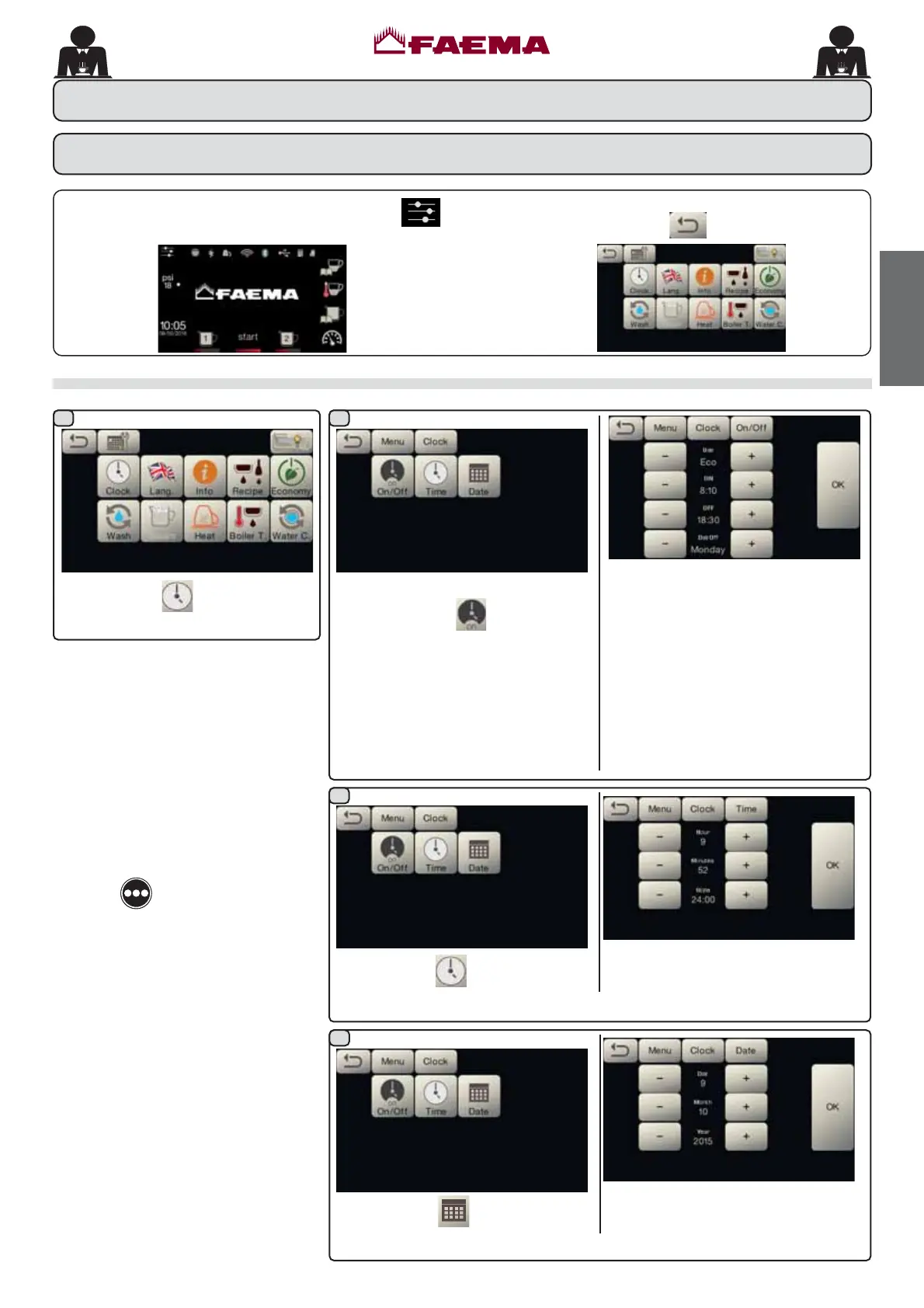
$FFHVVWKHSURJUDPPLQJPHQXE\SUHVVLQJWKHLFRQ .
Service time menu
$FFHVVWKH VHUYLFH KRXUV PHQX E\
pressing the icon
.
7KHVHSDUDPHWHUVFDQEHFRQ¿JXUHG
USE WLPHG VZLWFKRQVZLWFKRII
<(6 12 (FR GXULQJ WKH VZLWFKRႇ
phase, the machine resistance is not
FRPSOHWHO\ GLVDEOHG DQG DOORZV WKH
ERLOHUSUHVVXUHWRUHPDLQDWSVL
EDU
ONVZLWFKRQWLPH
OFFVZLWFKRႇWLPH
CLOSEDGD\RIFORVXUH
Press the icon
to set the time.
7KHVHSDUDPHWHUVFDQEHFRQ¿JXUHG
HOUR, MINUTES, STYLERU
$030
Press the icon
to set the date.
7KHVHSDUDPHWHUVFDQEHFRQ¿JXUHG
DAY, MONTH, YEAR.
5HWXUQWR WKH SUHYLRXV PHQXRU H[LW WKH SURJUDPPLQJ
PHQXE\SUHVVLQJWKHLFRQ
.
$
Press the icon .
$
$
$
$
AUTOMATIC SWITCH OFF / SWITCH
AUTOMATIC SWITCH OFF / SWITCH
ON
7KHPDFKLQHFDQEHVHWWRVZLWFKRႇDQG
switch on at programmed times.
Note. When the machine is working in
WKHDXWRPDWLFRQRႇIXQFWLRQGRQRW
use the general switch (1) to switch
RႇWKHPDFKLQH,IWKLVKDSSHQVWKH
machine will not be able to switch on
again automatically.
FORCED SWITCH ON
Press the
key to force the machine
on again.
Note. Forcing the machine on does
not change the programmed
RQRႇWLPHV
Note. At this point the machine will
remain on until the next switch
RႇWLPHLVUHDFKHG
To immediately return the machine to
³Rႇ´DVRULJLQDOO\SURJUDPPHGVZLWFKLW
RႇDQGRQDJDLQXVLQJWKHJHQHUDORQRႇ
VZLWFK1
'DWDÀRZFKDUW
CUSTOMER PROGRAMMING



 To Next Page