1 2
4
3
5
6
English
21 EN
Programming measures function
COFFEE
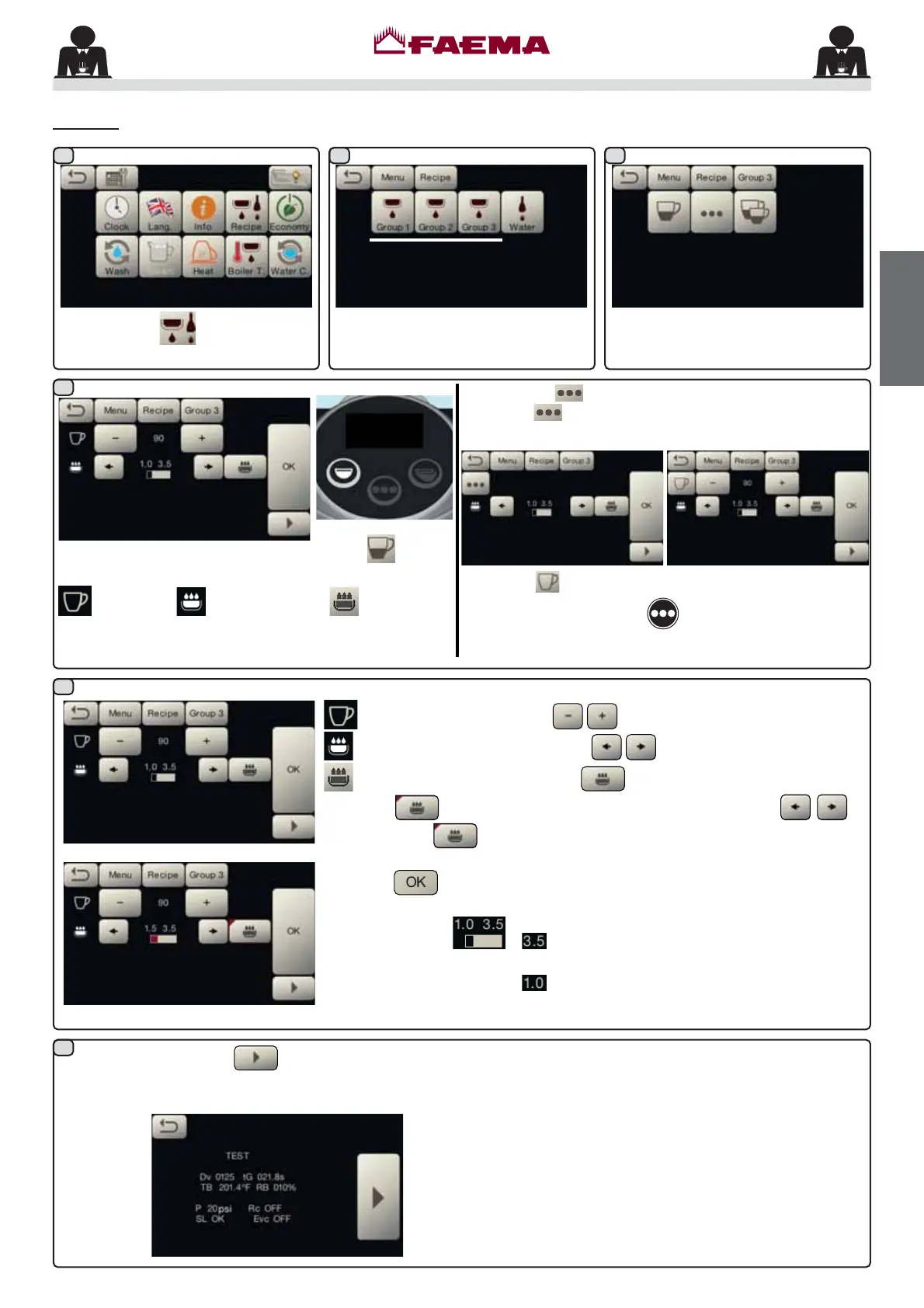
Press the icon
.
Press one of the coffee keys (ex.
Group 3).
$
$
The icons of the programmable keys
are shown on the services display.
TEST. By pressing the key, the dispensing starts
and the following screen appears on the services display:
The parameters displayed are:
Dv: Volumetric meter incremental counter
tG:
dispensing time
TB: LQVWDQWFR௺HHERLOHUWHPSHUDWXUH
RB:
DFWLYDWLRQFR௺HHERLOHUresistance
P: service ERLOHUSUHVVXUH
Rc: service ERLOHUUHVLVWDQFH
SL: service ERLOHUZDWHUOHYHO
Evc: service ERLOHUORDGVROHQRLGYDOYH
:KHQRQHRIWKHFRႇHHNH\VLVSUHVVHGHJWKH
key), the
following parameters are displayed on the services display:
Water dose; pre-infusion time; Blooming time.
The key in question will remain highlighted on the unit
display.
All the parameters can be adjusted by the user:
water dose (using the keys );
pre-infusion time (using the keys );
Blooming time (by pressing the icon, this will turn
into
allowing the time to be adjusted with the keys .
Press the
icon to exit the settings menu).
Press the
LFRQWRFRQ¿UPWKHLQIRUPDWLRQHQWHUHG
NOTE EXAMPLE
: shows the duration in seconds of the
pre-infusion phase.
shows the duration in seconds of the
Blooming phase.
NOTE. THE key can also be programmed as DOSED:
press the
icon on the parameter display screen:
Press the
icon to return to CONTINUOUS mode.
The other functions of the
key will remain unchanged
LQERWKFRQ¿JXUDWLRQV
$



 To Next Page