1 2
3a
3b
English
20 EN
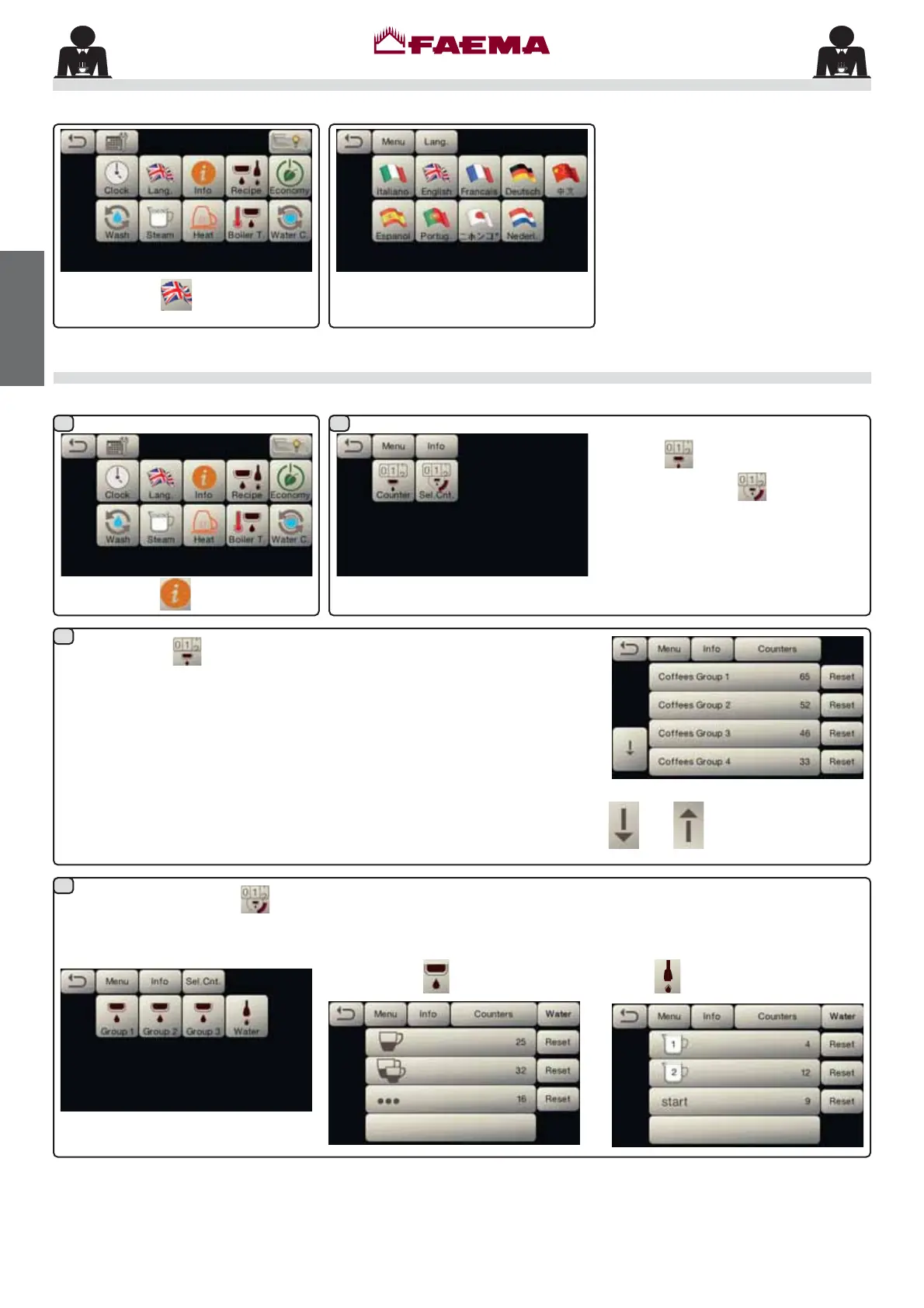
Language selection
Press the icon
.
Press the icon to choose the desired
language.
$
Counters
Press the icon
.
$
Select the type of meter to display:
Counters
or
Selection Counters
.
In the Counters
menu the listed parameters are:
&RႇHH*URXSQXPEHURIFRႇHHEDVHGEHYHUDJHV
WaterQXPEHURIWLPHVWKDWZDWHUZDVGLVSHQVHG
SteamGLVDEOHG
Steam + AirGLVDEOHG
Hot milkGLVDEOHG
Cold milkGLVDEOHG
7RWDO&RႇHHWRWDOQXPEHURIFRႇHHEDVHGEHYHUDJHV
In the Selection Counters
menu,
the parameters relative to the individual
keys are the ones that are counted.
([DPSOH RI FRXQWHU VHOHFWLRQ RID
FRႇHHJURXS
:
([DPSOHRIFRXQWHUVHOHFWLRQRIZDWHU
doses
:
Scroll through the entries using the
and arrows.



 To Next Page