20
This appliance must be installed by a qualified electrician
to comply with the relevant Institute of Electrical Engineers
(I.E.E.) regulations and also the local electricity supply
company requirements.
Note:
The cooker must be connected to the correct
electrical supply as stated on the voltage label on
the cooker, through a suitable cooker control unit
incorporating a double pole switch having a contact
separation of at least 3mm in all poles.
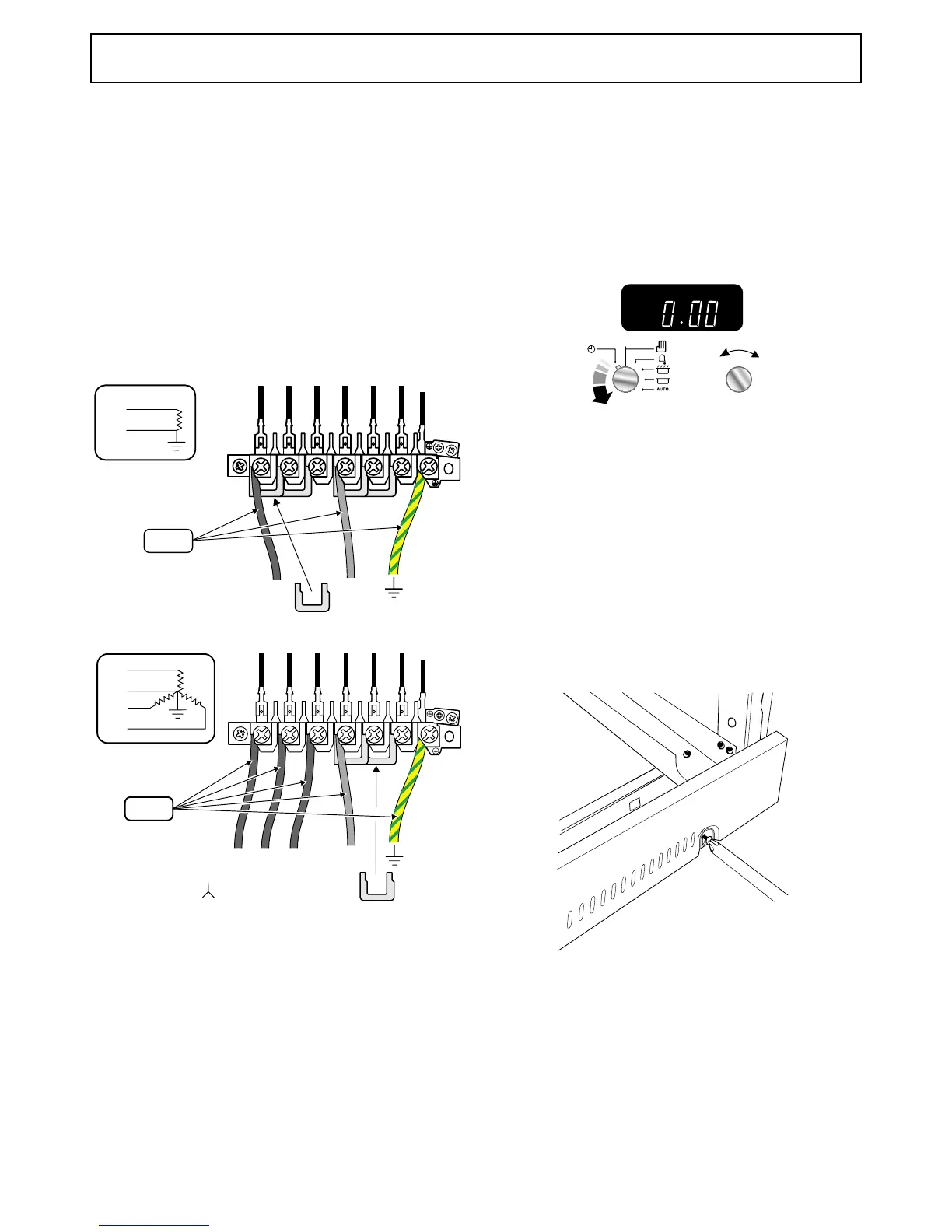
ArtNo.000-0010 Electrical connections single-phase
N
L
230Vac 50Hz
6mm
2
N
L
Single-phase
ArtNo.000-0011 Electrical connections 3-phase
NL1 L2 L3
N
L1
L3
L2
3N ac
230/400V 50Hz
6mm
2
Three-phase
Access to the mains terminal is gained by removing the
electrical terminal cover box on the back panel. Connect the
mains cable to the correct terminals for your electrical supply
type (see fig.). Check that the links are correctly fitted and that
the terminal screws are tight. Secure the mains cable using
the cable clamp.
Where the installation is protected by a 30 milliamp
sensitivity residual current device (RCD), the combined use of
your cooker and other domestic appliances may occasionally
cause nuisance tripping.
Check each burner in turn. Push in tap and turn to the large
flame symbol. Press ignition switch on fascia panel.
Set the clock to the time of day.
When the clock is first connected the display will flash ( 0.00)
and (
) alternately.
2-button clock set TOD
To set the clock to read the time of day turn and hold the
Timer knob to the clock symbol (
) and at the same time
turn the Adjusting knob left or right until the clock shows the
time of day. Remember this is a 24-hour clock. Let go of the
Timer knob and it will spring back to the vertical oven manual
setting.
Turn on the oven and check that the oven fan starts to turn
and that the oven starts to heat up. Turn off the oven.
Loosen the 3 screws along the front bottom edge of the
cooker. Hook the central keyhole over the central screw. Twist
and fit each end keyhole over their respective screws. Tighten
the fixing screws.
ArtNo.110-0001 - Securing the 110 plinth
Please complete your details in this Guide, inform the user
how to operate the cooker and hand over the Instructions.



 To Next Page