3.3 Communication Port
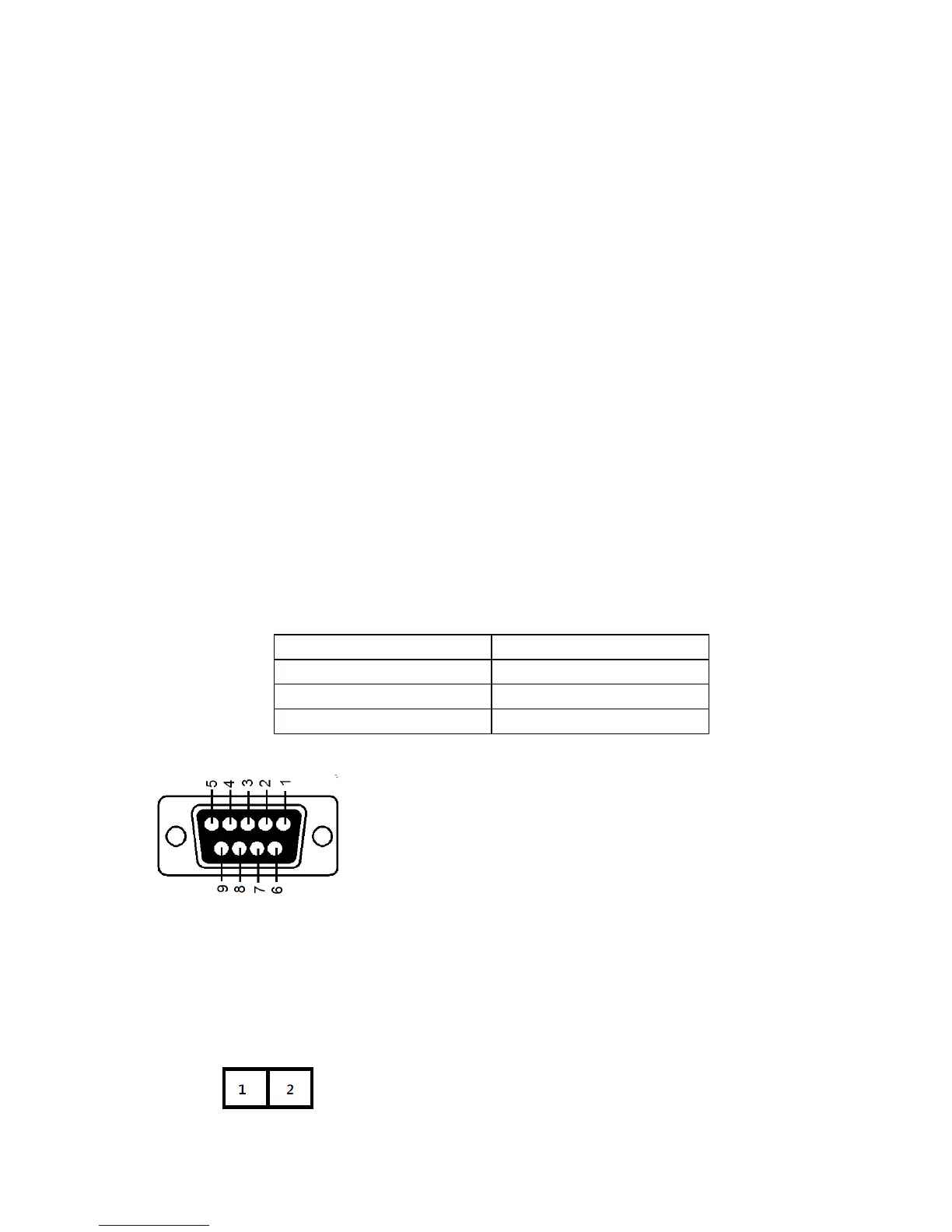
The UPS is equipped with a true RS-232 communication port to provide
communication with bundled UPS monitoring software for remote monitoring of the
UPS. In addition, there are six optional interface cards available to meet various
communication needs: USB, EPO, DCE (dry contact relay card), R2E, USE, and
an SNMP / HTTP card. (Please reference Chapter 8.) The software bundled with
the UPS is compatible with many operating systems, including Windows XP / Vista
/ 2008 / 7 / 8, Novell, NetWare, UNIX, Linux 2.6.x, Mac OS X v10.5 Leopard, and
Mac OS X v10.6 Snow Leopard. Please contact Falcon Electric for suitable
software. All communication ports including optional cards can be active and used
simultaneously to monitor the UPS status. However, only one communication
interface (the one with the highest priority) can control the UPS at a time. The
priorities of these communication interfaces are listed below (highest priority first).
1) EPO input port
2) Optional interface card
3) USB
4) RJ11/RJ45 Communication surge protection
5) RS-232
3.3.1 True RS-232
The RS-232 interface must be configured as follows:



 To Next Page