EasyManua.ls Logo

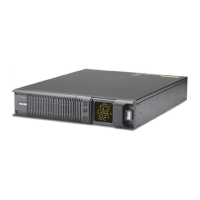
Falcon SSG1.5KRM-1 - User Manual

Falcon SSG1.5KRM-1
48 pages
Print Icon
To Next Page IconTo Next Page
Loading...
© 2020 Falcon® Electric, Inc. All rights reserved. Falcon® and the Falcon Electric logo are registered trademarks of Falcon Electric, Inc.
All other brand names and trademarks are the property of their respective owners. The information and specifications stated in this document
are subject to change without notice. OM480060 Rev. C, 7-2020
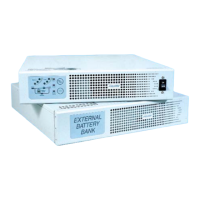
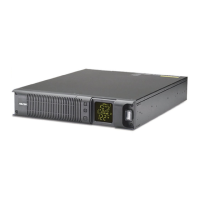
SSG Industrial Wide-temperature UPS
Installation & User Manual
1.5kVA to 3kVA
SSG1.5KRM-1
SSG1.5KRM-2
SSG2.2KRM-1
SSG2.2KRM-2
SSG2.2KRM-1-HW
SSG2.2KRM-2-HW
SSG3KRM-1
SSG3KRM-2
SSG3KRM-1-HW
SSG3KRM-2-HW

Other manuals for Falcon SSG1.5KRM-1

Questions and Answers

Summary

INTRODUCTION

Manual Overview

Provides basic information about the Falcon SSG Industrial Wide-temperature UPS, including installation, safety, features, operation, and troubleshooting.

UPS Features

Details key features such as wide temperature range, long-life UPS design, 12-year rated batteries, extended battery banks, and advanced communications.

SAFETY

Retain This User Manual

Instructions to save the manual for future reference and important safety instructions for installation and maintenance.

Warnings

Lists caution and warning statements regarding electric shock, fire risk, and proper circuit protection for safe operation.

PRODUCT OVERVIEW

Transportation

Guidelines for handling the UPS during transportation, emphasizing care due to stored energy and retaining shipping containers.

Operating Conditions

Specifies required protected environment, temperature range (-20°C to 55°C), and humidity for optimal UPS and battery life.

UPS Circuit Descriptions

Input Filter

Filters EMI and RFI, preventing conducted interference back to the utility source, complying with FCC Class B.

Input Rectifier & Power Factor Correction

Converts AC to DC power for the inverter, correcting input current for a sinusoidal waveform and minimizing distortion.

DC;DC Converter

Boosts battery DC voltage for the inverter, ensuring optimum efficiency and reducing ripple current for battery longevity.

DC;AC Inverter

Inverts DC power back to clean AC, providing continuous regulated power from utility or battery using IGBT/PWM design.

Battery Systems

Hot-swappable Battery Packs

Describes the flame-retardant battery packs, their interchangeability, and availability of optional extended banks.

Battery Charger

Details the charger's function to continuously charge UPS batteries from the utility power source.

Product Inspection

Inspecting the Equipment

Instructions for visually inspecting the UPS for shipping damage and procedures for filing claims with the carrier.

Package Contents

Box Contents

Lists all cables and accessories included with the SSG1.5KRM models for operation.

UPS Component Identification

Front View

Identifies and labels the components visible on the front panel of the 1.5kVA to 3kVA UPS models.

Rear Views

Identifies and labels components on the rear panels of various SSG models.

UPS Component Overview

Provides detailed descriptions of various UPS components, including ports, buttons, and features.

Display & Controls

LCD Display

Explains the icons and symbols shown on the UPS front panel LCD display for status monitoring.

Front Panel Controls

Details the function of each control button on the UPS front panel, such as Function/Test and Power/Bypass.

Getting Started

Installation Environment

Specifies requirements for the installation environment, including airflow, temperature, and humidity for optimal UPS operation.

Rackmount Installation

Provides step-by-step instructions for installing the UPS in a standard 19" equipment rack using mounting ears and slide rails.

Battery Pack; Bank Installation

Details the procedures for installing battery packs or banks into the SSG1.5KRM and SSG2.2KRM/SSG3KRM models.

UPS Start-up Procedure

SSG1.5 KRM Models

Step-by-step guide for starting up the SSG1.5KRM UPS, including fuse installation and power connection.

SSG2.2 KRM; SSG3 KRM Models

Step-by-step guide for starting up the SSG2.2KRM and SSG3KRM UPS models.

Electrical Specifications

2.2 kVA to 3 kVA Hardwire Terminal

Details current ratings and recommended circuit protection for 120V and 230V HW models.

UPS Operation Procedures

DC Start-up Procedure - Utility Power Unavailable

Instructions for starting the UPS in battery mode when utility power is unavailable.

Turn off UPS - Utility Power Available

Steps for safely shutting down the UPS when utility power is present.

Turn off UPS - Utility Power Unavailable

Steps for safely shutting down the UPS when operating in battery mode.

Operating Modes

Online Mode

Explains the UPS operation when connected to utility power, showing power flow and display indicators.

Battery Mode

Describes UPS operation on battery power, indicating battery capacity and audible alarms.

Bypass Mode

Explains bypass mode operation, when the load is directly connected to utility power.

Advanced Operating Features

Green Mode

Describes the power-saving green mode, its activation conditions, and usage recommendations.

REPO Mode (Remote Emergency Power Off)

Explains the REPO function for remotely shutting down the UPS via an external switch.

LSC Mode (Load Segment Control)

Details the programmable load segment control for shedding non-critical loads during power loss.

Meter Readings

LCD Meter

Explains how to use the set/alarm silence button to scroll through and view various meter readings on the LCD.

Battery Management

Battery Capacity Indicator

Explains how the battery capacity indicator shows remaining power and the use of the voltage meter.

Battery Self-test

Provides instructions and interpretation for performing a battery self-test to check battery health.

Programming Mode

Setup Options

Outlines configuring output voltage, enabling/disabling load segment controls, and green mode.

Default Programmed Settings

Shows the default programmed settings for 120V and 230V models regarding LSC, Green Mode, and output voltage.

Communication Features

RS-232 & USB

Describes the RS-232 and USB ports for connecting the UPS to a workstation and software installation.

DB-9 Serial Port (RS232)

Details the pinout designation for the DB-9 serial port used for RS-232 communication.

Serial Cable

Provides pin designation details for the serial cable used for UPS communication.

Dry Contact Relay Cards

Relay Contact Ratings

Specifies the ratings (48Vdc / 1 Amp Max) for the dry contact relay outputs.

Remote Shutdown Operation

Explains how to operate the remote shutdown feature using specific pins and voltage.

UA88376-SSG-HW, Hardwire Terminal Version

Details jumper configurations and terminal designations for the HW version of the relay card.

Batteries

Safety

Crucial safety instructions for handling and replacing batteries, warning about explosion, energy hazard, and electrical shock.

Battery Information

Battery Storage

Precautions for storing the UPS system to maximize battery life, including charging and temperature.

Battery Capacity Retention

Table showing maximum allowable storage periods based on ambient temperature and battery capacity.

Battery Pack Replacement

SSG1.5 KRM Models

Instructions for replacing the battery pack in SSG1.5KRM models, including safety warnings.

SSG2.2 KRM; SSG3 KRM Models

Instructions for replacing battery packs in SSG2.2KRM and SSG3KRM models.

Troubleshooting

Audible Alarms

Explains audible alarm codes, their possible causes, and recommended solutions for troubleshooting.

Troubleshooting Tips

Provides tips for common UPS problems like not turning on or short battery backup time.

Bit Error Codes

Lists and explains bit error codes, their causes, and solutions for severe UPS faults.

Technical Support

Contact Us

Provides contact information for Falcon Service, including address, phone numbers, and email for support and service.

Warranty

LIMITED WARRANTY

Details the four-year limited warranty, procedures, exclusions, and limitations for the UPS product.

Summary

INTRODUCTION

Manual Overview

Provides basic information about the Falcon SSG Industrial Wide-temperature UPS, including installation, safety, features, operation, and troubleshooting.

UPS Features

Details key features such as wide temperature range, long-life UPS design, 12-year rated batteries, extended battery banks, and advanced communications.

SAFETY

Retain This User Manual

Instructions to save the manual for future reference and important safety instructions for installation and maintenance.

Warnings

Lists caution and warning statements regarding electric shock, fire risk, and proper circuit protection for safe operation.

PRODUCT OVERVIEW

Transportation

Guidelines for handling the UPS during transportation, emphasizing care due to stored energy and retaining shipping containers.

Operating Conditions

Specifies required protected environment, temperature range (-20°C to 55°C), and humidity for optimal UPS and battery life.

UPS Circuit Descriptions

Input Filter

Filters EMI and RFI, preventing conducted interference back to the utility source, complying with FCC Class B.

Input Rectifier & Power Factor Correction

Converts AC to DC power for the inverter, correcting input current for a sinusoidal waveform and minimizing distortion.

DC;DC Converter

Boosts battery DC voltage for the inverter, ensuring optimum efficiency and reducing ripple current for battery longevity.

DC;AC Inverter

Inverts DC power back to clean AC, providing continuous regulated power from utility or battery using IGBT/PWM design.

Battery Systems

Hot-swappable Battery Packs

Describes the flame-retardant battery packs, their interchangeability, and availability of optional extended banks.

Battery Charger

Details the charger's function to continuously charge UPS batteries from the utility power source.

Product Inspection

Inspecting the Equipment

Instructions for visually inspecting the UPS for shipping damage and procedures for filing claims with the carrier.

Package Contents

Box Contents

Lists all cables and accessories included with the SSG1.5KRM models for operation.

UPS Component Identification

Front View

Identifies and labels the components visible on the front panel of the 1.5kVA to 3kVA UPS models.

Rear Views

Identifies and labels components on the rear panels of various SSG models.

UPS Component Overview

Provides detailed descriptions of various UPS components, including ports, buttons, and features.

Display & Controls

LCD Display

Explains the icons and symbols shown on the UPS front panel LCD display for status monitoring.

Front Panel Controls

Details the function of each control button on the UPS front panel, such as Function/Test and Power/Bypass.

Getting Started

Installation Environment

Specifies requirements for the installation environment, including airflow, temperature, and humidity for optimal UPS operation.

Rackmount Installation

Provides step-by-step instructions for installing the UPS in a standard 19" equipment rack using mounting ears and slide rails.

Battery Pack; Bank Installation

Details the procedures for installing battery packs or banks into the SSG1.5KRM and SSG2.2KRM/SSG3KRM models.

UPS Start-up Procedure

SSG1.5 KRM Models

Step-by-step guide for starting up the SSG1.5KRM UPS, including fuse installation and power connection.

SSG2.2 KRM; SSG3 KRM Models

Step-by-step guide for starting up the SSG2.2KRM and SSG3KRM UPS models.

Electrical Specifications

2.2 kVA to 3 kVA Hardwire Terminal

Details current ratings and recommended circuit protection for 120V and 230V HW models.

UPS Operation Procedures

DC Start-up Procedure - Utility Power Unavailable

Instructions for starting the UPS in battery mode when utility power is unavailable.

Turn off UPS - Utility Power Available

Steps for safely shutting down the UPS when utility power is present.

Turn off UPS - Utility Power Unavailable

Steps for safely shutting down the UPS when operating in battery mode.

Operating Modes

Online Mode

Explains the UPS operation when connected to utility power, showing power flow and display indicators.

Battery Mode

Describes UPS operation on battery power, indicating battery capacity and audible alarms.

Bypass Mode

Explains bypass mode operation, when the load is directly connected to utility power.

Advanced Operating Features

Green Mode

Describes the power-saving green mode, its activation conditions, and usage recommendations.

REPO Mode (Remote Emergency Power Off)

Explains the REPO function for remotely shutting down the UPS via an external switch.

LSC Mode (Load Segment Control)

Details the programmable load segment control for shedding non-critical loads during power loss.

Meter Readings

LCD Meter

Explains how to use the set/alarm silence button to scroll through and view various meter readings on the LCD.

Battery Management

Battery Capacity Indicator

Explains how the battery capacity indicator shows remaining power and the use of the voltage meter.

Battery Self-test

Provides instructions and interpretation for performing a battery self-test to check battery health.

Programming Mode

Setup Options

Outlines configuring output voltage, enabling/disabling load segment controls, and green mode.

Default Programmed Settings

Shows the default programmed settings for 120V and 230V models regarding LSC, Green Mode, and output voltage.

Communication Features

RS-232 & USB

Describes the RS-232 and USB ports for connecting the UPS to a workstation and software installation.

DB-9 Serial Port (RS232)

Details the pinout designation for the DB-9 serial port used for RS-232 communication.

Serial Cable

Provides pin designation details for the serial cable used for UPS communication.

Dry Contact Relay Cards

Relay Contact Ratings

Specifies the ratings (48Vdc / 1 Amp Max) for the dry contact relay outputs.

Remote Shutdown Operation

Explains how to operate the remote shutdown feature using specific pins and voltage.

UA88376-SSG-HW, Hardwire Terminal Version

Details jumper configurations and terminal designations for the HW version of the relay card.

Batteries

Safety

Crucial safety instructions for handling and replacing batteries, warning about explosion, energy hazard, and electrical shock.

Battery Information

Battery Storage

Precautions for storing the UPS system to maximize battery life, including charging and temperature.

Battery Capacity Retention

Table showing maximum allowable storage periods based on ambient temperature and battery capacity.

Battery Pack Replacement

SSG1.5 KRM Models

Instructions for replacing the battery pack in SSG1.5KRM models, including safety warnings.

SSG2.2 KRM; SSG3 KRM Models

Instructions for replacing battery packs in SSG2.2KRM and SSG3KRM models.

Troubleshooting

Audible Alarms

Explains audible alarm codes, their possible causes, and recommended solutions for troubleshooting.

Troubleshooting Tips

Provides tips for common UPS problems like not turning on or short battery backup time.

Bit Error Codes

Lists and explains bit error codes, their causes, and solutions for severe UPS faults.

Technical Support

Contact Us

Provides contact information for Falcon Service, including address, phone numbers, and email for support and service.

Warranty

LIMITED WARRANTY

Details the four-year limited warranty, procedures, exclusions, and limitations for the UPS product.

Falcon SSG1.5KRM-1 Specifications

General IconGeneral
BrandFalcon
ModelSSG1.5KRM-1
CategoryUPS
LanguageEnglish

Related product manuals