HID GLOBAL CONFIDENTIAL AND/OR PROPRIETARY INFORMATION. This document contains confidential and/or proprietary information,
which may not be duplicated, published, disseminated or disclosed, or used for any purpose, without the written consent of HID Global
Corporation. If you are an unintended recipient of this information or are unwilling to accept the above restrictions, please immediately return
this document to HID Global Corporation, 15370 Barranca Pkwy, Irvine, CA 92618-3106..
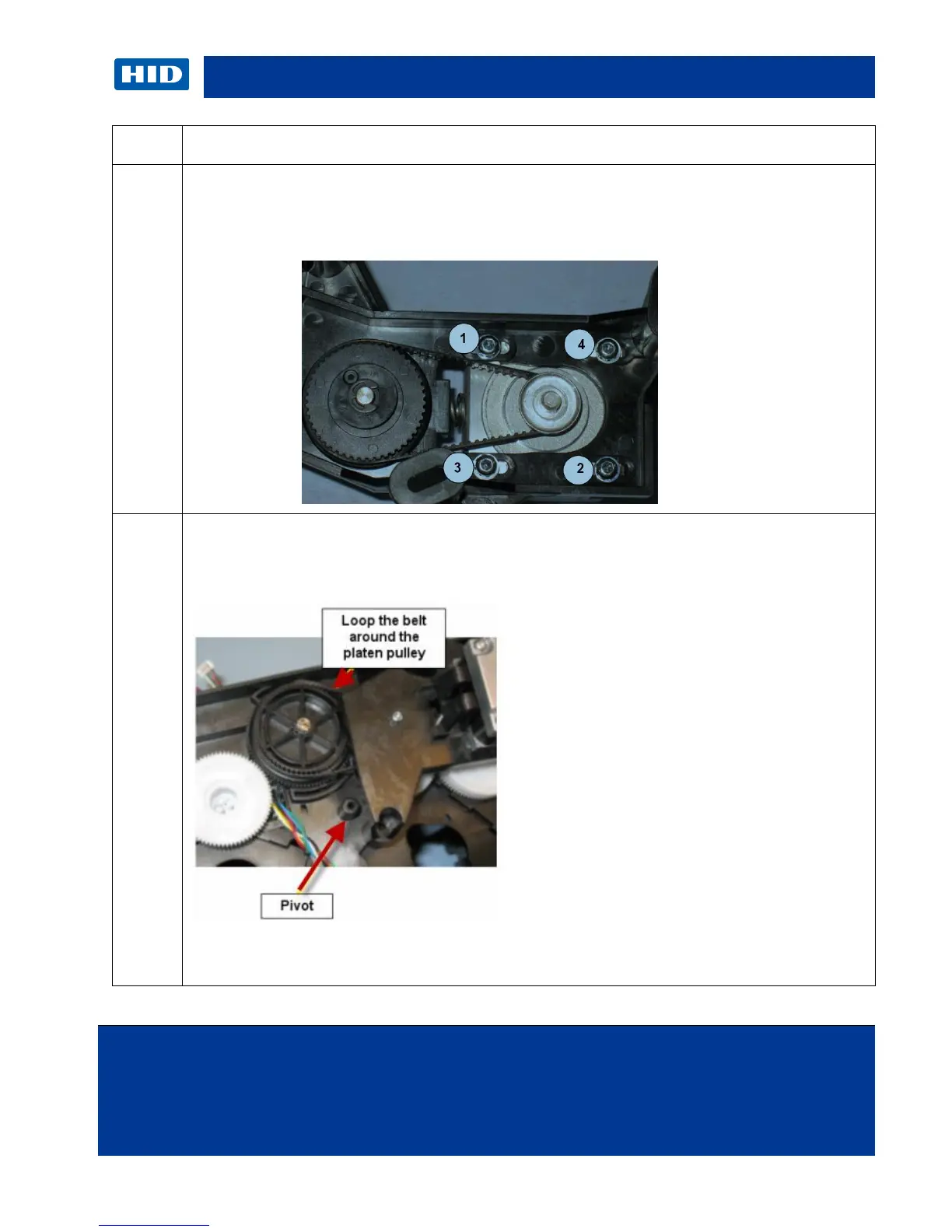
This Stepper Motor Mount provides a self tensioning feature.
Keep the four (4) screws loose while holding the Mount Frame.
Allow the spring to self-tension, then tighten the four (4) screws.
Install belt on stepper motor assembly and then loop the belt w/stepper drive assembly
around the platen roller shaft gear.
Place the Stepper Mount over the pivot peg.



 To Next Page