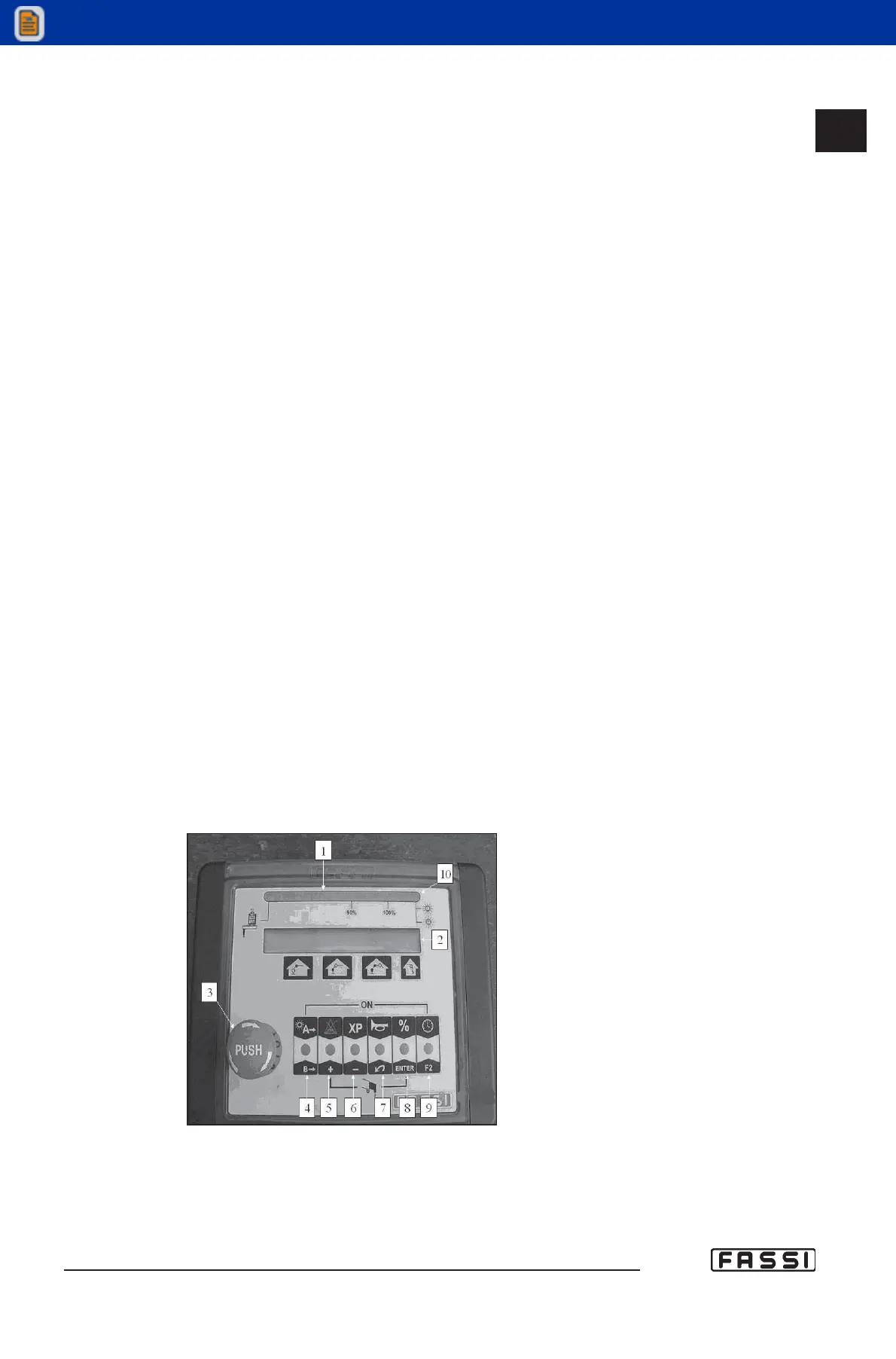
ALPHANUMERIC PANEL
Refer to fig. 2 to identify the various components of the panel:
1. Green, yellow and red led band signalling the load percentage as com-
pared to the capacity plate. Green light load between 0 and 90%.
Yellow light load between 90 and 100%. Red light load higher than 100%
(activation of the lifting moment limiting device).
2. Alphanumeric Display visualizing the pressure on the lifting rams, alarms,
various information and icons for the selection of the different menus.
3. Mushroom-shaped emergency button (always active).
4. Push-button to select the use of buttons 5, 6, 7, 8, 9 in configuration
"A" or "B". If the light is on, the "A" mode is enabled, if the light is off,
the "B" mode is enabled.
5A. Control button for the temporary exclusion of the lifting moment limiting
device, and for the reset of the messages "alarm" and "warning".
6A. "XP" device push-button.
7A. Audible alarm push button (see instructions and warnings).
8A. Push-button to modify the values displayed: pressure in Bar, load in %,
pressure in dapsi, crane angle in degrees, jib angle in degrees, oil tem-
perature.
9A. Button for the clock activation and to access the timer menu (see timer
16.7).
5B. + button (to increase values when modifying the parameters or to navi-
gate the menus in progression).
6B. - button (to decrease values when modifying the parameters or to navi-
gate the menus in regression).
7B. "INDEX" push-button to program or to select menus.
8B. "ENTER" button used to program or to select menus.
9B. F2 button (actually not in use).
10. Red light-flashing for "warning" or fixed for "alarm".
Led lights 4-6. If led lights 4 and 6 are flashing the panel is not enabled
(emergency excluded); contemporarily press on push-buttons 4 and 6
to activate it.
16.3
CONTROLS TO OPERATE
THE CRANE
GR4_5 - EVOLUTION
fig. 2



 To Next Page