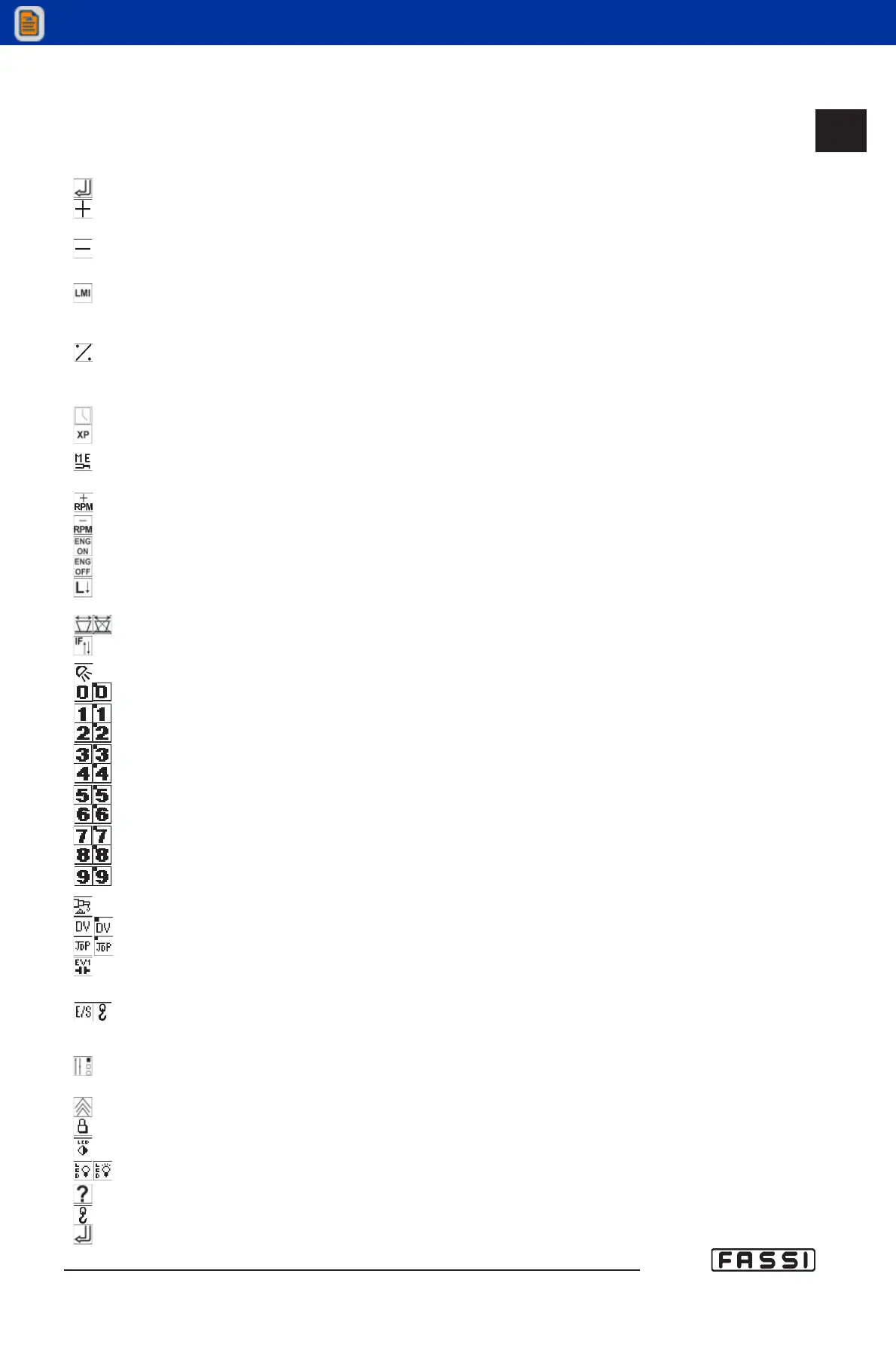
14.2.4 Icon legend
- RADIO REMOTE CONTROL DISPLAY AND GRAPHIC PANEL
ENTER
+ (to increase values when modifying the parameters or to navigate the
menus in progression).
- (to decrease values when modifying the parameters or to navigate the
menus in regression).
Activation of the procedure for the temporary exclusion of the lifting
moment limiting device, and for the reset of the messages "alarm"
and "warning".
Modification of the values displayed: pressure in Bar, load in %,
pressure in dapsi, crane angle in degrees, (jib angle) in degrees, oil
temperature.
Clock activation and access to the timer menu.
Activation/disactivation "XP" device.
Activation of the load check procedure on manual extensions
(only on the graphic display).
To increase truck's engine r.p.m.
To decrease truck's engine r.p.m.
Starting the truck engine.
Turning off the truck engine.
Decrease in crane general speed (each selection reduces speed by
the percentage set in the parameter visualised on "Lnn").
Selection of the 9°/10° function on the radio remote control.
Visualization of active "flag" icons in addition to the one selected.
Lighting working lights.
Activation of the supplementary exit 0.
Activation of the supplementary exit 1.
Activation of the supplementary exit 2.
Activation of the supplementary exit 3.
Activation of the supplementary exit 4.
Activation of the supplementary exit 5.
Activation of the supplementary exit 6.
Activation of the supplementary exit 7.
Activation of the supplementary exit 8.
Activation of the supplementary exit 9.
Activation of electric regeneration.
Activation of the electric deviator of flow.
Activation of JDP (Jib Dual Power).
De-energizing of the EV1 electrovalve without hinding the levers move-
ment to unload the pipes pressure.
Passage from crane control to stabilizers and vice versa.
- ICONS VALID ONLY FOR MENU OF THE PANEL GRAPHIC REGULATION
Upon activation the setting menu of the graphic panel is displayed
(lightness, contrast, etc.).
Access to the setting menu.
Keyboard blockage.
Contrast regulation.
Lighting retrolighting.
Visualisation of the software release.
Modification of load values from % to Bar on crane layout.
Visualization state of the lever, the control and the position of the
electric modules
CONTROLS TO
OPERATE THE CRANE
GR4_5-EVOLUTION
14.2.4



 To Next Page