Any movement (ram) (including the rotation) acts on all the movements, exclusive
of the re-entry/exit of the boom sections (provided that this speed is too low).
(!) ATTENTION (!)
This control of the dynamics and therefore of speed engenders a varia-
tion of the movement speed of the crane also without varying the posi-
tion of the control levers. (For instance when putting down on the ground
the load hanged on the winch, the crane movement gradually accelerates
even if the control lever of the radio remote control is kept unchanged).
16.3 Control panels of the lifting moment limiting
device (if fitted)
There are three types of control panels: Graphic, Alphanumeric or Basic.
GRAPHIC PANEL
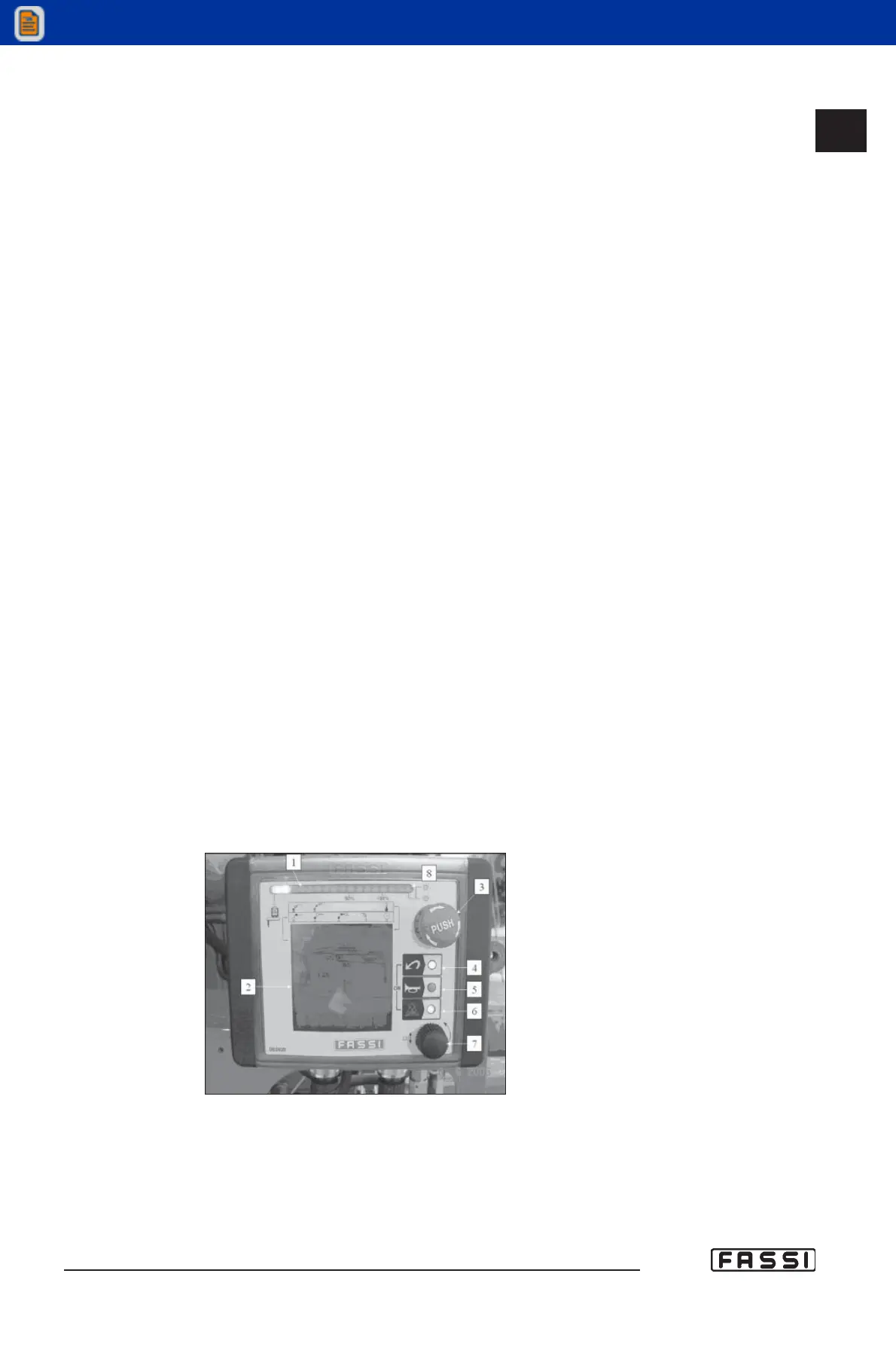
Refer to fig. 1 to identify the various components of the panel:
1 Green, yellow and red led band signalling the load percentage as com-
pared to the capacity plate. Green light load between 0 and 90%. Yellow
light load between 90 and 100%. Red light load higher than 100% (acti-
vation of the lifting moment limiting device).
2 Graphic Display visualizing the pressure on the lifting rams, alarms,
various information and icons for the selection of the different menus.
3 Mushroom-shaped emergency button (always active).
4 "INDEX" push-button to program or select menus.
5 Audible alarm push button (see instructions and warnings).
6 Control button for the temporary exclusion of the lifting moment limiting
device, and for the reset of the messages "alarm" and "warning".
7 Function selector with rotary movement "RX" to select the icons of the
program menus (see the icon legend, par. 14.2.3). Press on the selec-
tor to confirm the choice.
8 Red led light-flashing for "warning" or fixed for "alarm".
Led lights 4-6. If led lights 4 and 6 are flashing the panel is not enabled
(emergency excluded); contemporarily press on push-buttons 4 and 6
to activate it.
16.3
CONTROLS TO OPERATE
THE CRANE
GR4_5 - EVOLUTION
fig. 1



 To Next Page