9 / 92FAVERO ELECTRONICS - 0259-1060 - FA-15 User Manual - Rev03
ENGLISH
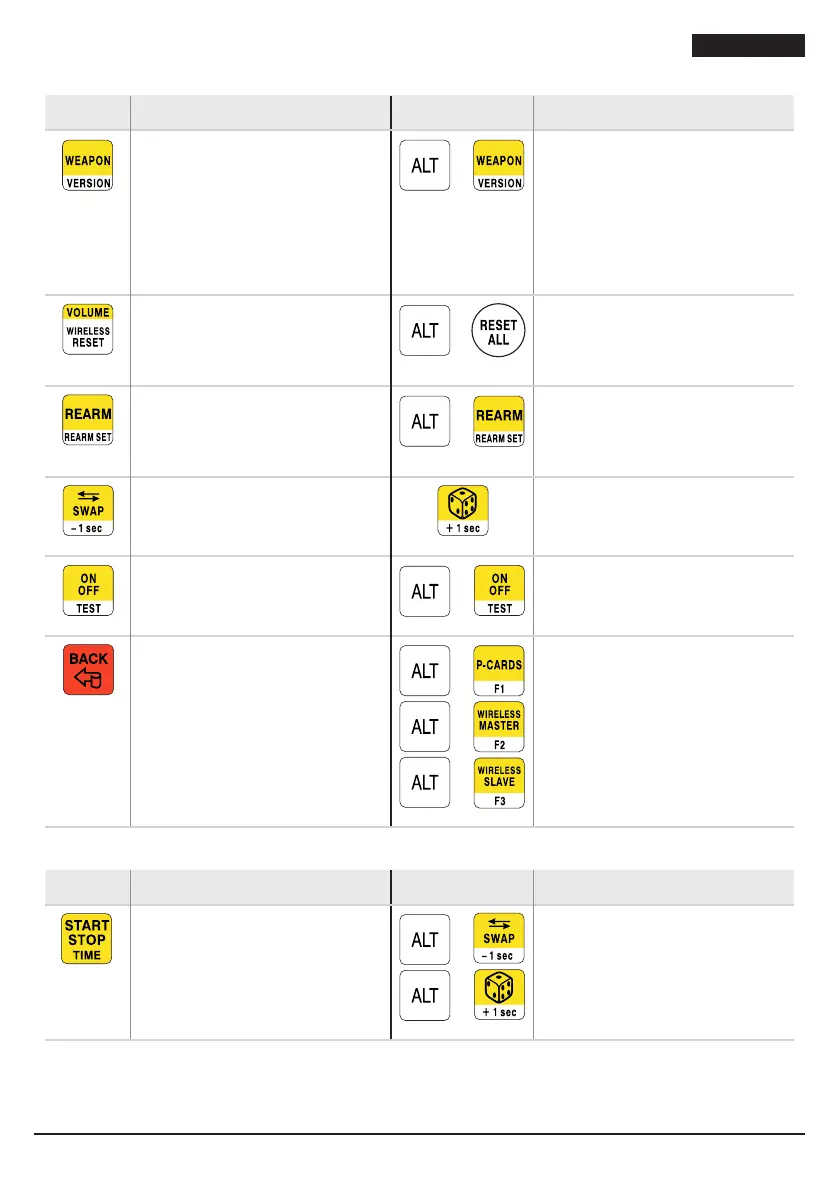
Keys for general use
Key Action/effect Key Action/effect
Press several times to select the
type of weapon that will be
indicated on the display:
• Foil = “FL”
• Sabre = “SA”
• Épée = “EP”.
+
Press several times to change the
ÉPÉE mode:
• “EP 1”, FIE compliant, with
automatic increase of hits
• “EP 2”, with rapid indication
of hits, ideal for training
• “EP 3”, FIE compliant, with
manual increase of hits.
Press several times to modify the
volume of the acoustic signal: 0
(sound off),
1, 2 and 3 (max volume).
+
Reset to start of match settings.
Manual rearm (if automatic
rearm is not active).
+
Press several times to select the
automatic rearm time, from: “—”
manual, 1 second, 3 and 5
seconds.
Swap view (points, cards and
priority).
Random assignment of priority:
the timer is set to 1 minute. Press
again to remove priority.
Turn on/off.
+
Test FA-15 (see paragraph “3.4.
TEST function”)
Cancels the last operation
performed regarding scores,
cards and matches. This does not
affect the timer.
+
+
+
Special functions (currently
unused).
Timer keys
Key Action/effect Key Action/effect
Timer start/stop.
+
+
Changes the timer value in
increments of 1 second, and in
increments of 1/100th second for
the last 10 seconds.


 To Next Page