14
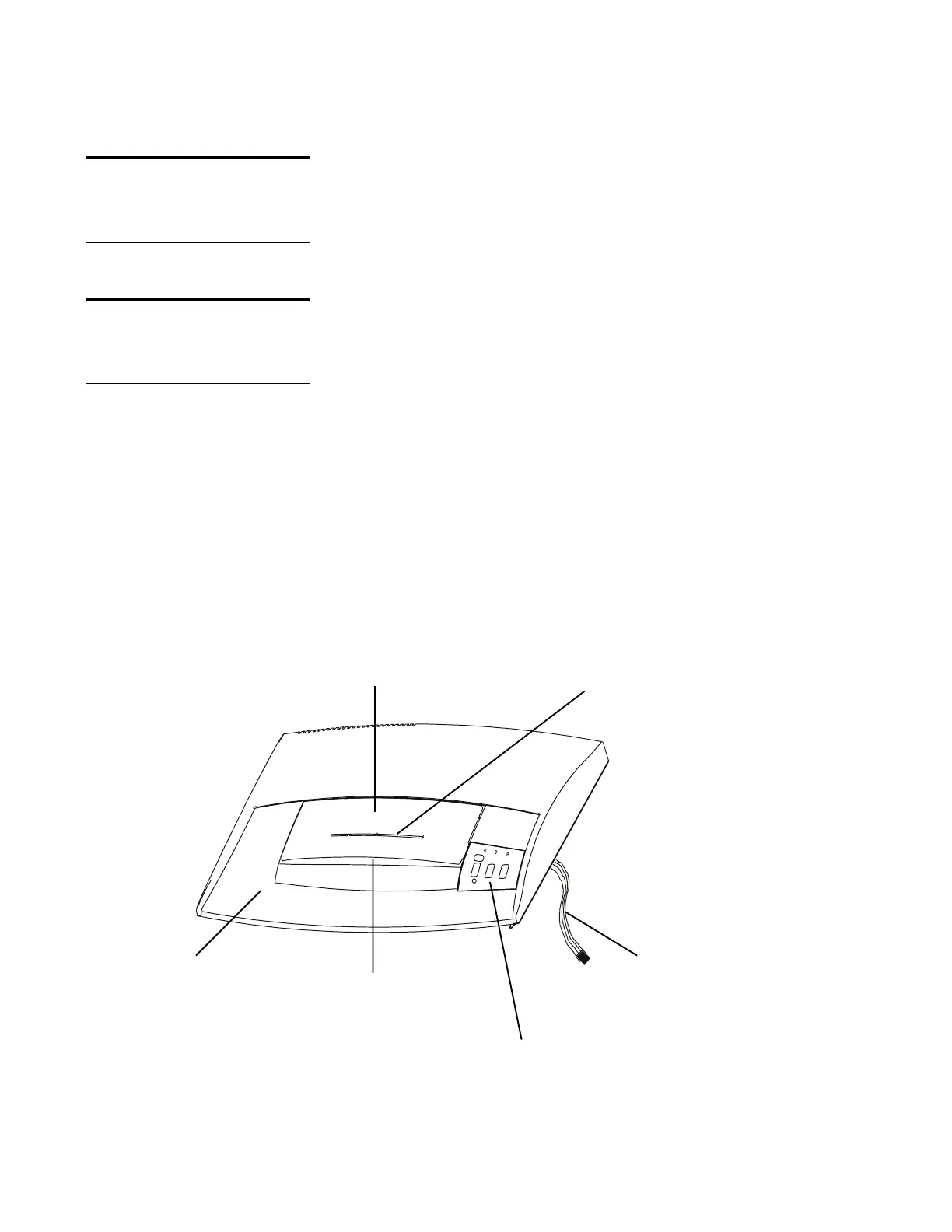
Remove Housing Cover
Three screws hold the housing cover to the front of the
cabinet, and three plastic tabs fit in openings along the
rear of the cabinet. A plastic cable connects the
switches located in the housing cover to the PC board.
Remove the cover gently, so that this cable is not
damaged.
To remove the housing from the cabinet:
1 Remove the wastebasket.
2 Remove the 3 screws that hold the cover to the lip
at the front of the cabinet.
3 Grip the housing cover on both sides, then gently
lift and push the cover toward rear of the unit to
release the rear latches.
Note: Be careful. The latches are plastic and
may break if too much force is applied.
4 Set the cover aside.
DO THIS FIRST
Unplug the Shredder
TOOLS
Phillips screwdriver
cable (connects to
PC board)
Housing Cover
operator panel (see
page 4 for details
CD feed slot on safety flap
(220-2 and C-220 only)
paper feed slot
housing cover
insert panel
safety flap






 To Next Page