29
Replace Operator Panel Switches
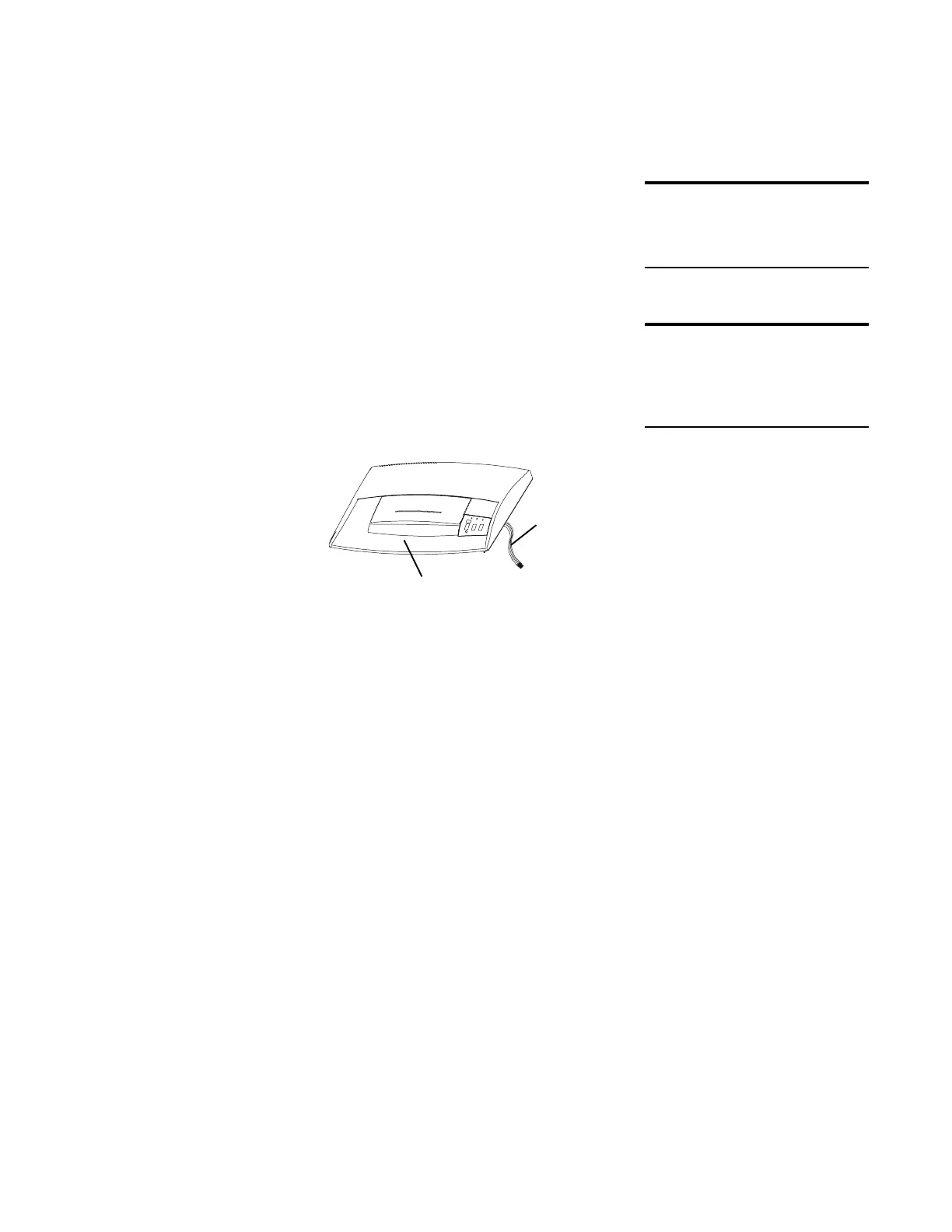
The switches (Reverse, Off, Automatic, and Manual
Forward) on the Operator Panel in the housing cover
insert, connect via a cable to the PC board. If the cable
or a switch is defective, replace the housing cover insert.
To replace the housing cover insert:
1 Turn the housing cover over and remove the
6 screws that secure the housing cover insert to
the housing cover.
2 Lift the insert up and away from the cover.
3 Put the new insert in place and secure it to the
housing cover.
Troubleshooting LEDs
Three troubleshooting LEDs (door ajar, basket full, and
paper jam) fit into supports attached to the PC board.
Another LED (ready) indicator is mounted directly on the
PC board. If a troubleshooting LED or the ready LED
fails, replace the entire PC board. (See Remove/Replace
the PC board and the wiring diagram.)
DO THIS FIRST
Remove Housing Cover
TOOLS
Philips screwdriver
Long nose pliers
Housing Cover
cable connects
to the PC board
housing cover
insert panel






 To Next Page