17
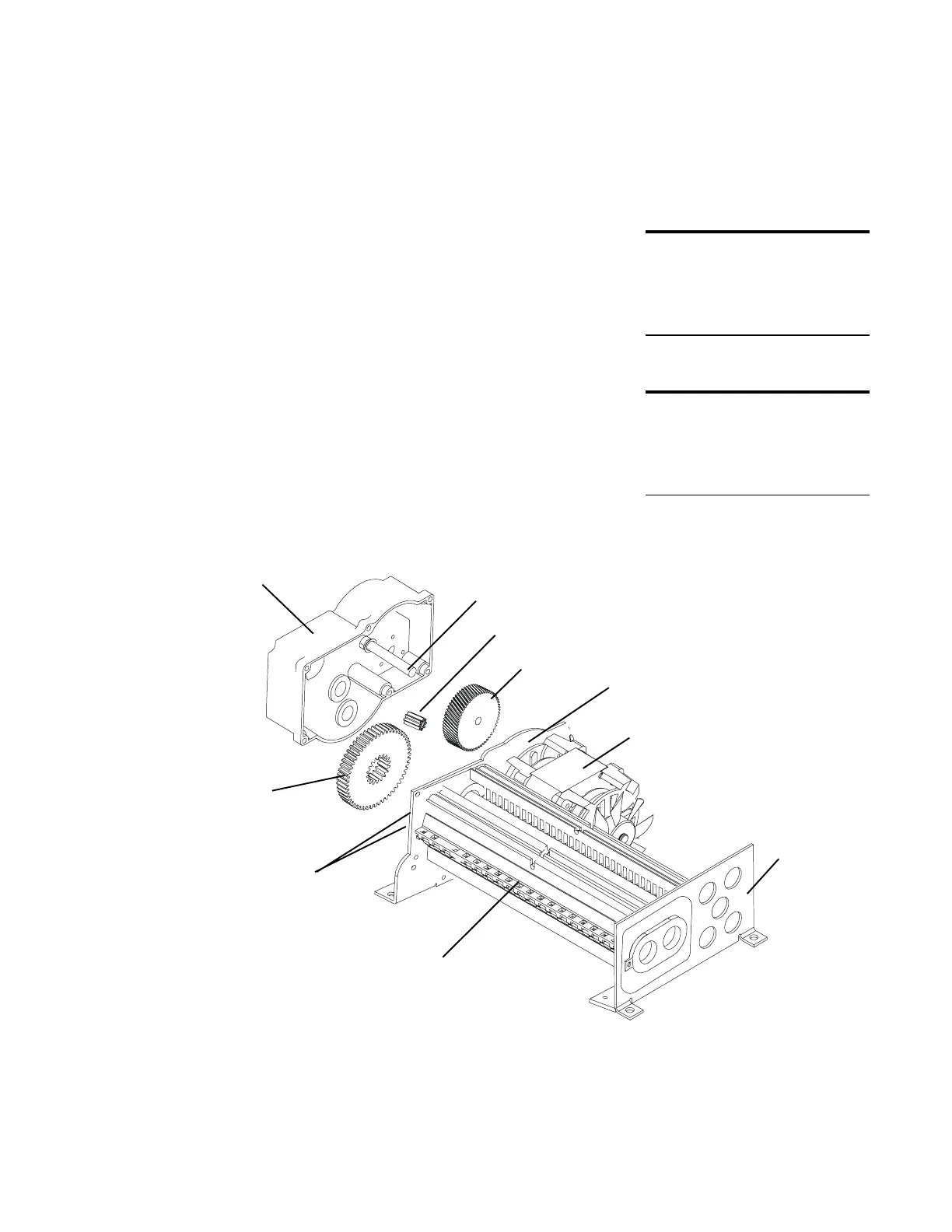
Remove Cutting Assembly Gears
The cutting assembly gears are the same for the 220-2,
220C-2, C-220, and C-220C shredders. The small white
gear fits over the gray drive gear. The large white gear
fits over the large cutting cylinder gear. Both cutting
cylinder gears are permanently attached to the cutting
cylinders.
To remove the cutting assembly gears:
1 Remove the 6 screws and washers that hold the
gearbox cover to the left bearing plate.
2 Pull the gear box cover away and up from the
bearing plate. The small white gear and the gray
drive gear will remain on the gear box shaft.
3 Remove the large white gear and washer from the
cutting cylinder shaft.
DO THIS FIRST
Remove Cutting Assembly and
Motor from Cabinet
TOOLS
Philips screwdriver
Gear puller
right
bearing
plate
shaft
gearbox
left bearing plate
motor
large white
gear
small white gear
small & large cutting
shaft gears (not
shown)
cutting assembly
small drive gear






 To Next Page