Several other EXP-1 modes reside in the CONTROLS LAYER. Use the ENCODER to scroll among and select
these modes and the options within them. These modes are:
VOLUME MODE (“VOL”): Turns o the EXP-1 Volume mode (green LED) pedal function (see illustrations below).
EXPRESSION MODE (“EXP”): Allows three dierent assignments. “OFF” turns o the EXP-1 Expression mode
pedal function (red LED). “VOLUME” congures EXP-1 to control master volume (similar to VOLUME MODE
above). “AMP/FX” congures EXP-1 to control the amp or eect shown in the SIGNAL PATH LAYER.
HEEL and TOE MODES: Together, these specify the range of the parameter to be controlled.
LIVE MODE: When ON, the congured parameter immediately jumps to the value “commanded” by the po-
sition of the pedal. When OFF, initial pedal position is “ignored” until the pedal is actually moved, after which
it’s in synch with the congured parameter.
BYPASS MODE: When ON, eect bypass can be toggled on and o using the EXP-1 toe switch.
REVERT MODE: When ON, the congured parameter is restored to the value stored in the preset when
switching from Expression mode to Volume mode using the toe switch.
DEFAULT MODE: Congures initial EXP-1 mode (Volume or Expression) for the preset in use. DEFAULT MODE
is overridden when the “GLOBAL SETTINGS” function “MODE SOURCE” is set to “PEDAL” (see “GLOBAL SET-
TINGS” on following page).
55
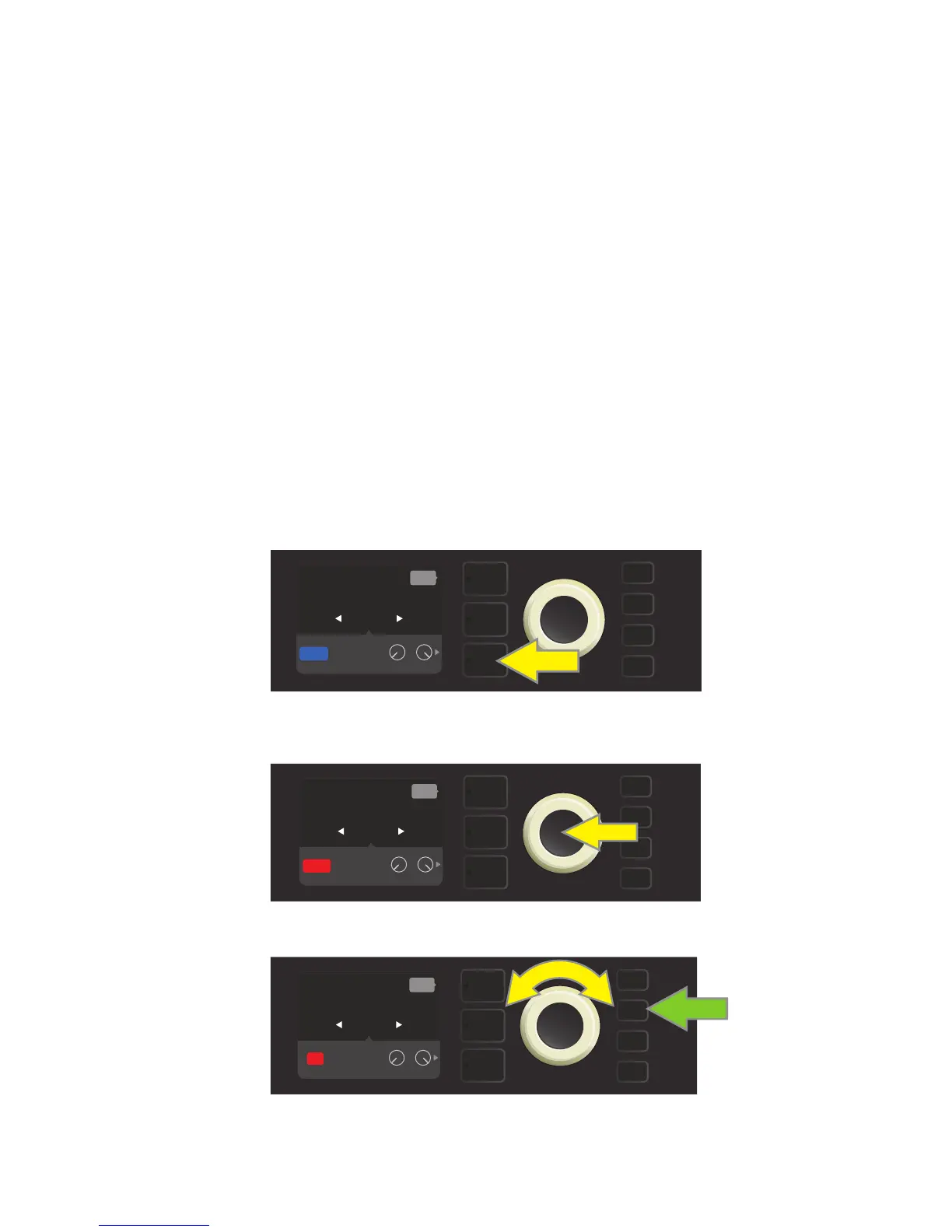
In this example, to turn o the EXP-1 Volume mode pedal function for the Rumble V2 shown in the SIGNAL PATH LAYER,
press the CONTROLS LAYER button. “VOLUME” mode will be automatically highlighted in the CONTROLS LAYER.
Press the ENCODER on “VOLUME.” The label box will change from blue to red, indicating that an adjustment can now be made.
Turn the ENCODER (yellow arrow) to “OFF,” then press it to select “OFF” setting. EXP-1 Volume mode pedal function for the amp shown in
the SIGNAL PATH LAYER is now o, and the label box will return to blue. Press the SAVE utility button (green arrow) to keep changes.
MENU
GAIN
PARAM HEEL TOE
RUMBLE
V2
VOLUME
VOLUME
EXP-1 (PRESET)
back
SAVE
AMP
FX
EXP
MENU
GAIN
PARAM HEEL TOE
VOLUME
VOLUME
EXP-1 (PRESET)
back
SAVE
RUMBLE
V2
AMP
FX
EXP
MENU
SAVE
GAIN
PARAM HEEL TOE
OFF
VOLUME
EXP-1 (PRESET)
back
RUMBLE
V2
AMP
FX
EXP















 To Next Page