Pag 39
KIT
VIDEOPORTERO DIGITAL 5 HILOS
VIDEOPORTERO DIGITAL 5 HILOS
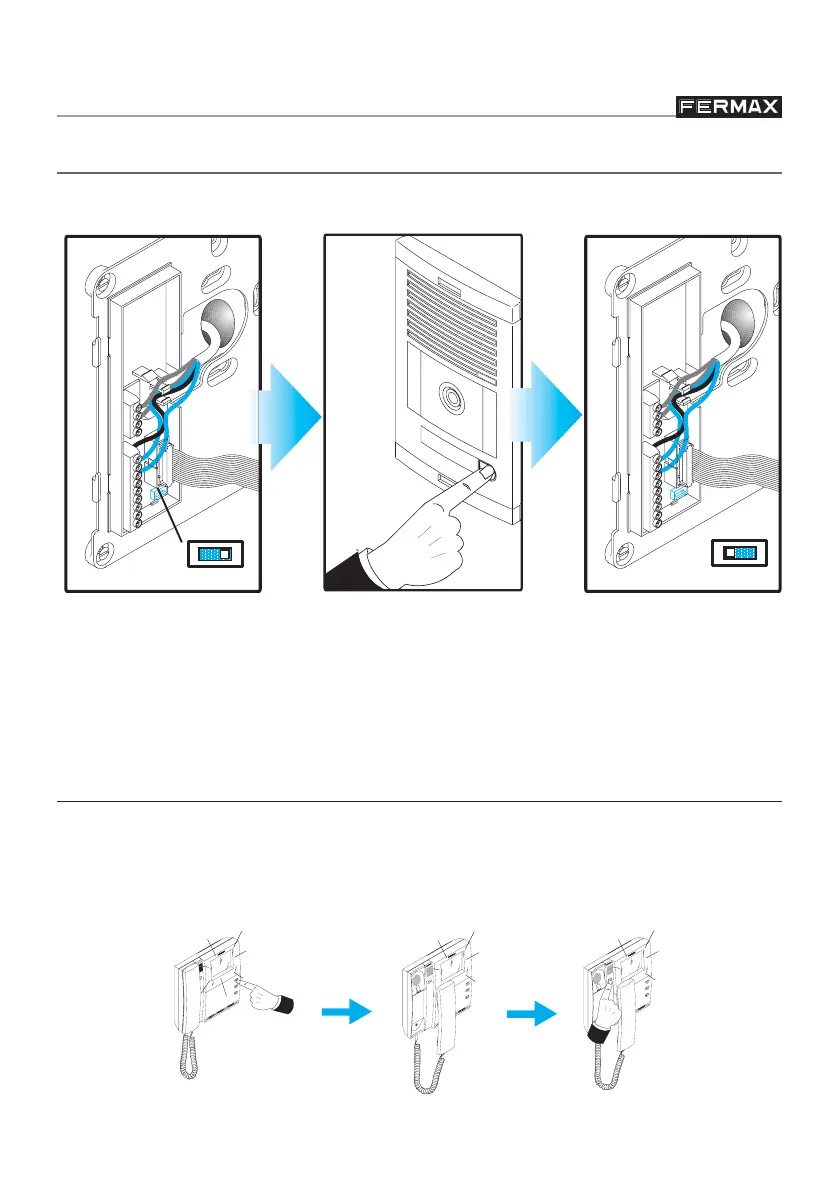
The time between steps 1 and 2 must be less than 2 minutes. If this period is exceeded,
set the jumper in its original position and start the sequence again.
VERY IMPORTANT NOTES
99
99
9
The monitor will not work until it has been programmed.
99
99
9
Check the monitor is operating correctly by pressing the auto-on key, making
sure that communication with the outdoor panel is established and the door
release is working.
PROGRAMMING THE MONITOR
1.Set the J1 switch in the
PRG position. You will
hear a confirmation
tone.
2.Press the house call
button. Confirmation
tone is heard again.
3.Return switch to original
setting and position the
Monitor.
H
I
G
H
R
E
S
O
L
U
T
I
O
N
C
C
D
C
A
M
E
R
A
PAN
& TIL
T
J1
PRG
J1
PRG
Once the monitor is connected, follow these steps to programme it:
F
L
A
T
M
O
N
I
T
O
R
H
I
G
H
R
E
S
O
L
U
T
I
O
N
2
1
F
L
A
T
M
O
N
I
T
O
R
H
I
G
H
R
E
S
O
L
U
T
I
O
N
2
1
F
L
A
T
M
O
N
IT
O
R
H
IG
H
R
E
S
O
L
U
T
IO
N
2
1
99
99
9
Adjust audio level on the amplifier if necessary.








 To Next Page