Pag 40
KIT
VIDEOPORTERO DIGITAL 5 HILOS
VIDEOPORTERO DIGITAL 5 HILOS
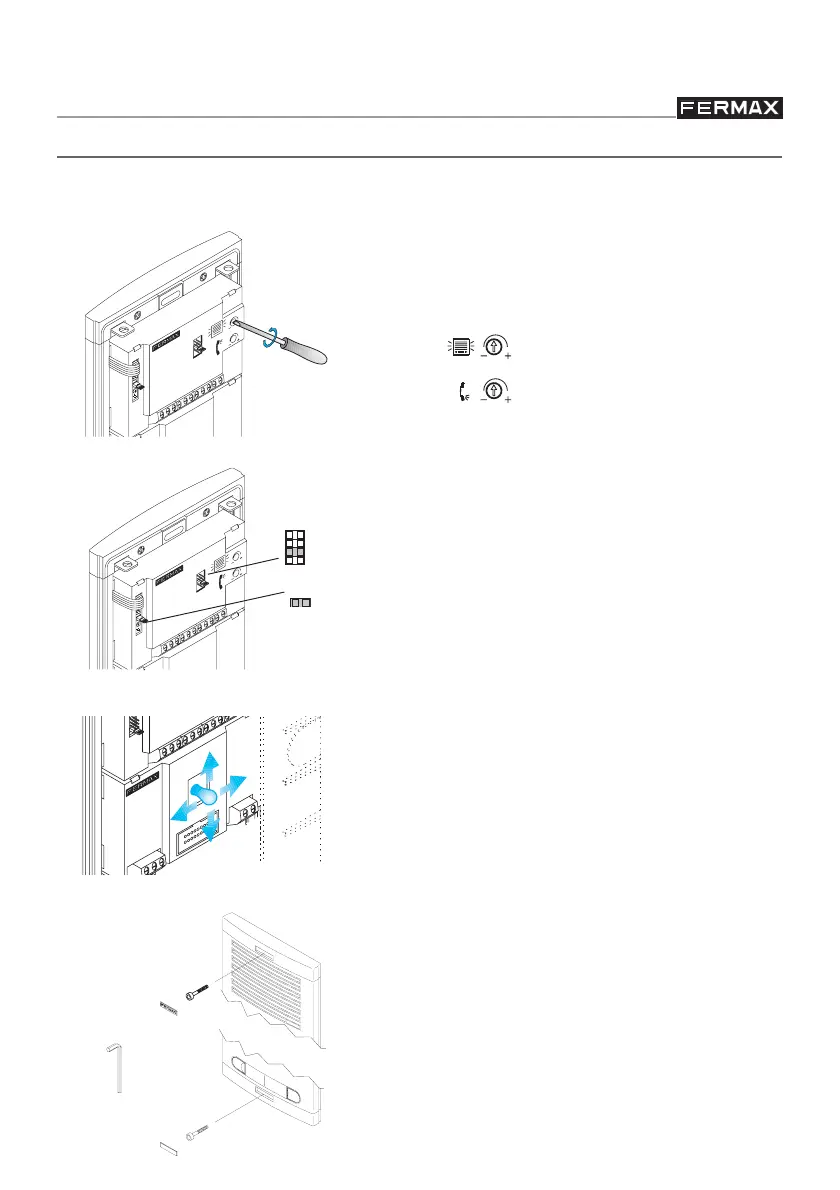
FINAL PANEL CONFIGURATION AND SETTINGS
Configure the outdoor panel amplifier and set the telecamera angle (in Video Entry System
Kits) if necessary:
99
99
9 Select language for “open door” message.
99
99
9 JP2: Do not remove
99
99
9 Adjust the audio if necessary.
EXT.
INT.
Panel volume
House volume
In Video Entry Kits:
99
99
9
Focus the camera by moving the lens in
the desired direction with the help of the
«pan and tilt» lever
99
99
9
Pan&Tilt adjust lets you move the lens 10º
in all 4 directions.
Once you have made all the necessary
adjustments, close the panel with the key
supplied with the Kit.
JP2
A
B
C
D








 To Next Page