1. Installation
1-19
Festo P.BE-FB14-EN en 1411d English
Activation of the layer setting service (LSS) with DIL
switch
3
The bus node CPX-FB14 supports layer setting service (LSS)
in accordance with CiA DSP-305.
With the help of the layer setting service (LSS), the LSS mas
ter can change the baud rate and node number of an LSS
slave via the CANopen bus.
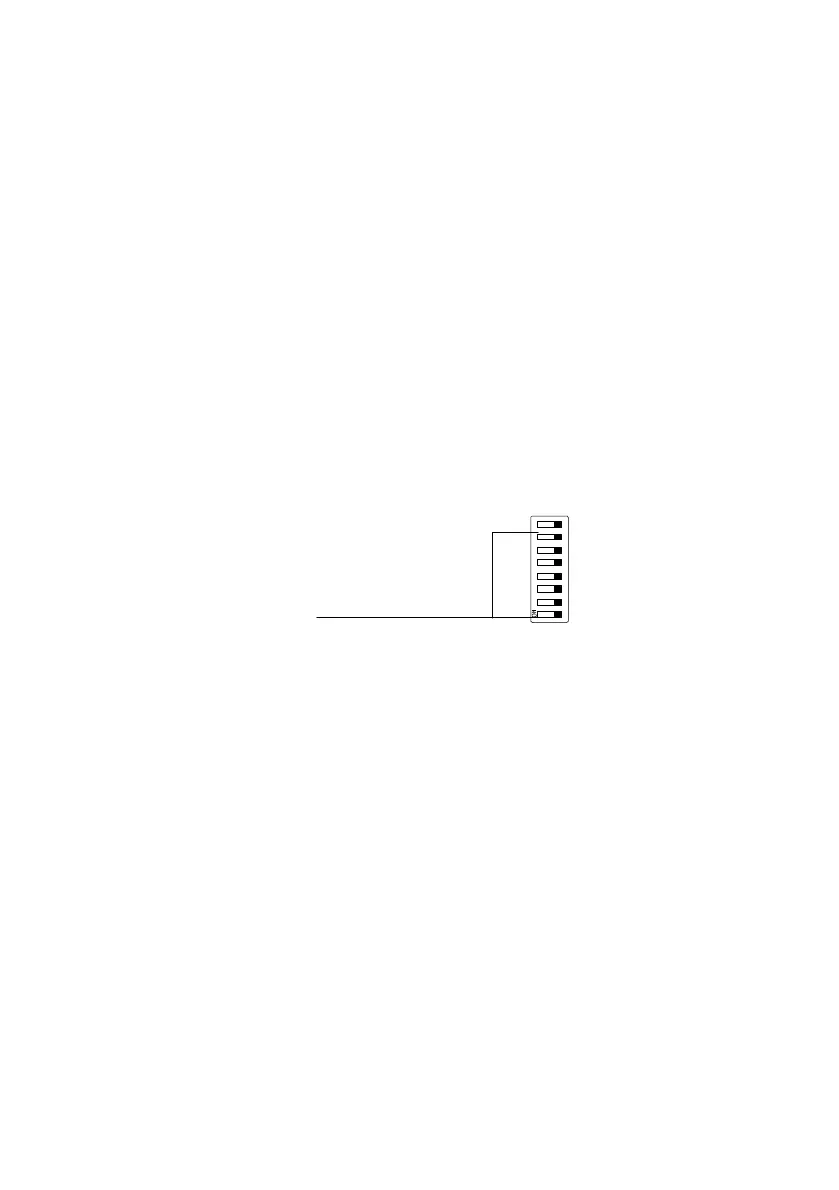
You activate LSS with the 8-off DIL switch 3.
To do this, set the switch elements 1 … 7 of the DIL
switch 3 to OFF (station number = 0).
1 Activate LSS
(switch
elements 1…7)
1234 5678
1
Fig. 1/5: DIL switch 3 (station number)
Resetting parameters with DIL switch
3
The bus node can be reset to factory setting with switch ele
ment 8 of the DIL switch 3.
The power supply of the CPX terminal is switched off.
1. Set the switch element 8 of the DIL switch 3 to ON.
2. Switch on the power supply for the CPX terminal (Power
on).
The bus node is reset to factory settings during boot-up.
3. Set the switch element 8 of the DIL switch 3 back to OFF.


 To Next Page