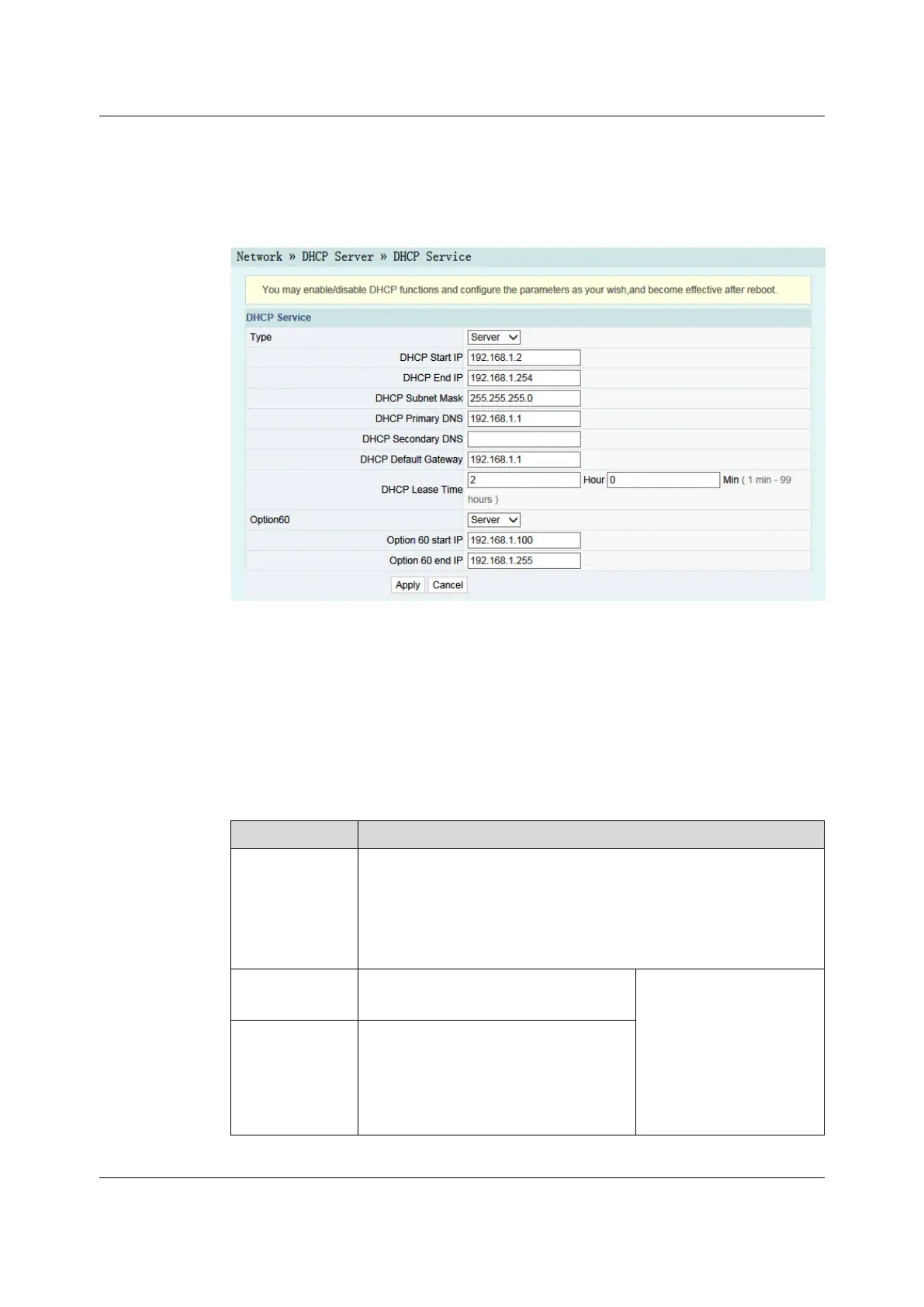
Figure 3-16 DHCP Service
2. Configure the DHCP server parameters as required. For details of the
parameters, see Table 3-7.
3. Click Apply to save the configuration information. The configuration will take
effect after the ONT is rebooted.
Table 3-7 Parameters for the DHCP Server
Item
Description
Type
Enables or disables the DHCP server.
u Server: Enables the DHCP server. The ONT can dynamically
distribute IP addresses to user terminals.
u Disable: The user terminals connected to the ONT cannot obtain the
private network IP address using the DHCP.
DHCP Start IP
The starting IP address of the IP address
pool for the active DHCP server.
Note: The IP address set
here should be in the
same network segment
with the IP address set in
LAN Settings; otherwise,
the DHCP server will not
operate normally.
DHCP End IP
The ending IP address of the IP address
pool for the active DHCP server.
40
Version: A

 To Next Page
 Loading...