3 Web Configuration Guide
3.4.1.73.4.1.7 MAC Address Filtering
One user device may have multiple IP addresses but only one MAC address. The
user device access authority in the LAN can be controlled effectively by setting the
MAC address filtering. After the fire wall is enabled, the pre-set rules will take effect,
and the MAC addresses that meet the filtering criteria will be filtered.
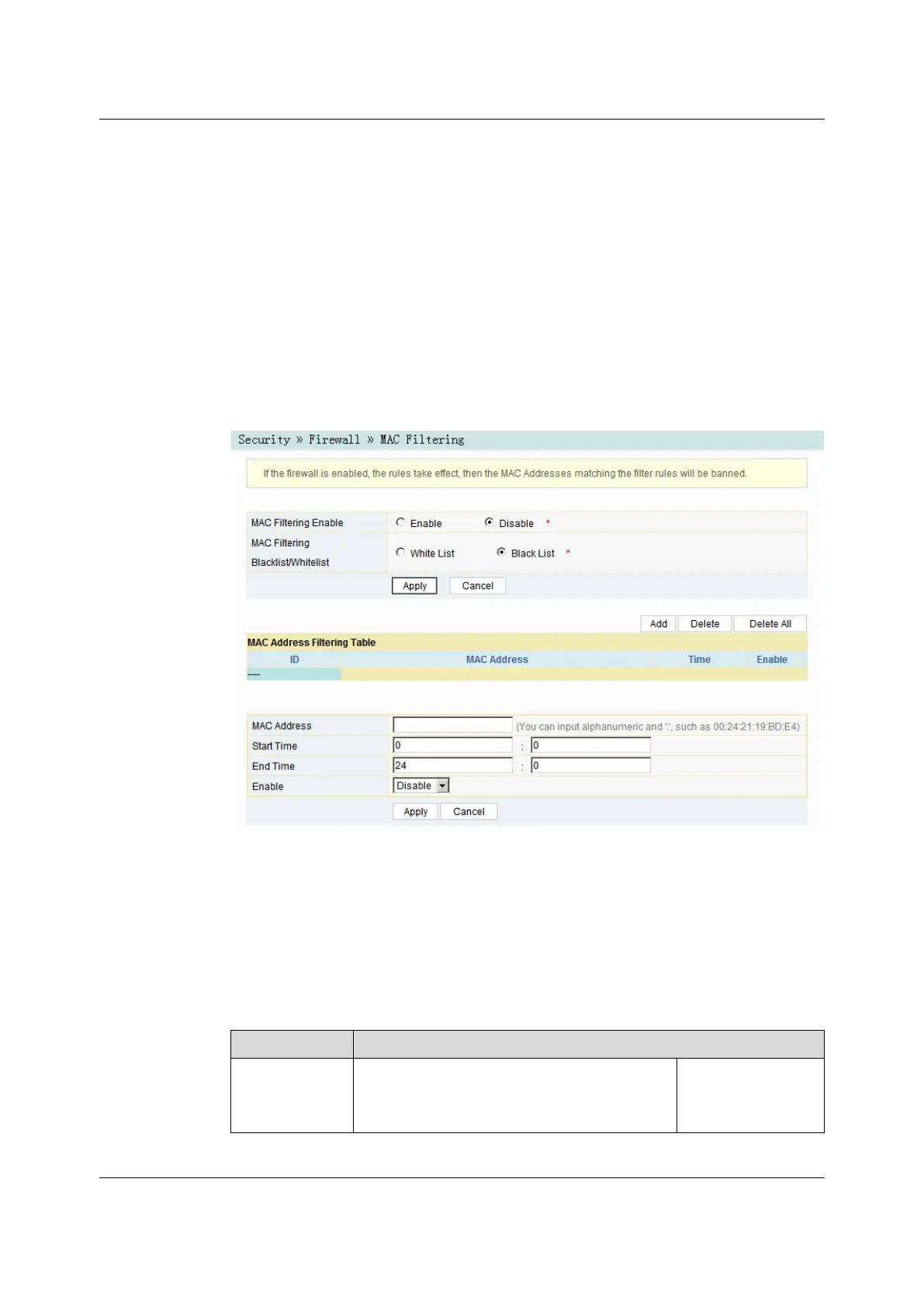
1. Select Security in the navigation bar and select Firewall→MAC Filtering in
the left link bar, and then click Add to open the MAC address filtering table
configuration page, as shown in Figure 3-30.
Figure 3-30 MAC Address Filtering
2. Configure parameters relevant to filtering as required. For details of the
parameters, see Table 3-19.
3. Click Apply to save and apply the configuration.
Table 3-19 Parameters for MAC Address Filtering
Item
Description
MAC Filtering
Enable
Enables or disables the MAC address filtering
function.
Click the Apply
button below to apply
the settings.
Version: A
59


 To Next Page
 Loading...