EN
ROBOTIC LAWN MOWER USER MANUAL
Planning
11
TYPES OF LAWNS
What does your lawn look like?
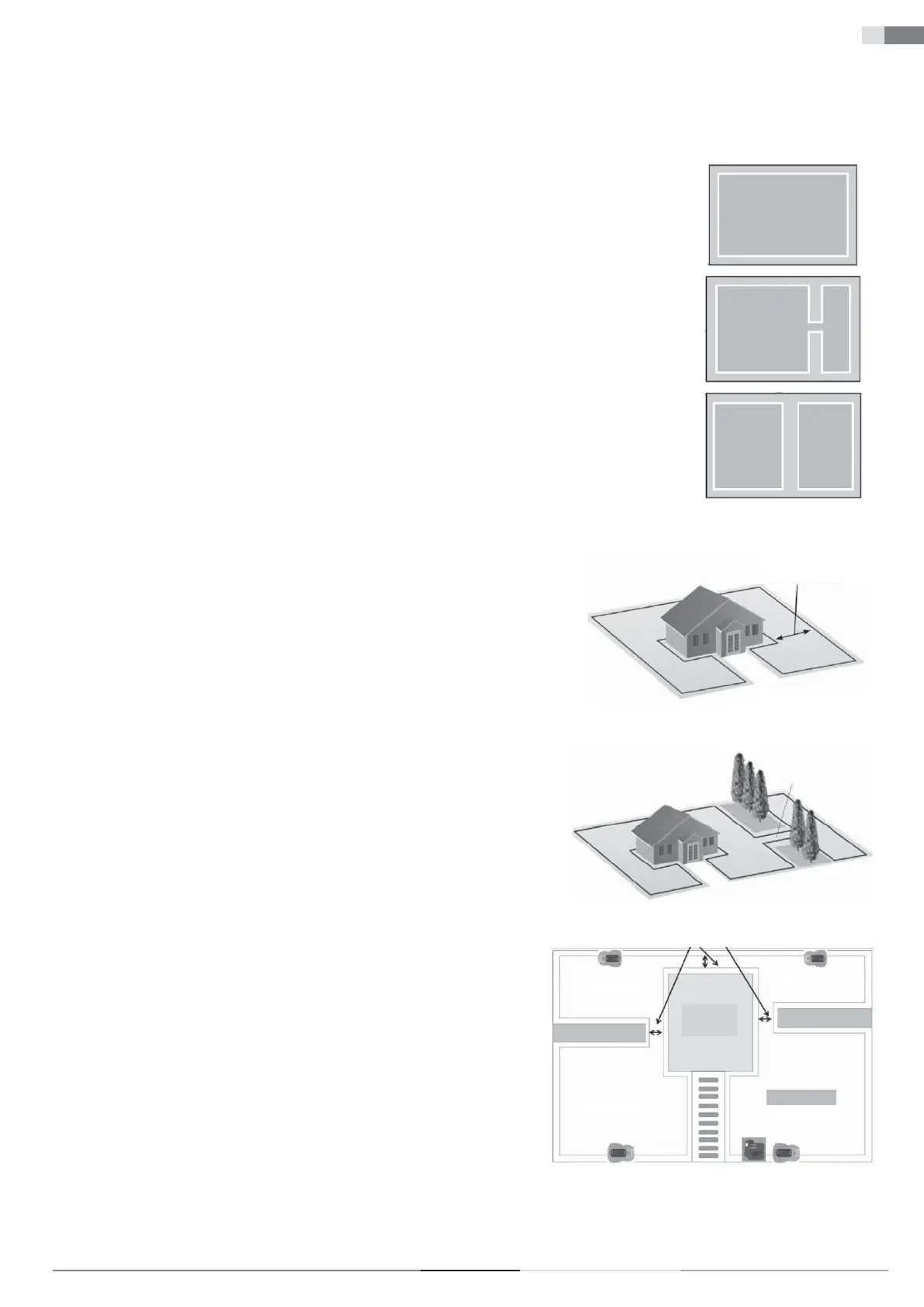
There are three basic types of lawns, and some lawns are a combination of more than one type.
Your fi rst task is to determine which type of lawn you have.
1. Main Zone Only:
The robotic lawn mower mows the entire lawn within the defi ned boundaries.
Main zone only
2. Main Zone + Subzones
The robotic lawn mower can move automatically between the main zone and subzones.
Main zone
Subzone
3. Separate Zone
The robotic lawn mower will mow each zone separately, and manual transfer is needed between zones.
Main zone
Separate
zone
LAWN TYPE WITH MAIN ZONE ONLY
A 'Main Zone Only' lawn consists of one continuous area. It does not include any subzones or separate
zones. The entire lawn area forms one continuous zone and all areas of the lawn are wide enough (at
least 1 metre wide at the narrowest point) for the robotic lawn mower to navigate.
Minimum width 1 m
Main zone only
LAWN TYPE WITH MAIN ZONE AND SUBZONES
This type of lawn comprises multiple zones connected by narrow passages. These passages can be
relatively narrow but wide enough (40–50 cm) for the lawn mower to pass through. The passages
should be fi rm, fl at, and smooth (not rocky, sandy, or elevated).
On this type of lawn, the robotic lawn mower will be able to move from one zone to another and mow
the entire area.
Narrow passage
Main zone
Main zone
Subzone
If the lawn is large, we recommend dividing it into subzones. This increases the lawn mower's
effi ciency, allowing you to schedule mowing for various areas at different times. A maximum of 4
zones can be defi ned (main zone + 3 subzones).
When setting the zone division in the main menu, the main zone is preset as zone 1. The user can
add additional subzones from zone 2, zone 3, up to zone 4.
For more details, see the section “Division into Zones” on page 21.
Narrow passage
Zone 3
Zone 4
Zone 2
Main zone
(Zone 1)
HOUSE


 To Next Page