EN 20
Menu functions and how to set them up
FZRR 5650-A, FZRR 5950-A
6. MENU FUNCTIONS AND HOW TO SET THEM UP
MAIN MENU
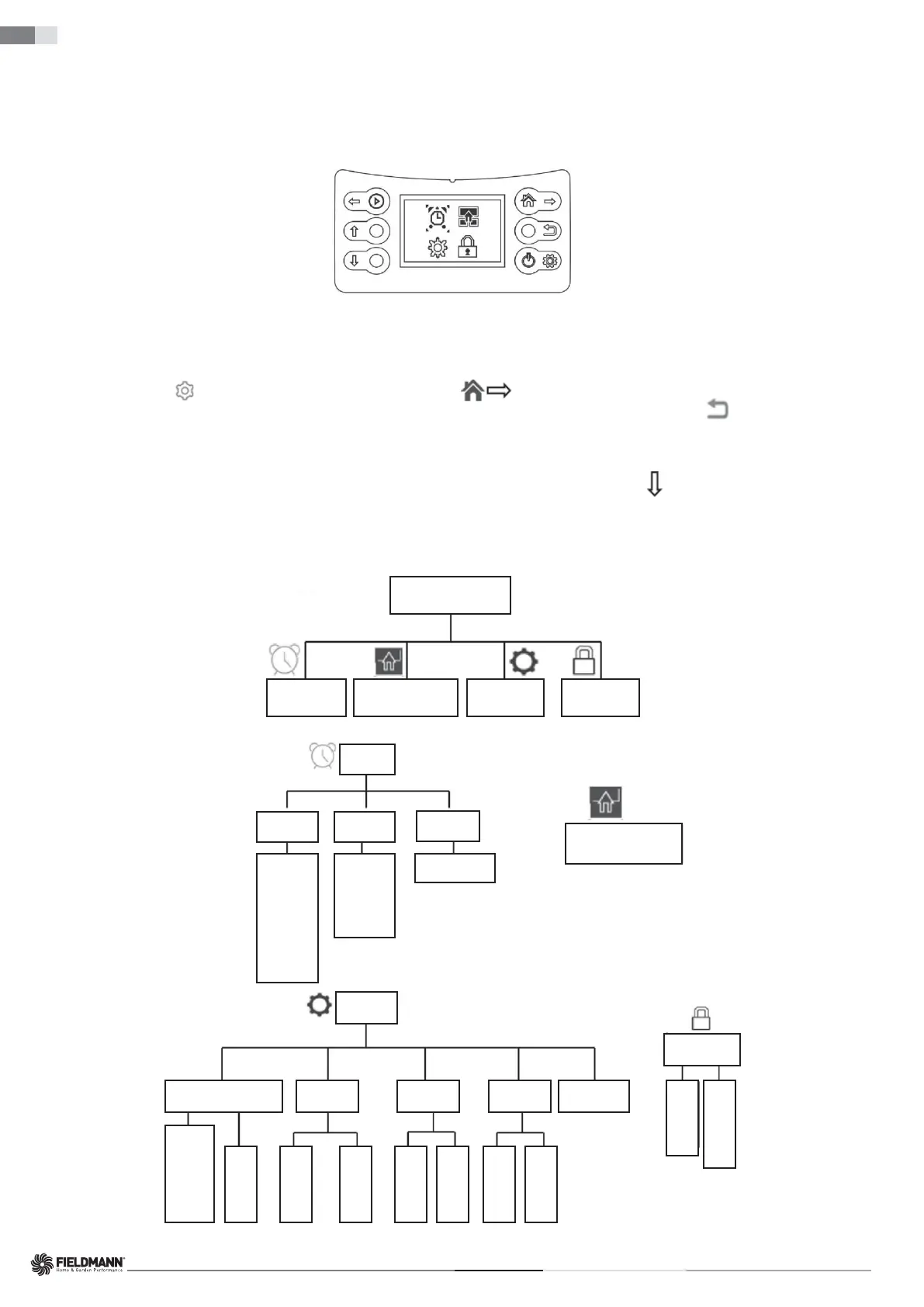
When you press the STOP button and open the cover, press the SET button on the control panel and the main menu will appear on the screen.
The main menu offers four options:
• Timer
• Division into zones
• Settings
• Security
Each of the menus contains a range of sub-menus.
Through them, you have access to all functions for setting up the robotic mower.
Navigating between Menus
To navigate the main menu and sub-menus, you can use the operation selection buttons and multi-function buttons.
By pressing the SET button (
), you enter the main menu, then use the right button ( ) to move the cursor and select a sub-menu; pressing the SET button
again confi rms your choice and enters the sub-menu. After completing the settings in the sub-menus, you can press the BACK button (
) to go back to a higher
level, or you can close the cover to return directly to the home page.
Sub-Menus
Some sub-menus contain pre-selected options. This means that these options are chosen. By pressing the DOWN button ( ), you can toggle between "On" and "Off”
to activate or deactivate a specifi c function.
In some sub-menus, you need to enter information (date, time, etc.) using the control panel.
STRUCTURE OF MENUS
Main Menu
Division into Zones Settings SecurityTimer
Main menu:
Time
Which day
Sun
Mon
Tue
Wed
Thu
Fri
Sat
Whole week
ON/OFF
Zone 1
Zone 2
Zone 3
Zone 4
00:00–00:00
Which zone
Which time
Division into Zones
Settings
Date/Time Energy Rain Sensor Reset Error Log
Security
Yyyy-mm-dd
XXXX
00:00
Normal
ECO
On
Off
Delete all
subzones
Delete all time
work
Change
password
ON/OFF screen
lock
Sub-menu:



 To Next Page