EN 22
Menu functions and how to set them up
FZRR 5650-A, FZRR 5950-A
SETTINGS
Date/Time
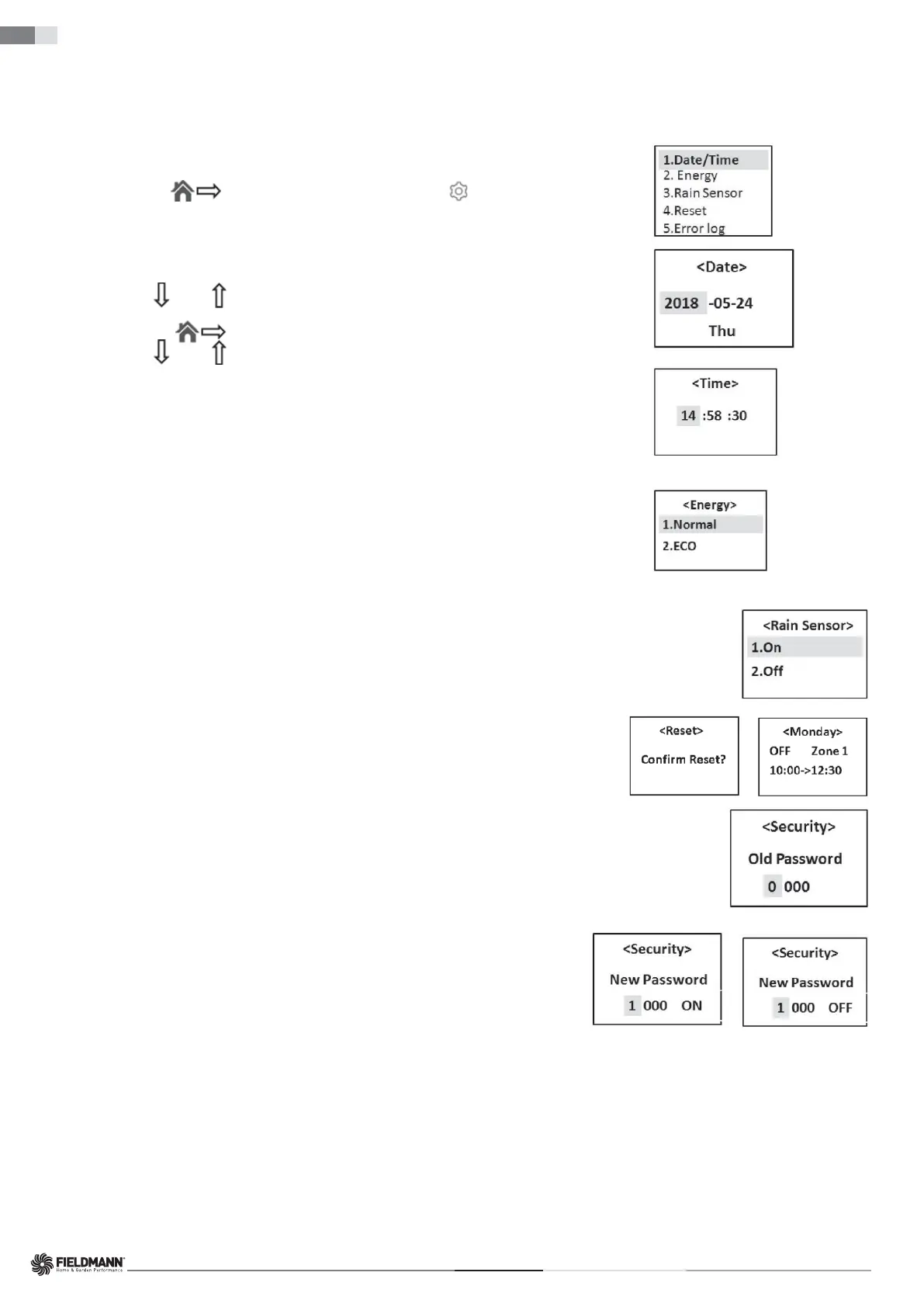
The default date format is year/month/date and the time is a 24-hour format.
1. Open the control panel cover and press the SET button to enter the main menu.
2. Press the right button (
) to move the cursor to the Settings symbol ( ).
3. Press the SET button to enter the Settingssub-menu.
4. Press the SET button to enter the Date/Time setting interface.
5. Press the DOWN (
) or UP ( ) button to change the numbers corresponding to the YEAR.
6. Press the right button (
) to move the cursor to the numbers representing the MONTH or DATE.
7. Press the DOWN (
) or UP ( ) button to change the numbers corresponding to the MONTH or DATE.
Use a similar procedure on the control panel as described above to set the TIME.
8. Press the SET button to confi rm the Date/Time setting.
Energy
There are two energy consumption modes to choose from:
Normal – the mower's movement speed and cutting speed are as indicated in the technical information (see Chapter 10).
It is used for normal grass cutting or grass higher than 8 cm. The robotic lawn mower is preset in this mode.
ECO – the mower's movement speed and cutting speed are reduced by 10–30% compared to normal mode.
This mode is recommended for mowing lower grass, daytime lawn maintenance or night-time operation.
Use a similar procedure on the control panel as described above to set the energy consumption mode.
Rain Sensor
The robotic lawn mower can also cut in the rain or in high humidity conditions; however, wet grass easily sticks
to the robotic lawn mower, and there is a higher risk of slipping on steeper slopes.
The rain sensor is enabled by default.
Use a similar procedure on the control panel as described above to activate or deactivate the rain sensor.
Reset
During a reset, the zone division settings and timer settings will be erased, so think carefully before using this
function.
SECURITY
Setting a four-digit password to lock the screen display can help prevent children or other persons who are not
familiar with the safe operation of the mower from using it without supervision.
It also functions as an anti-theft feature, preventing unauthorised persons from operating the mower.
The default password is: 0000
If needed, you can change it and choose a new password.
Use a similar procedure on the control panel as described above to change the password.
You can also turn the screen lock on or off.
If you enable the screen lock, the robotic lawn mower will request a password every time you open the cover.
The screen lock is preset to the "OFF” state.
Use a similar procedure on the control panel as described above to activate or deactivate the screen lock.


 To Next Page