EN
63
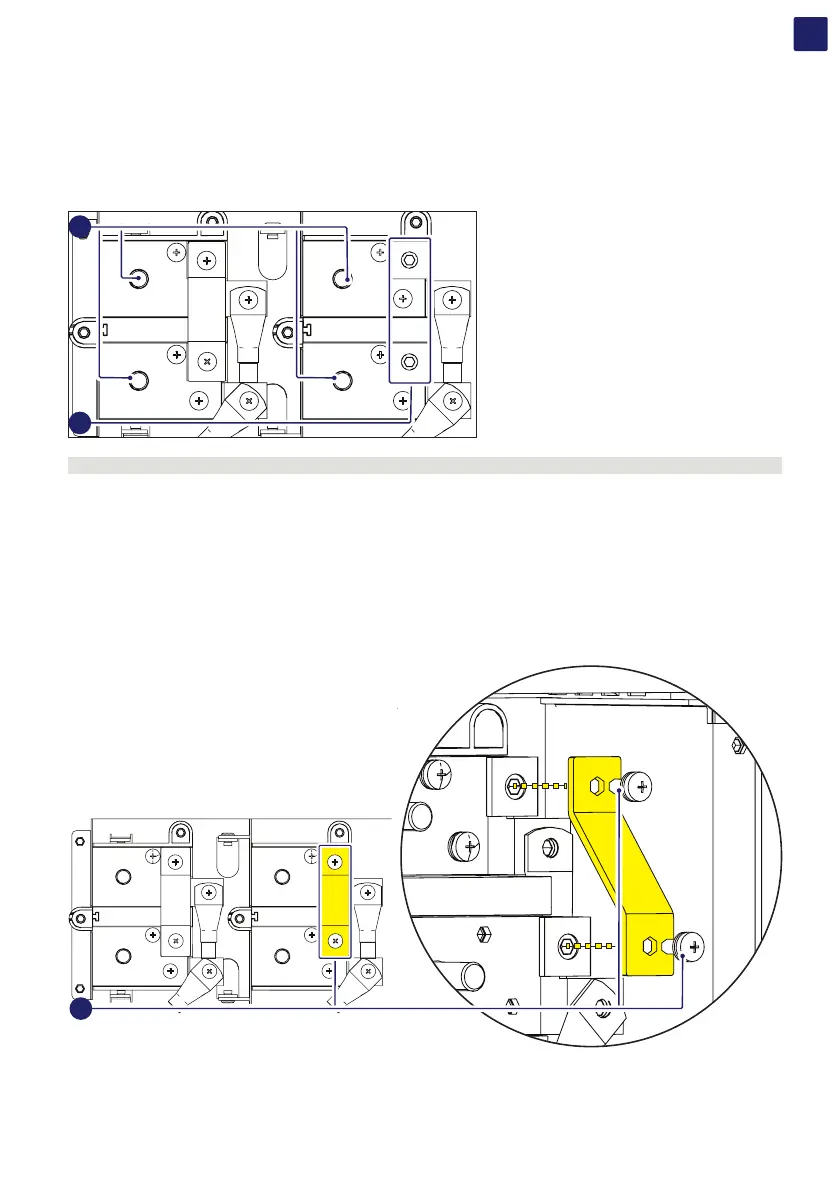
Independent channel configuration (default configuration)
The independent configuration of the input channels (MPPT) is set by factory. This means that the parallel bar (supplied) must not be
installed on the parallel MPPT connection points (31), and that the software setting “Independent channel mode” should be performed on
the inverter; this setting can be done by different way:
1. During the commissioning wizard phase (STEP 4)
2. In the dedicated section of the internal webserver “Setup section > Setup DC side > Input mode”
MPPT 1
–
MPPT 1
+
MPPT 2
+
MPPT 2
–
31
17
ATTENTION – A Negative paralleling input busbar is pre-installed by factory and shall remain installed.
Parallel channel configuration
The configuration of the input channels (MPPT) can be set in parallel. This means that the parallel bar (supplied) must be installed on the
parallel MPPT connection points (31) using the two M6 screws (supplied) with a tightening torque of 8Nm, and that the software setting
“parallel channel mode” should be performed on the inverter; this setting can be done by different way:
1. During the commissioning wizard phase (STEP 4)
2. In the dedicated section of the internal webserver “Setup section > Setup DC side > Input mode”
MPPT 1
–
MPPT 1
+
MPPT 2
+
MPPT 2
–
MPPT 1
–
MPPT 1
+
MPPT 2
+
MPPT 2
–
31



 To Next Page