Document #51003 Rev.E 01/11/02 P/N 51003:E
19
Accessories
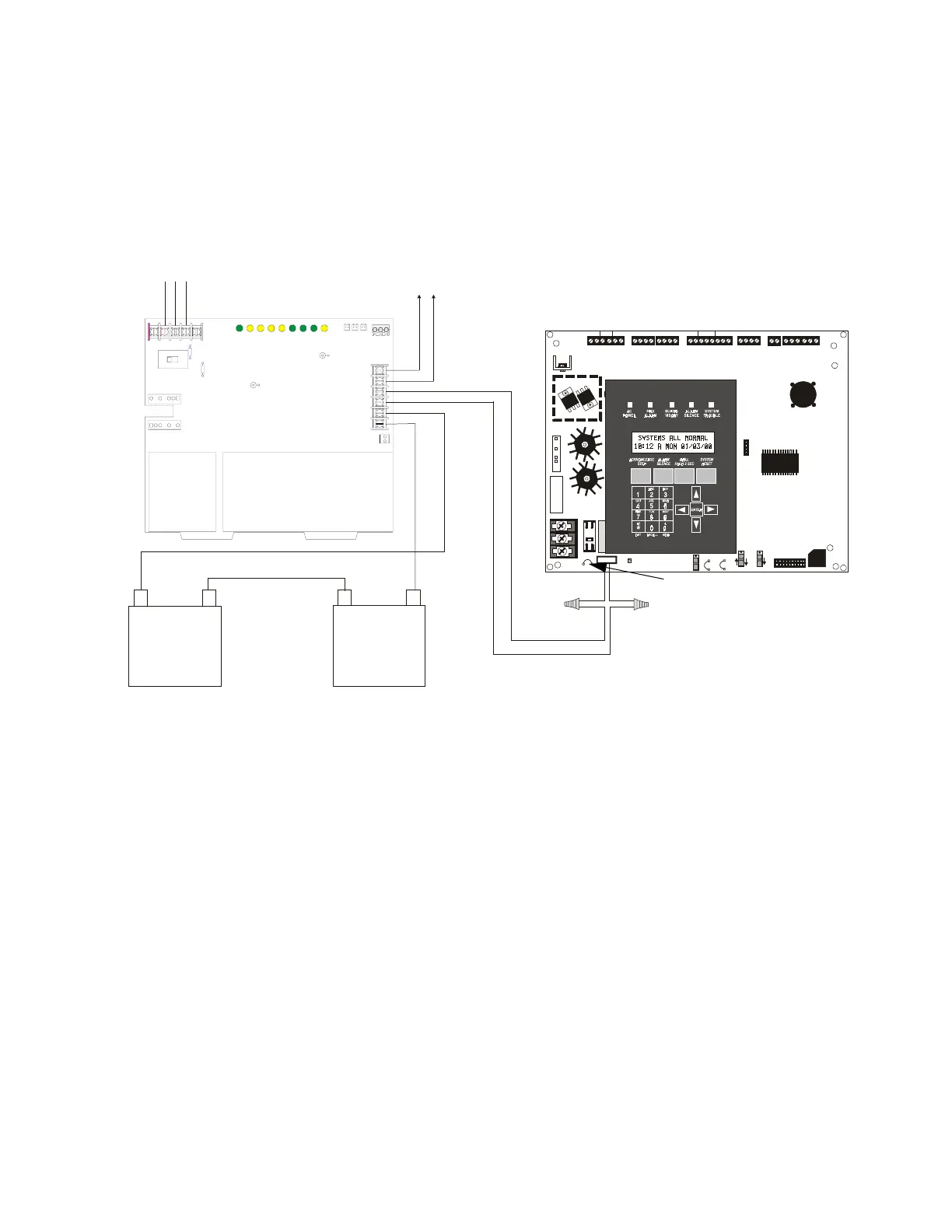
Wire the CHG-120F to the MS-9200 as shown. Cut Jumper JP1, which is only on the newer versions of the MS-9200
main circuit board, to disable the FACP battery charger when using the CHG-120F. Wire the batteries to the
CHG-120F but do not connect the Battery Interconnect cable until the system is ready for testing.
24V UNREG
24V NONRS 24V RST BELL 2 POWER
BELL 1 POWER
SUPV
ALARM
TROUBLE PC/PRINTER TERM COMM
GND FAULT
DISAB LE
TRANSFORMER 1
TRANSFORMER 2
- +
BATTERY
RS-232
PC/PRINTER
RS-48 5
TERM . MODE
TROUBLE
+ - + - + -
B+ A + A- B-
B+ A + A- B-
NO C NO NC C NO NC C
A B B+ A+ B- A -
1 COMM 2
ACS SHIELD SLC SLC
OUT+ IN+ OU T- IN-
T
B
4
T
B
2
T
B
1
T
B
3
T
B
7
T
B
5
T
B
6
J16
J6
JP3
JP1
CAUTION
HIGH VOLTAGE
J3
TB8
J19
J17
JP4
SW1
SW3
SW2
CAUTION!
HIGH VOLTAGE
GNDFAULT
-
+
Battery –
25 AH
(12 V)
25 AH
(12 V)
–
+
–
+
TB2
TB1
–
+
–
+
–
+
Battery +
Battery Interconnect Cable
Charger
To A u x il i a r y
Equipment
AC Power In
Neut
Grd
Hot
Out 2 -
Out 1 +
Out 1 -
Out 2 +
FIGURE 1-2:
CHG-120F Battery Charger (Requires BB-55F Battery Box)
Cut wires from MS-9200 battery cable
connected to J3.
Use wire nuts to connect wires.
Cut JP1 to disable MS-9200
battery charger.
- +
9200chgf.cdr














 To Next Page