INSTRUCTION MANUAL FIT REMOTE DISPLAY PINION
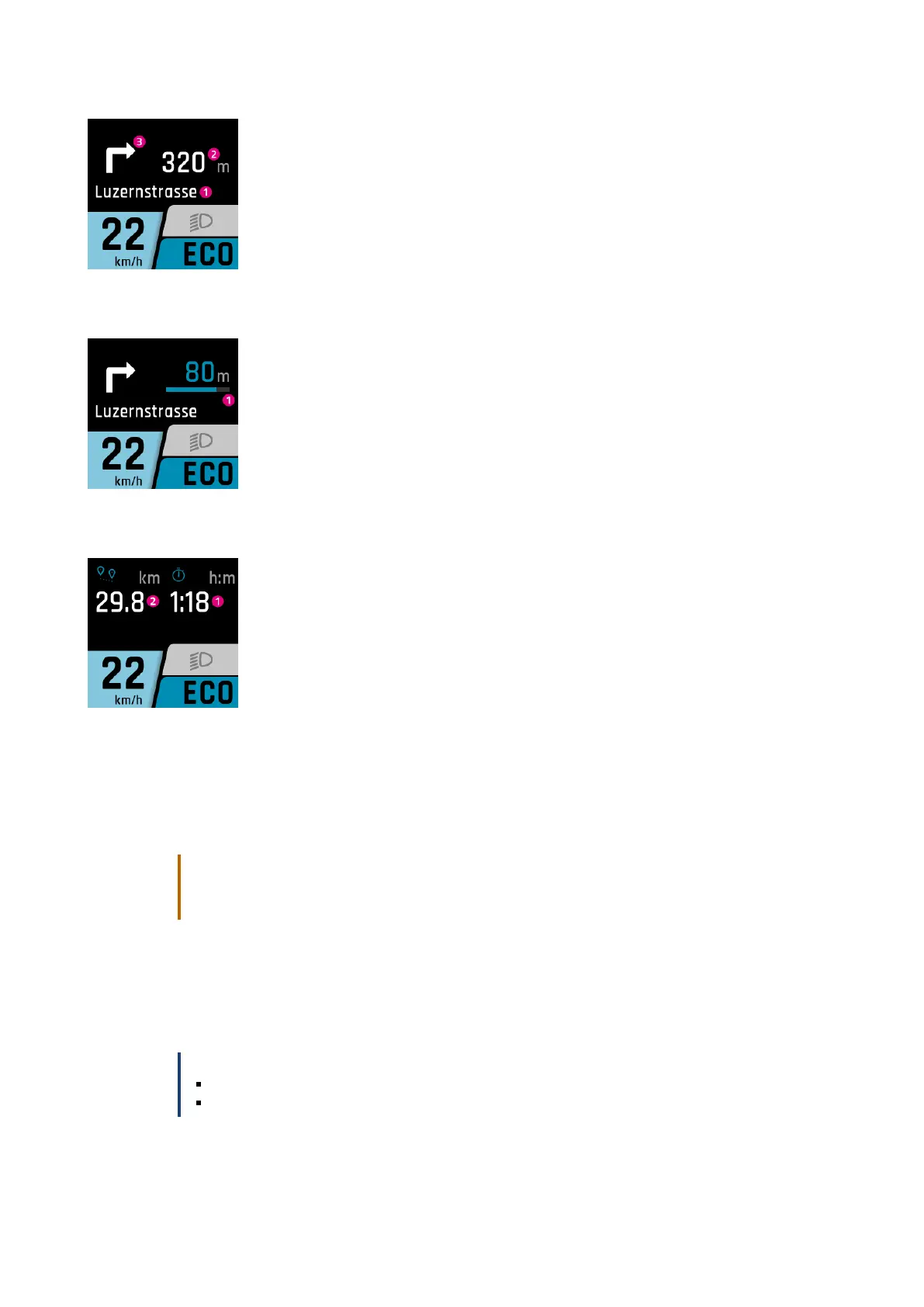
If navigation has been started on the smartphone, the following display appears.
1. Road ahead
2. The distance to the next navigation point
3. Navigation direction at next navigation point
From 100m before a navigation point, the distance is also indicated by a bar.
1. The distance to the next navigation point
NAVI SUB-DISPLAY
1. Current remaining time to the navigation destination
2. The distance to the next navigation point
DISPLAY CALLS
The call display is only available in conjunction with the FIT E-Bike Control app. To use the FIT E-Bike Control app, the
smartphone must be connected to the e-bike using the FIT Key Card (see Section 6.1.2).
CAUTION
Do not take calls while riding.
When a call is displayed, first find a suitable place to stop before answering the call.
To enable the call to be displayed, the necessary authorizations must be granted to the FIT E-Bike Control app once
on the smartphone. In the E-bike Settings menu, the call display must be activated in the Connectivity submenu.
The calls are only displayed. Calls cannot be accepted via FIT Remote.
NOTICE
Android – Only phone calls are displayed.
iOS – Displays phone calls and messenger calls.
FIT_Manual_Remote_Display_Pinion_V3_en | Version 03 | 24.10.2023 22



 To Next Page