10
Note
The equipment has been leveled and calibrated before
delivery, but due to transportation or other influences,
the distance between the nozzle and platform may change.
It is recommended to conduct [Calibration] after unpacking.
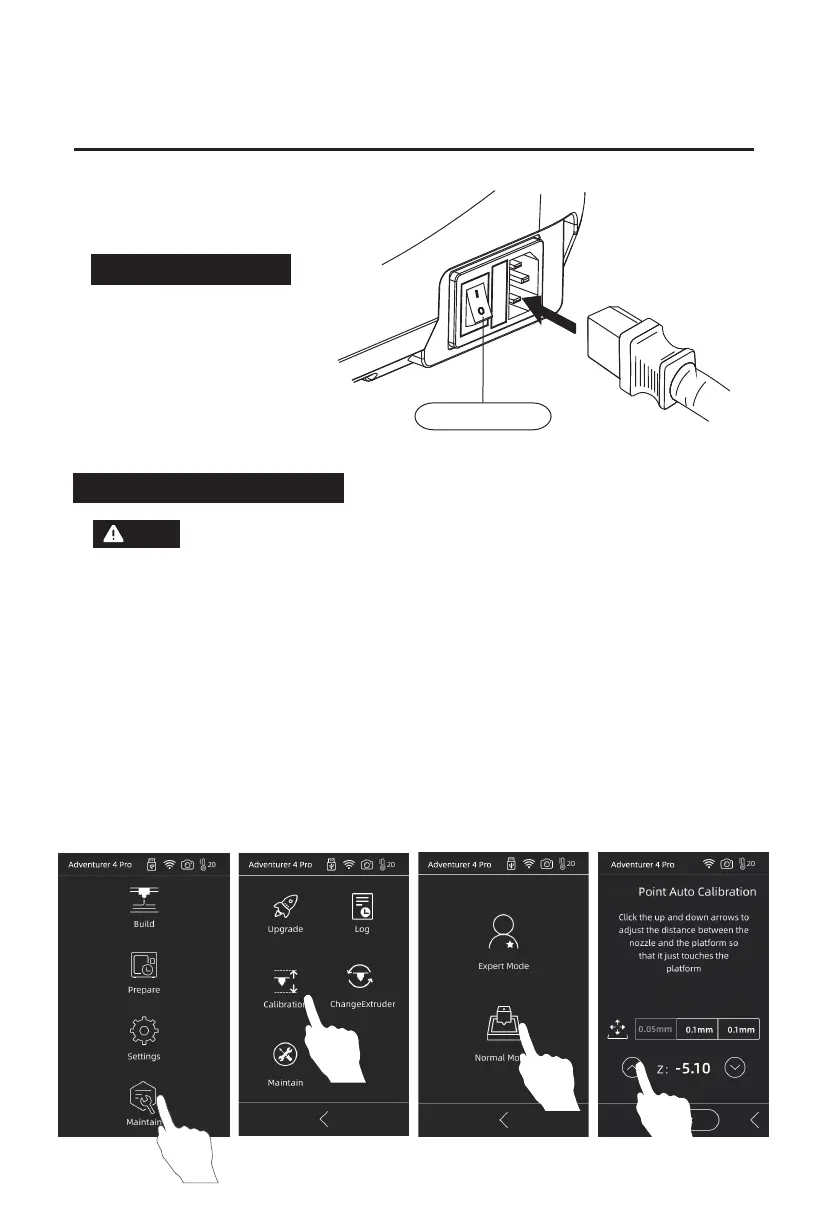
1. Click [Maintain] - [Calibration] - [Normal Mode] to start pre-calibration.
The first point is to calibrate the initial distance between the extruder and the
platform. Click the Up and Down arrows to adjust the Z-axis deviation value;
Insert a leveling card between the nozzle and the platform. If it cannot be inserted,
it means that the nozzle and the platform are too close. Click the Up arrow to make
the nozzle away from the platform.
1/30
30
Leveling and calibration
Chapter 4 Equipment Preparation
Power Switch
Connect to power
Connect the cable to the printer,
turn on the switch and the screen
lights up.















 To Next Page