Make sure the password is entered correctly.
Q26
. Wi-Fi connection failure?
Q27. Firmware update
Please do not disconnect the network during downloading or updating to prevent
update failure.
Q28
. Why is the boot screen white and the firmware is not displayed?
When the printer is idle for a long time, please apply lubricating oil on the guide rails.
Or perform this operation every other month. Please put the filament in the drying
box to prevent moisture.
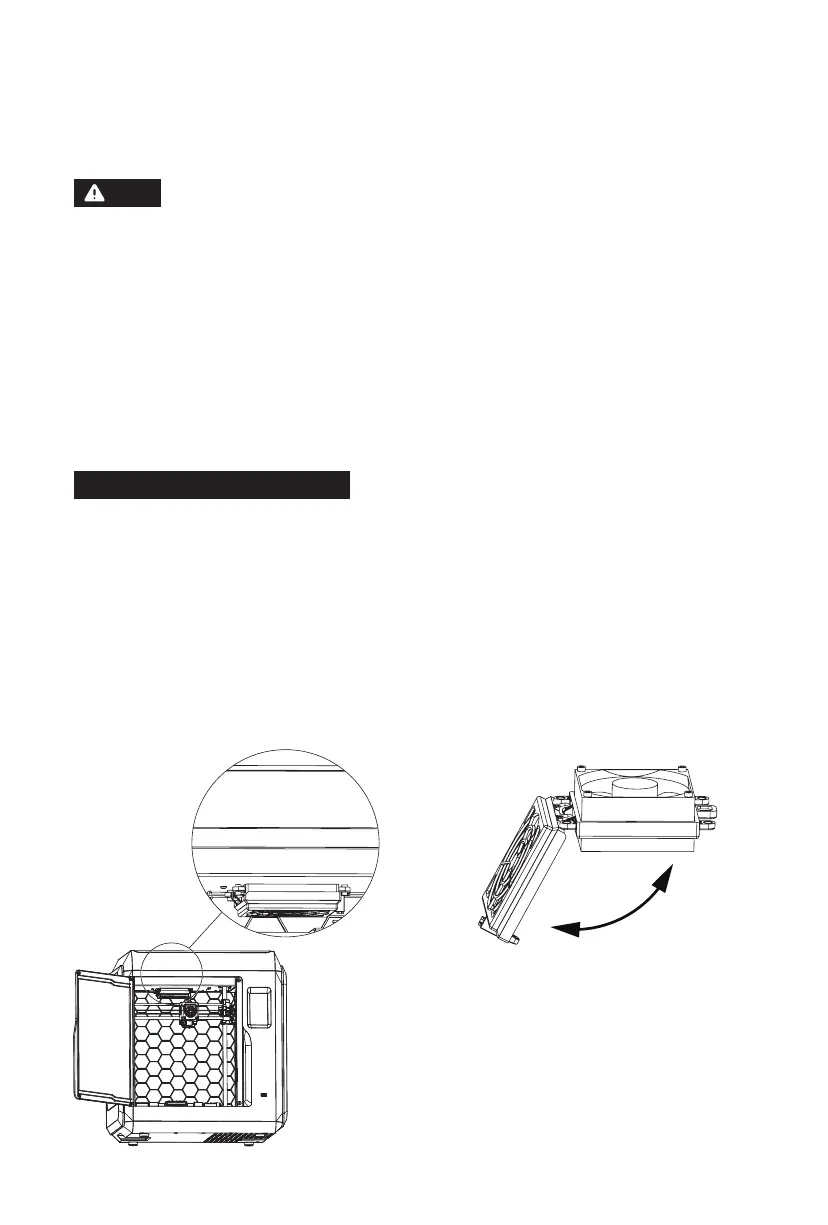
Replacement method is as follows:
Daily Maintenance Instructions:
Note
30
1. Please check the Wi-Fi hotspot name for special characters. If so, please modify the
name and try again;
2. Please check your password for special characters. If so, please modify it and try again.
1. If the startup sound can be heard, please replace the screen or the cable;
2. If the startup sound can not be heard, please contact the supplier.
1. Open the front door of the printer, and
find the air filter device indicated in the
picture.
2. Open the air filter cover, put in a new
cotton filter, and close the filter cover.















 To Next Page