10
10
Features
Battery Pack Module
The Flashpoint XPLOR 600Pro TTL uses an advanced 28.8v/2600mah Li-ion polymer
battery with exceptional performance. The available charge-and-discharge cycles
exceed 300 times.
The battery pack is designed to be reliable and safe with circuitry to prevent
overcharge, deep discharge, excess current, and short circuit.t takes only 2 hours to
fully charge the battery by using the standard battery charger.
Battery Precautions
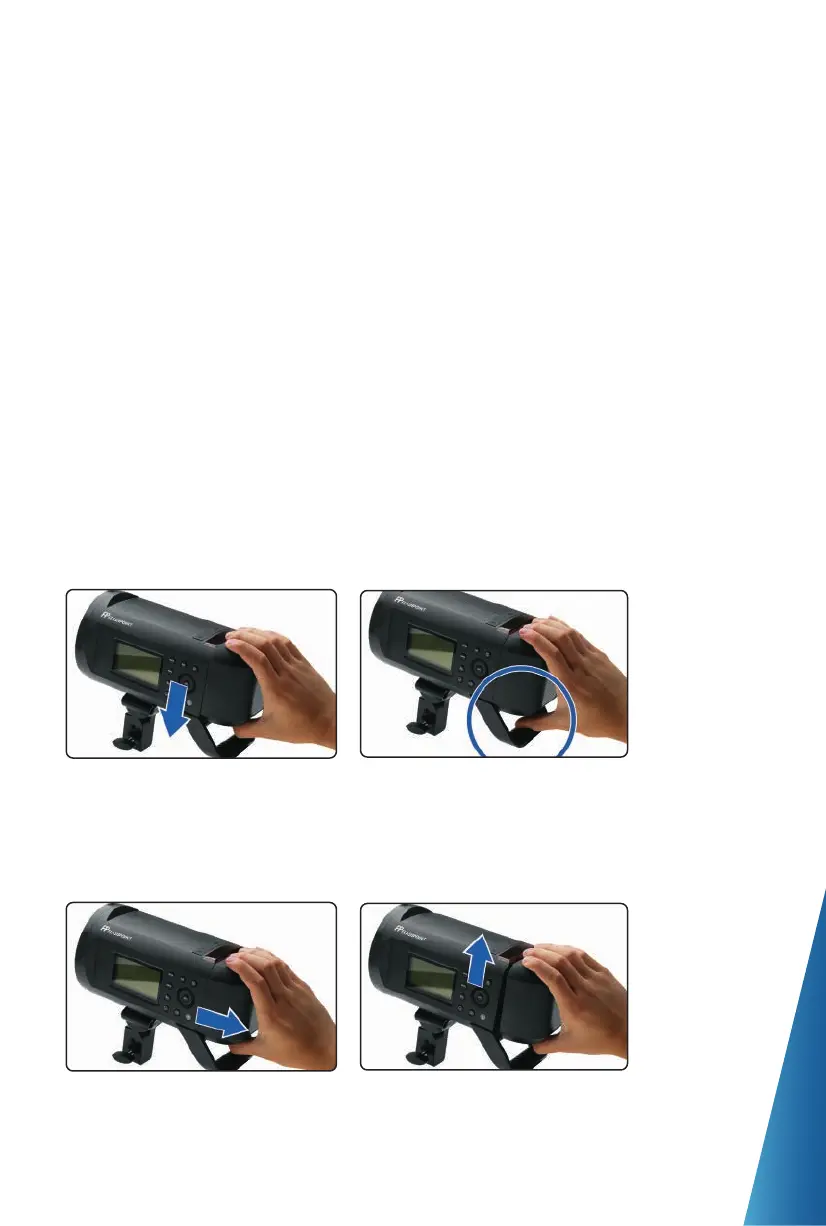
Mounting and Releasing the Battery Pack
1. Do not short circuit.
2. Do not expose to rain or immerse into water. This battery is not water proof.
3. Keep out of reach of children.
4. Avoid 24 hours of continuous charging.
5. Store in a dry, cool, ventilated place.
6. Do not dispose into fire or incineration.
7. Dead batteries should be disposed according to local regulations.
8. Never leave a depleted battery in storage. It’s best to recharge batteries every 3
months.
1. To mount the battery pack,
match the battery’s 4 Alignment
Posts with the main battery
compartment’s sockets on the
rear of the XPLOR 600Pro.
2. Slide the battery pack down until
it is securely locked in place.
1. To release the battery, first turn
off the power.
2. Then, slide the Battery Release to the
right while lifting the battery pack
upward, out of the connection.


 To Next Page