18
High Speed Sync (HSS) enables the flash to synchronize with all camera shutter
speeds. The sun is no longer an impediment to masterful lighting outdoors. By be
able to utilize shutter speeds as well as f-stops, to control exposure, the power of
the flash can overcome the presence of too much sunlight or the impact of
ambient light when shooting in bright environments. This is also convenient when
you want to use aperture priority for fill-flash portraits.
Stable Color Temperature Option
High-Speed Sync
21
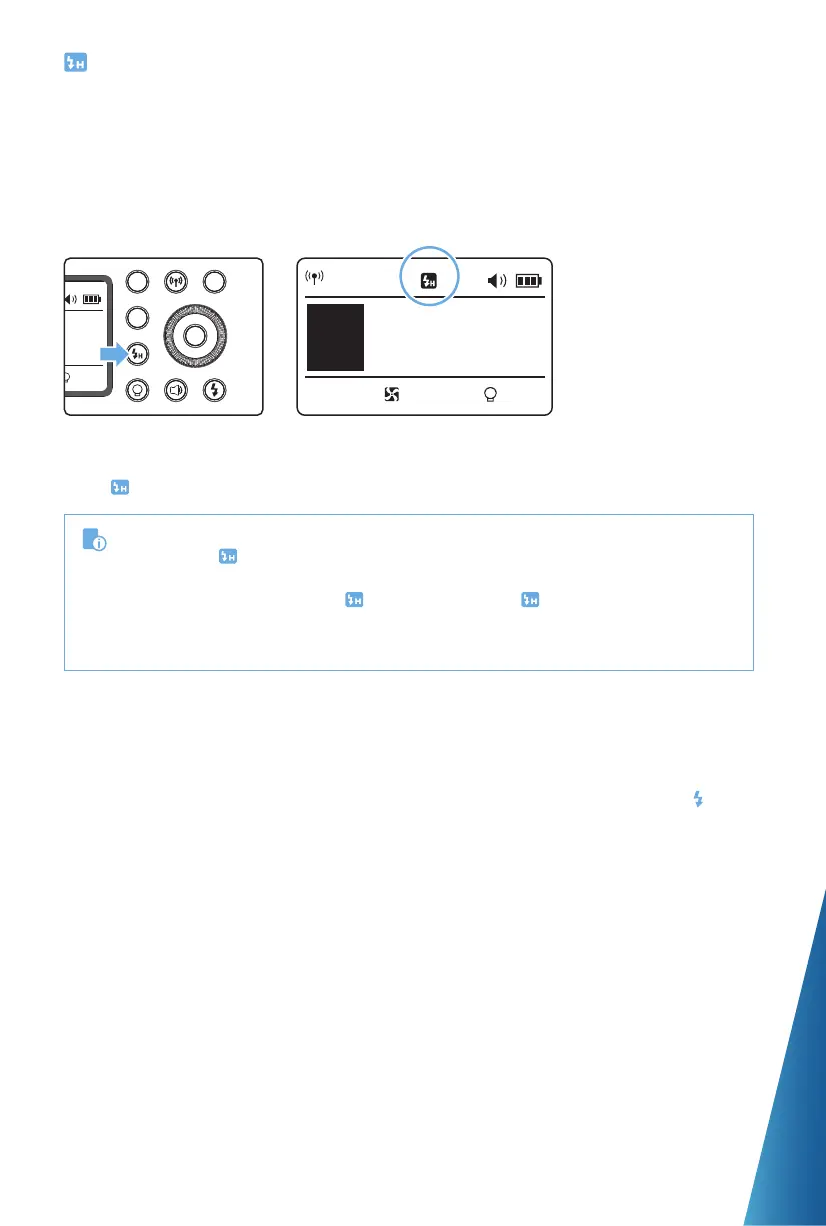
Press High Speed
Sync Button so that
< > is displayed.
CH 1
M
A
10%
1/256+0.3
Please use an R2 Pro or R2
series transmitter device.
•
If you set a shutter speed that is the same as or slower than the camera’s maximum ash
sync speed,
< >
will not be displayed in the viewnder.
•
With high-speed sync, the faster the shutter speed, the shorter the eective ash range.
•
To return to normal ash, press
< >
button again. Then
< >
will disappear.
•
Multi ash mode cannot be set in high-speed sync mode.
•
Over-temperature protection may be activated after 50 consecutive high-speed sync ashes.
The function limits the maximum error of color temperature in full power to
approximately +/- 75°K. To select this feature, enter MENU C.Fn-COLOR and select
ON. The color temperature function is turned on and ready for Full Power color
stability. When adjusting the power output from high to low in M mode, the Flash
Ready Indicator will blink, the audio beep will prompt for 10 times, indicating power
bleed to stabilize the output. Press the Test Button to discharge and recycle the flash
for normal balanced operation.


 To Next Page