15
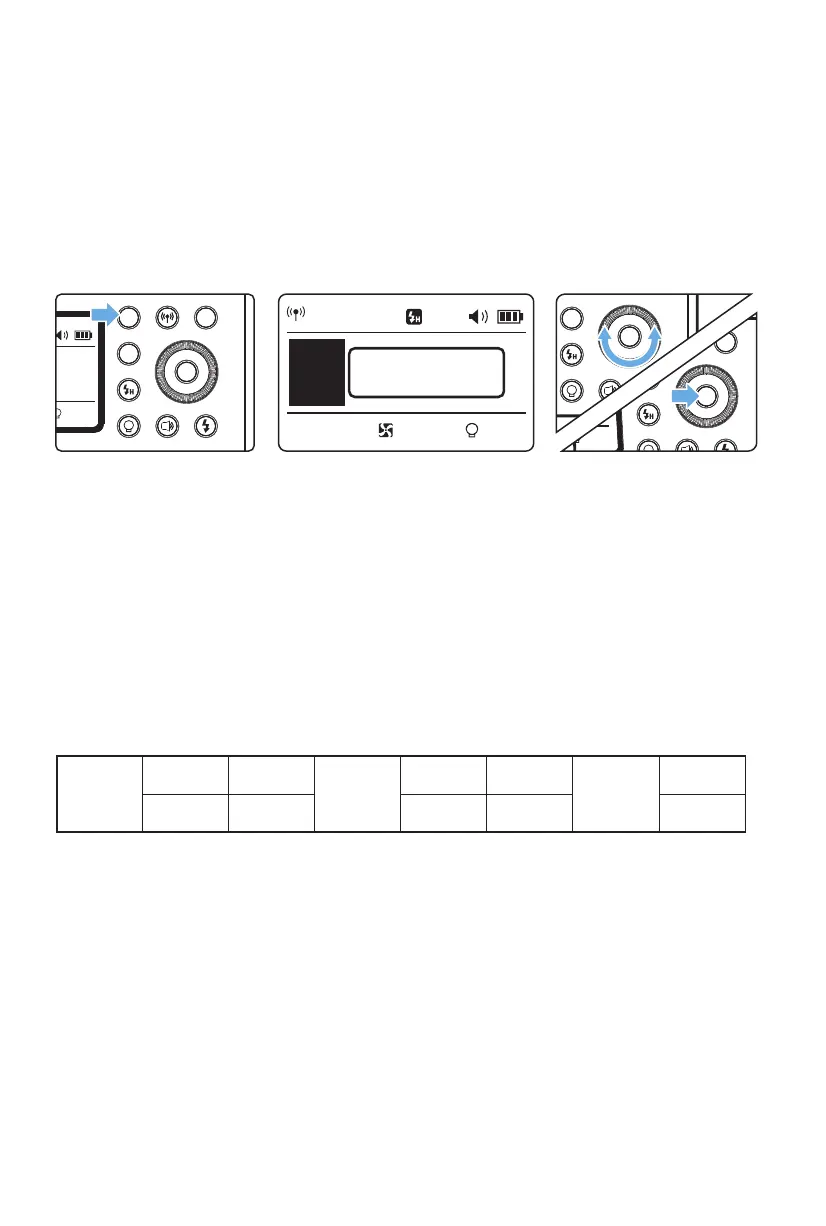
Press the Mode Selection Button <MODE> to sequentially display the two ash
modes on the LCD panel with each press.
The XPLOR 600Pro ash has two ash modes: Manual (M) and Multi (Stroboscopic).
The ash output is adjustable manually from 1/1 (full power) to 1/256th power in
1/3rd stop increments. To obtain a precise ash exposure, use a hand-held ash
meter to determine the required ash output.
Flash Modes
Flash duration refers to the length of time that from ash’s ring to reach the half
peak at maximum output of the light burst. The half peak at maximum is usually
expressed as t=0.5. In order to provide the photographer with more concrete
data, this product adopts t=0.1. The dierence between t=0.5 and t=0.1 is shown
in the following picture.
Flash Duration
Flash Mode M: Manual Flash
The following table makes it easier to see how the exposure values changes in terms
of equivalent stops when you increase or decrease the ash output. For example,
when you decrease the ash output to 1/2, 1/2-0.3, or 1/2-0.7, and the same
exposure value when you increase the ash output to more than 1/2, 1/2+0.3,
1/2+0.7, and 1/1. The relative amount from the starting value will be displayed.
Flash Output Range
Examples of gures displayed when reducing ash output level →
← Examples of gures displayed when increasing ash output level
1/1
1/1–0.3
1/2+0.7
1/1-0.7
1/2+0.3
1/2-0.3
1/4+0.7
1/2-0.7
1/4+0.3
...
...
1/2 1/4
CH 1
M
A
10%
1/256+0.3
1
Press < MODE >
button so that < M >
is displayed.
Press < SET > button
again to confirm the
setting.
2
Turn the Select Dial to
choose a desired flash
output amount.
3


 To Next Page