14
Wireless Flash Shooting: Radio (2.4G) Transmission
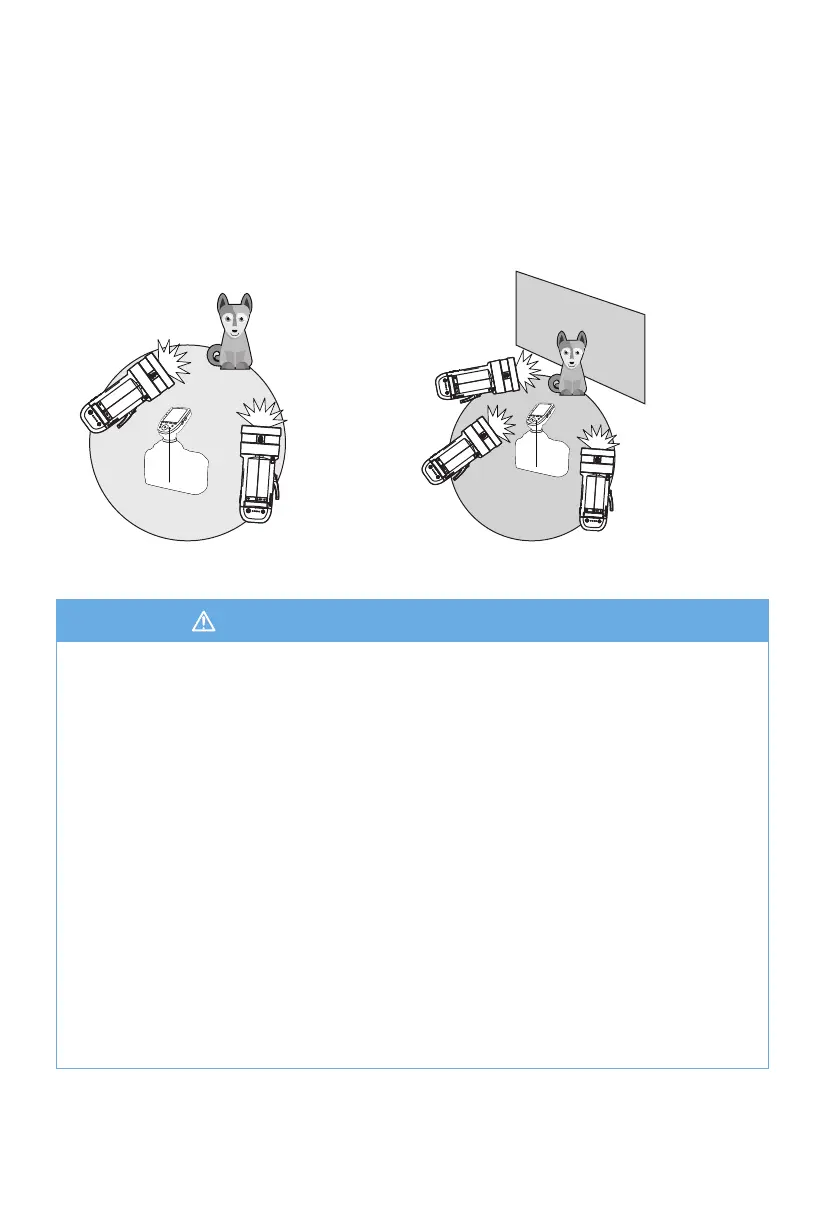
Wireless Multiple Flash Shooting
• Shooting with Two Slave Groups • Shooting with Three Slave Groups
You can divide the slave units into two or three groups and perform multiflash
while changing the ratio factor.
In addition, you can set and shoot with a different flash mode for each firing group.
A
B
A
B
C
1. Interference by the a 2.4Ghz signal in outer environment (e.g. a wireless base
station, 2.4Ghz WiFi router, Bluetooth, etc.)
→ Solution: Adjust the channel CH setting on the flash trigger (add 10+ channels) and
use the channel with a clear signal. Alternatively, turn off the other 2.4Ghz devices.
2. XPLOR 600Pro status conditions
a. Solutions: Please make sure that the flash has finished its recycle or caught up
with the continuous shooting speed.
b. Check that the flash is not in a over-heat protection state or other duress factors.
→ c. Please lower the flash power output.
3. Signal distance between the remote transmitter trigger and the flash is too close
→Solution: Turn on the “close distance wireless mode” on the flash trigger (<1.6ft / 0.5m).
R2 series: Long press the test button and hold, then turn the flash on until the ready light
blinks for 2 times.
R2 Pro series: Set the C.Fn-DIST to 0-98ft / 0-30m.
4. The flash trigger and the receiver end devices are in the low battery levels
→Solution: Replace the battery. 1.5V disposable alkaline batteries are recommended for
the transmitters.
Troubleshooting R2 2.4Ghz Wireless Conditions


 To Next Page