12
The XPLOR 600Pro operates primarily as a R2 wireless slave strobe, either with
the XPLOR’s built-in R2 wireless receiver or external R1 wireless connections.
As a R2 Radio Slave unit, the XPLOR 600Pro can be linked to a Canon, Nikon, Sony,
Olympus/Panasonic or Fujilm camera system according the R2 Transmitter
Master. Flashpoint R2 Streaklights, Zoom Speedlights, R2/Pro Transmitters, Zoom
Mini ashes and older R2 devices can control the XPLOR 600Pro.
Wireless Flash: R2 Radio 2.4Ghz Transmission
CH 1
M
A
10%
1/256+0.3
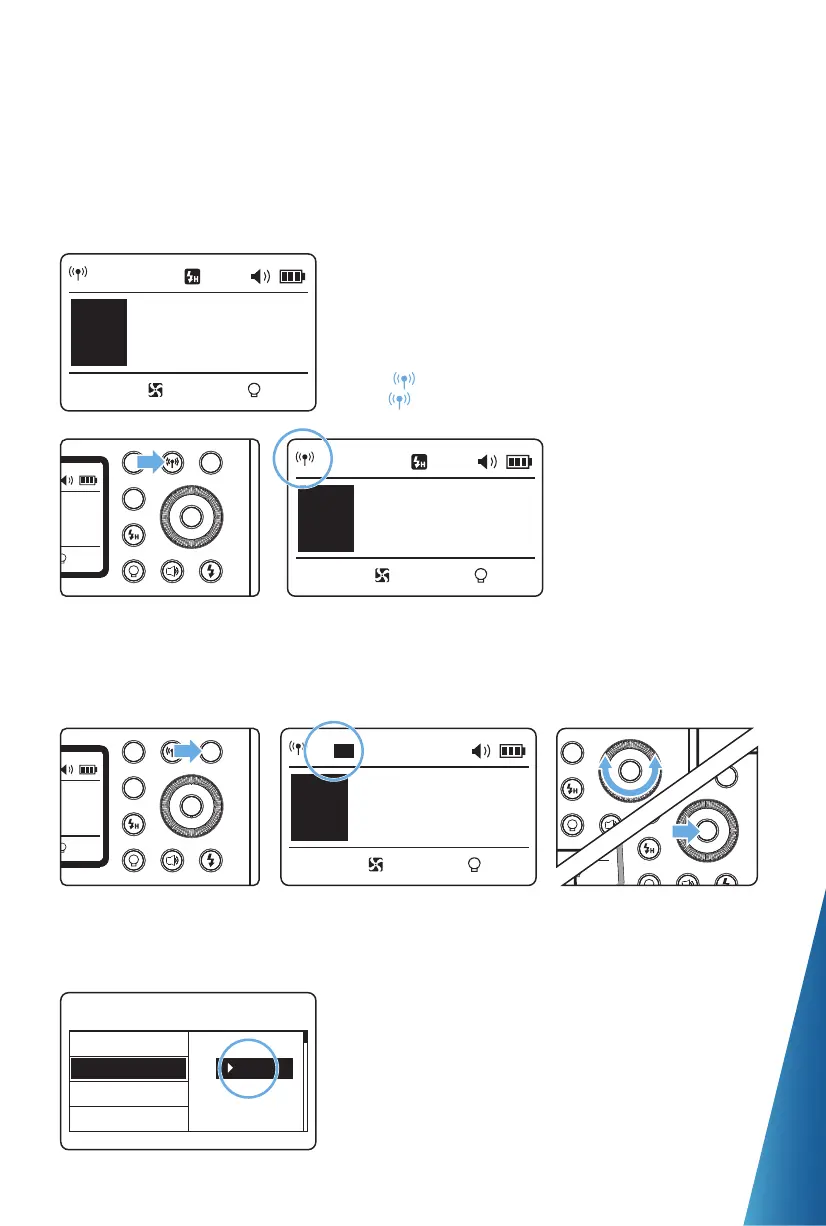
1. Wireless Settings
Press < > Wireless Setting Button again
until < > is displayed on the panel.
2. Setting the Communication Channel
If there are other wireless flash systems nearby, you can change the channel IDs to
prevent signal interference. The channel IDs of the master unit and the slave unit(s)
must be set to the same.
CH 1
M
A
10%
1/256+0.3
1
CH32
M
A
10%
1/256+0.3
Long press the < GR/CH >
Button for 2 seconds so that
channels ID is displayed on
the LCD panel.
2
Turn the Select Dial to
choose a channel ID from
1 to 32.
4
Wireless ID setting: press the MENU button to enter
C.Fn-ID and choose from 01 to 99 (Note: this can only be
achieved when the master unit also has this function).
3
Press the < SET > button
to confirm.
C.Fn
RESET
Ver 0.6
LCD
ID
99


 To Next Page