CoRe+
TM
Cable management system and pedestal installation guide
13
BEFORE GETTING STARTED
! When unpackaging the Cable management system, make sure to remove the security
screw used to hold the counterweight during transport.
¡
Installing new side-by-side charging stations
• First, install the pedestal. Refer to CoRe+ MC Installation Guide for pedestal.
• Then, prepare installation material for the side-by-side charging station mount
brackets and Cable management systems, and follow the instructions that are
indicated below.
• Finally, install the charging stations. Refer to CoRe+ MC Installation Guide.
• Installing on existing side-by-side charging stations
Caution : Before getting started, cut off the current to prevent an electric shock.
INSTALLATION ON PRE-INSTALLED CHARGING STATIONS
1. Remove both charging stations from the pedestal so that you can install the new side-by-side
charging station mount brackets and the two Cable management systems.
2. Remove the wiring as you will need to hook the charging stations to new wires.
3. Then, prepare installation material for the side-by-side charging station mount brackets and Cable
management systems, and follow the instructions that are indicated below.
4. Reinstall the charging station on the new brackets.
Allow 10" (30 cm) of additional electrical wiring to connect the new charging station
to the installation.
Side-to-side charging
station supports and cable
managements installation
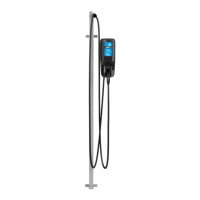
1. Assemble the flexible tube.
2. Remove the plate giving you access to the electric wires at the bottom
of the pedestal and allow 30 cm (10 in) of extra wiring so to connect the
charging station once the flexible tube has been installed.
3. Screw the end of the flexible tube to the charging station mount bracket, on
the pedestal side.
4. Pass wires through the flexible tube.
5. Screw the rst charging station mount bracket to the pedestal* using the
holes provided for this purpose with the included screws, that is, the holes
that were used to secure the charging stations that were installed back-to-
back previously.
Caution : This pedestal is certied like an electrical enclosure, and any alteration must
comply with local regulation.
6. Place the column of the Cable management system inside the charging
station mount bracket, place tightly in the corner.
Recommendation : To position the column, when you stand in front of the
charging station, make sure to place the output (cable clamp) of the Cable
management system on the exterior side, and a gasket is inserted between the
pedestal and the back cover.
7. Screw the bottom column of the Cable management system by placing the
round spacing shim between the pedestal and the column, and tighten the
screws solidly to secure the column.


 To Next Page