CoRe+
TM
Cable management system and pedestal installation guide
14
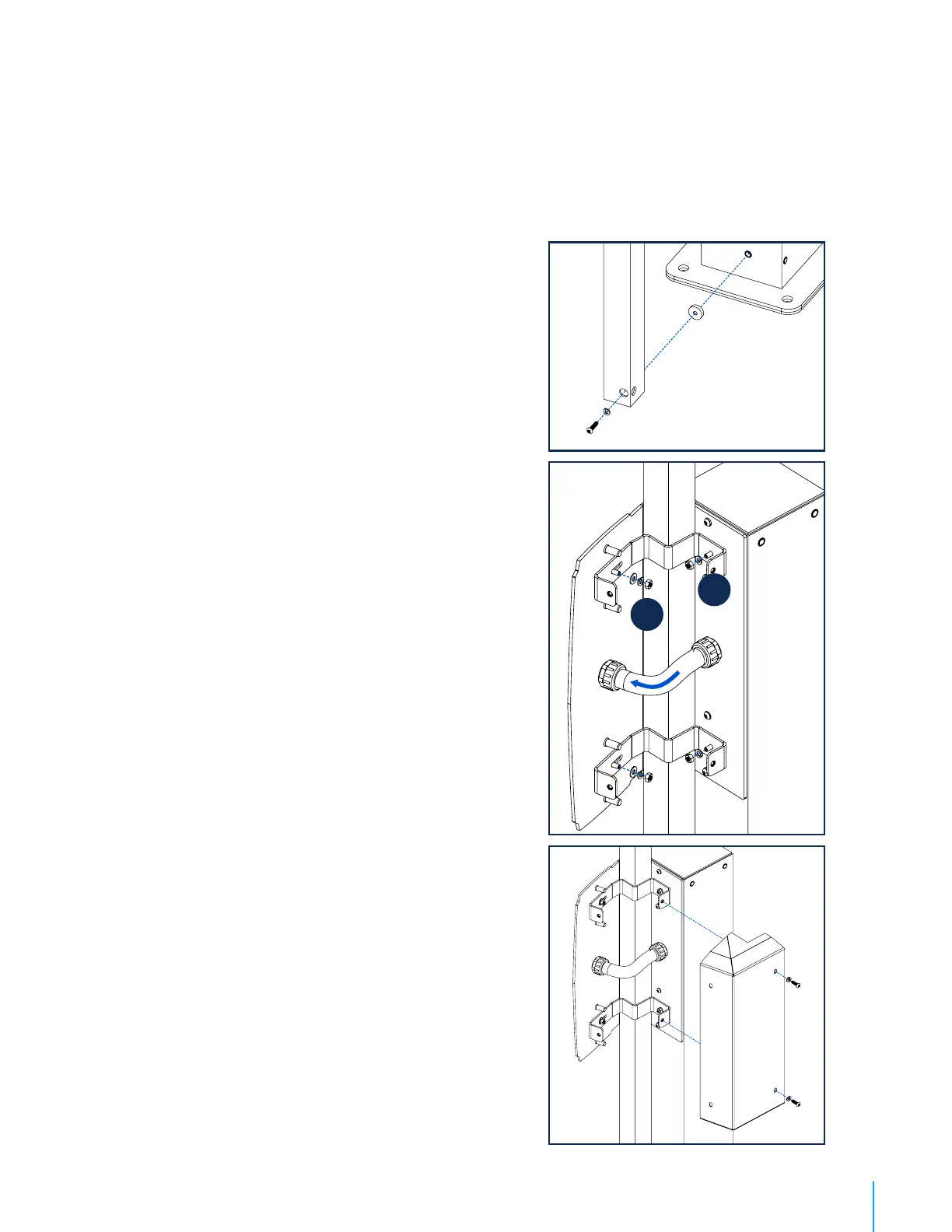
8. Insert the other end of the flexible tube in the hole
provided for this purpose , and screw the bushing from
the exterior of the charging station mount bracket so to
maintain the flexible tube in place.
Remark : This will allow to hold the column during the
installation of the bottom column mount brackets.
9. Install both column mount brackets starting with the 1st
assembly (1 on illustration) then proceed installing the 2nd
(2 on illustration).
Remarks : Each column mount bracket has a slot to make
its installation easier, which must be place on the front side
of the bracket, in other words on the side where the charging
station will be installed. Do not screws the bolts too tight
when placing the brackets so you can move them easily and
position them correctly. Once everything is well positioned,
tighten the bolts.
10. Secure the back cover in the column mount brackets
with the four screws.
Side-to-side charging station
supports and cable managements
installation
11. Install the second column on the opposite side of the
charging station by following the above steps 1 to 10.
12. Install or reinstall the charging stations. Refer to the
CoRe+ MC Installation Guide if need be.
13. Proceed with the positioning of the cable clamp. Refer to
page 15.
14. Install the poster panel. Refer to page 16.
1
2


 To Next Page