Fluke 19xC-2x5C
Users Manual
16
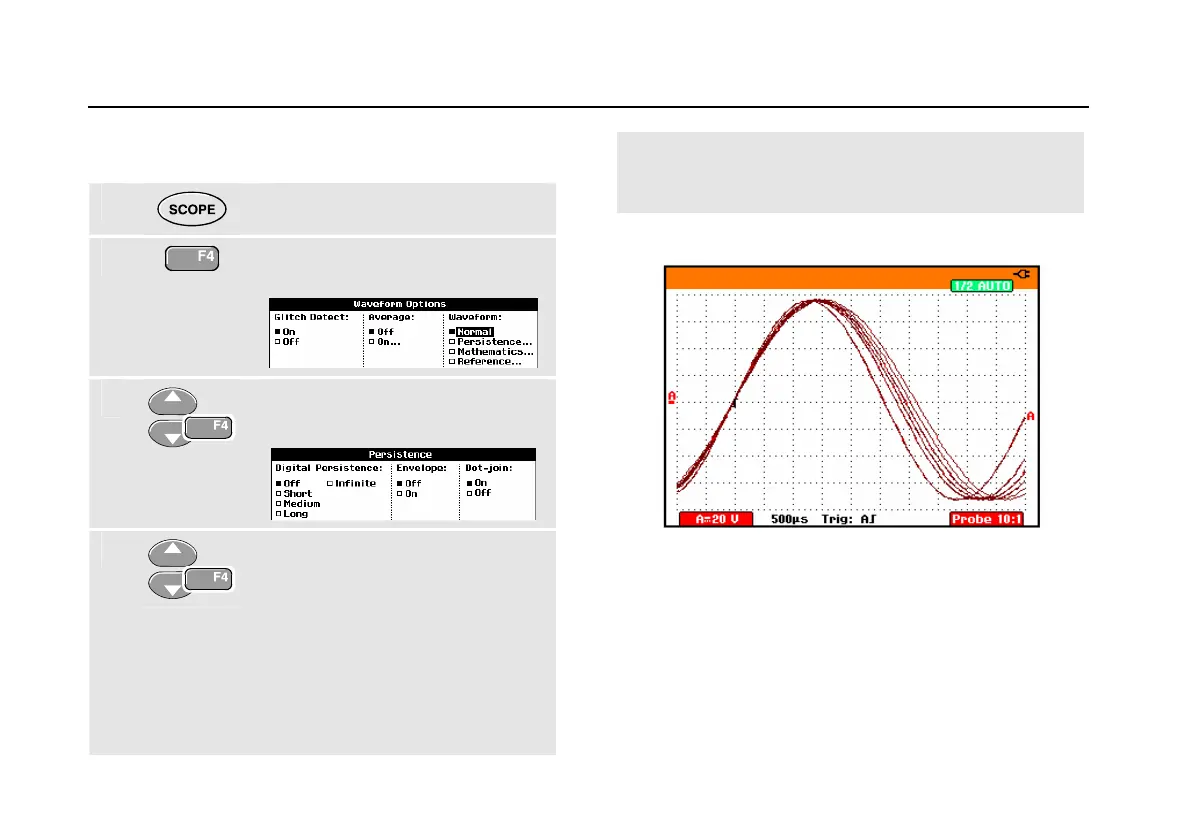
Using Persistence to Display Waveforms
You can use Persistence to observe dynamic signals.
1
Display the SCOPE key labels.
2
Open the Waveform Options
menu.
3
Jump to Waveform: and open the
Persistence... menu.
4
Select Digital Persistence: Short,
Medium, Long or Infinite to
observe dynamic waveforms .
Select Digital Persistence: Off ,
Envelope: On to see the upper
and lower boundaries of dynamic
waveforms (envelope mode).
Select Dot-join: On or Off to
choose your personal preference
for the waveform representation.
Figure 10. Using Persistence to Observe Dynamic
Signals






 To Next Page