Fluke 19xC-2x5C
Users Manual
80
Viewing the Bus Waveform Screen
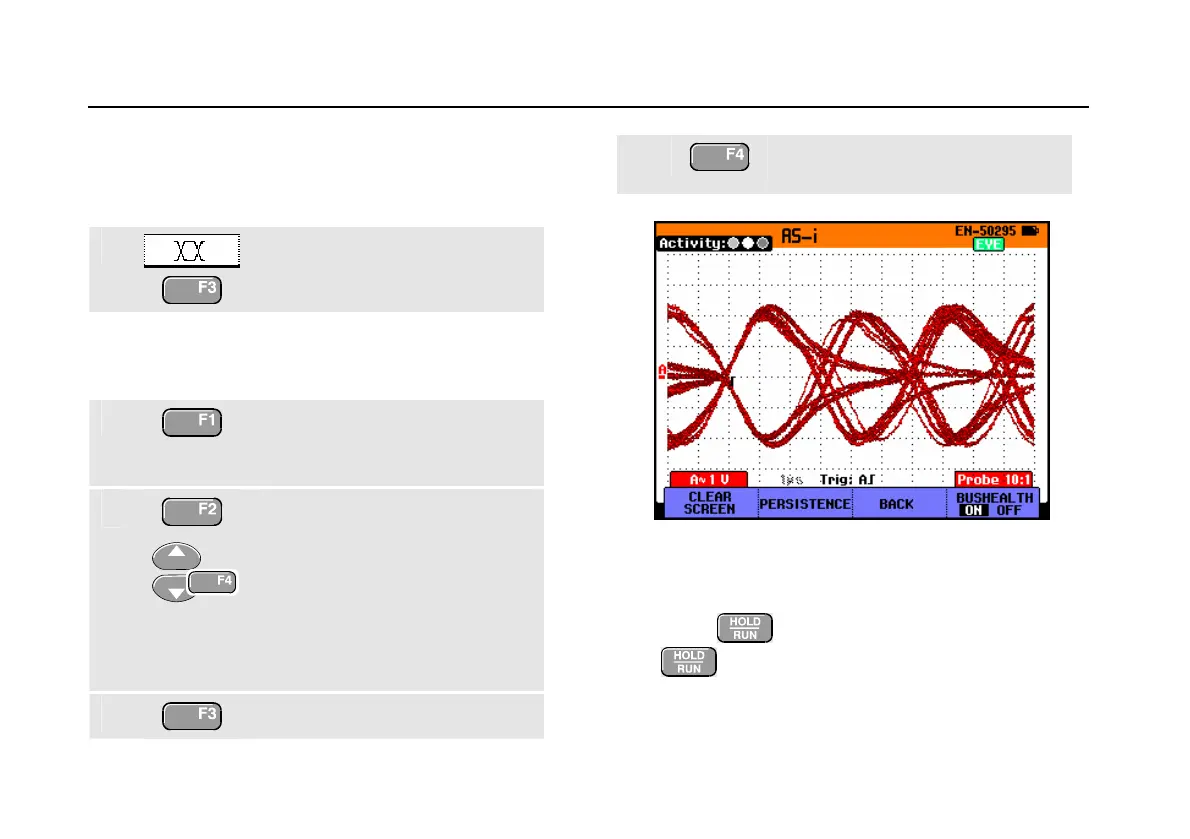
To view the waveform eye pattern of the bus voltage, do
the following:
1
In the main screen select eye
pattern mode. You will see a
screen like Figure 46.
The screen shows the waveforms of one bit time triggered
on a positive as well as on a negative edge in persistence
mode.
2
Clear the persisted waveforms
and restart showing the
waveform.
3
Open the Persistence menu.
Select Digital Persistence:
Short, Medium, Long or Infinite
to observe dynamic waveforms .
Select Dot-join: On or Off to
choose your personal preference
for the waveform representation.
4
Return to the test screen.
5
Exit the Bushealth mode and
enter the Scope/Meter mode.
Figure 46. Eye Pattern Screen
Notes
- Press
to freeze the screen. Pressing
again will clear the persistence waveform
and restart showing the waveform eye pattern.






 To Next Page